

WPSolr logo
  • Brands & Agencies 💛
  • Products
    • Parsing & Chunking
    • Search
      • Algolia  Search
      • Apache Solr  Search
      • Elasticsearch  Search
      • Google AI Commerce  Search
      • OpenSearch  Search
      • OpenSolr  Search
    • AI Search
      • OpenSearch  AI Search
      • PostgreSQL  AI Search
      • Vespa  AI Search
      • Weaviate  AI Search
    • AI Recommendations
      • Amazon Personalize  AI Recommendations
      • Recombee  AI Recommendations
    • AI Personalized Search & Recommendations
      • Algolia  AI Personalized Search & Recommendations
      • Google AI Commerce  AI Personalized Search & Recommendations
  • Learn
    • Documentation & Guides – Everything to get started fast
    • Youtube – 100 practical videos from setup to live site demos
    • Forums – Direct support from our team
    • Blog
  • Pricing
  • My licenses
  • Meet
  • 📞  Call
    • 📞  US : (951) 612-8259
    • 📞  France : 01 62 04 55 85
  • Brands & Agencies 💛
  • Products
    • Parsing & Chunking
    • Search
      • Algolia  Search
      • Apache Solr  Search
      • Elasticsearch  Search
      • Google AI Commerce  Search
      • OpenSearch  Search
      • OpenSolr  Search
    • AI Search
      • OpenSearch  AI Search
      • PostgreSQL  AI Search
      • Vespa  AI Search
      • Weaviate  AI Search
    • AI Recommendations
      • Amazon Personalize  AI Recommendations
      • Recombee  AI Recommendations
    • AI Personalized Search & Recommendations
      • Algolia  AI Personalized Search & Recommendations
      • Google AI Commerce  AI Personalized Search & Recommendations
  • Learn
    • Documentation & Guides – Everything to get started fast
    • Youtube – 100 practical videos from setup to live site demos
    • Forums – Direct support from our team
    • Blog
  • Pricing
  • My licenses
  • Meet
  • 📞  Call
    • 📞  US : (951) 612-8259
    • 📞  France : 01 62 04 55 85
  • Brands & Agencies 💛
  • Products
    • Parsing & Chunking
    • Search
      • Algolia  Search
      • Apache Solr  Search
      • Elasticsearch  Search
      • Google AI Commerce  Search
      • OpenSearch  Search
      • OpenSolr  Search
    • AI Search
      • OpenSearch  AI Search
      • PostgreSQL  AI Search
      • Vespa  AI Search
      • Weaviate  AI Search
    • AI Recommendations
      • Amazon Personalize  AI Recommendations
      • Recombee  AI Recommendations
    • AI Personalized Search & Recommendations
      • Algolia  AI Personalized Search & Recommendations
      • Google AI Commerce  AI Personalized Search & Recommendations
  • Learn
    • Documentation & Guides – Everything to get started fast
    • Youtube – 100 practical videos from setup to live site demos
    • Forums – Direct support from our team
    • Blog
  • Pricing
  • My licenses
  • Meet
  • 📞  Call
    • 📞  US : (951) 612-8259
    • 📞  France : 01 62 04 55 85
Expand All Collapse All
  • What is WPSOLR ?
    • The standard WordPress SQL search
    • The WPSOLR search with Elasticsearch, Apache Solr, or Algolia
  • Your configuration journey, step by step
    • Install Apache Solr
    • Hosted Apache Solr and SolrCloud Services
    • Install Weaviate
    • Install Opensearch
    • Install Elasticsearch
    • Elasticsearch Hosting
    • Configure search
      • Getting started with search
      • Getting started with Ajax (live) search
      • Getting started with facets
      • 0. Connect your indexes
        • Create a Google Retail search index
        • Create an Elasticsearch index
          • Generate a test Elasticsearch index
          • Create an Elastic Elasticsearch index
          • Create an Elasticsearch index
          • Create a Qbox Elasticsearch index
          • Create an ElasticPress Elasticsearch index
          • Create an Aiven Elasticsearch or OpenSearch index
          • Create a Bonsai Elasticsearch index
          • Create an Amazon AWS Elasticsearch index
          • Create an ObjectRocket Elasticsearch index
          • Create a Cloudways Elasticsearch or Opensearch index
          • Create an Alibaba Cloud Elasticsearch index
          • Create a Compose Elasticsearch index
          • Connect to an Elasticsearch index
        • Create an Apache Solr index
          • Generate a test Apache Solr index
          • Create an Apache Solr index
          • Create a SearchStax SolrCloud index
          • Create an Opensolr Solr index
          • Connect to an Apache Solr index
        • Create an Opensearch index
          • Create a WPSOLR Hosting OpenSearch index
          • Create an Amazon AWS OpenSearch index
        • Create a Weaviate index
          • Weaviate with Google PaLM API
          • Weaviate with GPT4All
          • Weaviate with sentence transformers
          • Weaviate with CLIP text-to-image
          • Weaviate with HuggingFace Endpoints API
          • Weaviate with OpenAI GPT API
          • Weaviate with Cohere Multilingual API
          • Weaviate with Question Answering transformers
          • Weaviate with Hybrid search
          • Weaviate with Reranker - Cohere
          • Weaviate with Reranker - Transformers (cross-encoders)
        • Create an Algolia index
      • 1. Activate extensions (Add-ons)
        • bbPress add-on
        • YITH WooCommerce Ajax Search add-on
        • SEO add-ons
          • Yoast SEO add-on
          • All in One SEO add-on
        • Listable add-on
        • ACF add-on
        • Advanced Scoring add-on
        • Cron Scheduling add-on
        • Theme add-on
          • Filters layouts
            • Radiobox & Checkbox Layout
            • Numeric Range Layout
            • Colour Picker Layout
            • Date Picker (Flatpickr) Layout
            • Range Slider Layout
          • Add Ajax to the current Theme
          • Collapse taxonomy hierarchies
          • Custom Facets CSS
        • WPML add-on
        • Premium add-on
          • Manage more than one Elasticsearch or Solr index
        • PDF Embedder add-on
        • Geolocation add-on
        • AI Natural Language APIs add-on
          • Amazon Comprehend
          • Google Natural Language
          • Aylien Text Analysis
          • MeaningCloud
          • Qwam Text Analytics
        • Toolset Types add-on
        • AI Image and OCR APIs add-on
          • Google Vision
          • Amazon Rekognition
        • Embed Any Document add-on
        • MyListing add-on
        • Polylang add-on
        • WooCommerce add-on
        • Cross-domain federated search add-on
        • Directory+ add-on
        • Toolset Views add-on
        • Listify add-on
        • Jobify add-on
        • Query Monitor add-on
      • 2. Define your search
        • 2.3 Boosts
        • 2.3 Suggestions (Ajax search)
        • 2.1 Search
        • 2.2 Data
      • 3. Index your data
    • Configure recommendations
      • Algolia - Recommend and Personalized search
      • Recombee - Recommendations
      • Google Retail - AI Recommendations and Personalized search
      • Amazon Personalize
    • Configure WPSOLR Parsing and Chunking
    • Create your Custom Templates for Citations, Suggestions, Related Posts & Recommendations
  • Quick start

Add Ajax to the current Theme

1055 views 0 April 8, 2017 Updated on November 16, 2020

What is it ?

You want to keep your current Theme to display WPSOLR results, including filters. But you really like the default WPSOLR Ajax template ?

Good news ! You can now add Ajax to your current Theme, even if your theme does not include Ajax features.

How does it work ?

Sections of the current Theme search page concerned by Ajax

Some sections of your search page will start an Ajax call, and some sections of your search page will be refreshed when the Ajax call is completed.
Each Theme search template being different, in the following settings, you will tell the plugin which sections need to start Ajax or be refreshed by Ajax, with jQuery selectors.


Image wpsolr-admin-addon-theme-jquery-selectors.png of Add Ajax to the current Theme


But first, how to activate Ajax with the current Theme ?

There is a new search template option “Use my current theme search template with Ajax” in screen 2.1. Just select it. Then use the Theme extension options to configure Ajax.
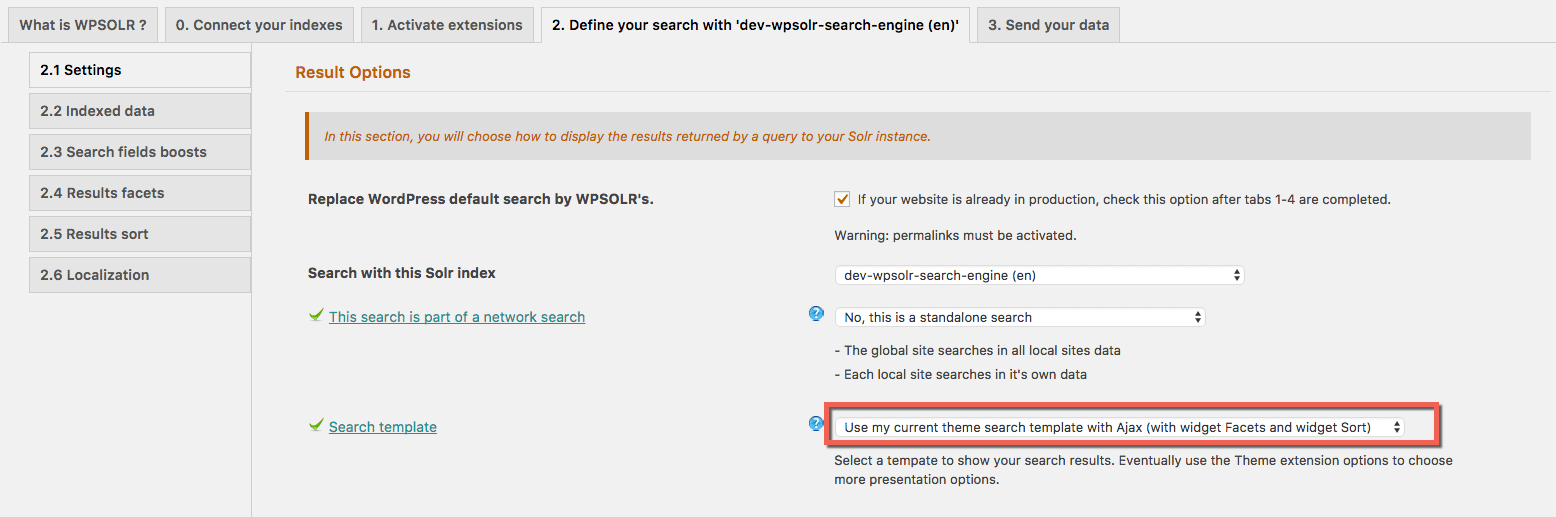
Select Ajax with the current theme search template


Does Ajax work with a WooCommerce theme?

Yes, it does. Even better, all the settings are preconfigured to work with all WooCommerce themes without any configuration.

Does Ajax work with any theme?

Yes, it probably does. Using jQuery selectors, you should be able to tell the plugin which of your template sections will be Ajaxified.

Was this helpful?

Yes  3 No
Related Articles
  • Configure WPSOLR Parsing and Chunking
  • Create a WPSOLR Hosting OpenSearch index
  • Create your Custom Templates for Citations, Suggestions, Related Posts & Recommendations
  • Getting started with facets
  • Getting started with Ajax (live) search
  • Getting started with search

Didn't find your answer? Contact Us

Previously
Range Slider Layout
Up Next
Collapse taxonomy hierarchies

Built for brands and agencies worldwide

Adobe
Software Development
10K+ employees
Harvard University
Higher Education
798K alumni
University of Essex
Higher Education
101K alumni
Tally
Software development
501-1K employees
WebFX
Advertising Services
501-1K employees
DEFINITION 6
Advertising Services
1K-5K employees
Proto Thema
Newspaper Publishing
51-200 employees
The Fold London
Retail Apparel and Fashion
11-50 employees
Georgia-Pacific LLC
Paper and Forest Product Manufacturing
10K+ employees
Agencies, Software, Universities, Media, Newspapers, Publishers, Retails, Manufacturing, E-Commerce. And many more »

Recommended content

Powered by WPSOLR Enterprise with Recombee

Understand Where Your Store Is Losing Sales
Join our Affiliate Program!
Features
Search Hosting for WordPress
File Parsing and Chunking
Integration Hub
Search
Facets (Filters)
Search Add-ons
Recommendations
Keyword search engines
Comparison grid
Apache Solr & Solr Cloud
Elasticsearch
OpenSearch
Algolia
AI search engines
Comparison grid
PostgreSQL pgvector
Weaviate
Google Retail
Vespa.ai
OpenSearch vector
AI recommendation engines
Comparison grid
Recombee
Amazon Personalize
AI personalization engines
Comparison grid
Google Retail
Algolia
Buy and Learn
Pricing
Privacy policy
Terms and Conditions
© 2026 Eostis SARL. All Rights Reserved.
More
My licenses
Support
Documentation
Blog
Recommendations powered for you by WPSolr
Manage Consent
To provide the best experiences, we use technologies like cookies to store and/or access device information. Consenting to these technologies will allow us to process data such as browsing behavior or unique IDs on this site. Not consenting or withdrawing consent, may adversely affect certain features and functions.
Functional Always active
The technical storage or access is strictly necessary for the legitimate purpose of enabling the use of a specific service explicitly requested by the subscriber or user, or for the sole purpose of carrying out the transmission of a communication over an electronic communications network.
Preferences
The technical storage or access is necessary for the legitimate purpose of storing preferences that are not requested by the subscriber or user.
Statistics
The technical storage or access that is used exclusively for statistical purposes. The technical storage or access that is used exclusively for anonymous statistical purposes. Without a subpoena, voluntary compliance on the part of your Internet Service Provider, or additional records from a third party, information stored or retrieved for this purpose alone cannot usually be used to identify you.
Marketing
The technical storage or access is required to create user profiles to send advertising, or to track the user on a website or across several websites for similar marketing purposes.
  • Manage options
  • Manage services
  • Manage {vendor_count} vendors
  • Read more about these purposes
View preferences
  • {title}
  • {title}
  • {title}