Uncategorized guides for WordPress & WooCommerce

Characters, Tokens and Embeddings

When building retrieval-augmented systems for WooCommerce stores, three measurements are easy to confuse: characters, tokens, and embeddings. They describe different stages of the content pipeline, and choosing the wrong one can lead to oversized chunks, incomplete product context, higher API costs, or poor search results. Characters are a simple size estimate A character is a letter, number, space, punctuation mark, or other symbol in a text string. Character counts are easy to calculate and useful for initial inspection after a document has been parsed. For example, a product description might contain 4,800 characters, including HTML text, headings, specifications, and line breaks. That number tells you how large the raw string is, but it does not reliably tell you how much context a language model will
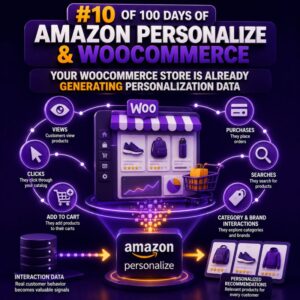
Your WooCommerce Store Is Already Generating Personalization Data

Most WooCommerce stores already produce the behavioral signals needed for product recommendations and other personalized experiences. The data is usually distributed across orders, sessions, product catalogs, customer accounts, carts, searches, and marketing systems rather than being organized as a personalization dataset. Where the data already exists A typical WooCommerce installation can provide several useful data sources: Orders: customer identity, products purchased, quantities, order dates, prices, refunds, and order status. Product views: products displayed or viewed during a browsing session, when tracked by analytics or a custom event integration. Cart activity: products added to carts, removed from carts, or abandoned before checkout. Searches: search terms and the products returned or selected. Customer profiles: account identifiers, registration dates, billing region, language, and other permitted attributes. Product catalog

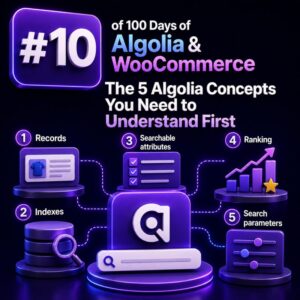
The 5 Algolia Concepts You Need to Understand First

Before connecting Algolia to a WooCommerce store, it helps to understand the objects and decisions that control how search behaves. Algolia is not a drop-in replacement for the WordPress or WooCommerce database query layer. It is a hosted search engine that receives prepared product data, builds an index, and answers search requests against that index. The following five concepts provide the foundation for designing a reliable WooCommerce integration. 1. Indexes Are Searchable Product Collections An Algolia index is a collection of records that can be searched. For WooCommerce, an index commonly represents a product catalog such as products_production or products_staging. An index is more than a database table. Its settings determine which fields are searchable, which fields can be used for filtering, how results are

Connecting an AI Chatbot to WooCommerce Products

Why Connect a Chatbot to WooCommerce Products? A WooCommerce chatbot becomes much more useful when it can work directly with the products, categories, prices, attributes, and availability already stored in the store. Instead of answering generic questions, it can help shoppers identify the products that match their needs and move them toward a purchase. For WooCommerce agencies, the key is to connect the chatbot to structured product data rather than duplicating the catalog inside the chatbot itself. What Product Data Should Be Available? A useful product connection typically exposes information such as: Product title and description Price and sale price Categories and tags Attributes such as size, color, material, or compatibility SKU Stock availability Product URL Product images Variations and their attributes The chatbot can

The WooCommerce CRO Checklist Every Agency Should Use

A useful WooCommerce conversion rate optimization process is more than changing button colors or adding urgency messages. Agencies need a repeatable checklist that connects customer research, store analytics, technical performance, merchandising, checkout usability, and controlled experimentation. The objective is to identify revenue constraints, prioritize work by likely impact, and verify that improvements produce profitable growth rather than temporary increases in orders. 1. Establish the commercial baseline Before recommending changes, document how the store currently generates revenue. Use a consistent reporting period, usually the previous 30 to 90 days, and separate meaningful segments such as device type, traffic source, customer status, and product category. Sessions and engaged sessions Product detail page views Add-to-cart rate Cart-to-checkout rate Checkout completion rate Overall conversion rate Revenue per session Average

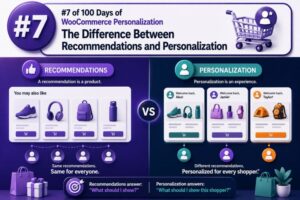
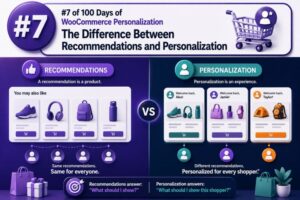
The Difference Between Recommendations and Personalization

Recommendations and personalization are related WooCommerce capabilities, but they solve different problems. A recommendation selects products, content, or offers that may be relevant to a shopper. Personalization changes the broader shopping experience based on who the shopper is, what they have done, and what they are likely trying to accomplish. That distinction matters when planning a storefront, selecting extensions, defining data requirements, and measuring results. A product carousel can make recommendations without personalizing the page around the visitor. Conversely, a personalized experience may change shipping messaging, navigation, pricing visibility, or checkout prompts without recommending a single product. What a recommendation does A recommendation is an item-level suggestion. Its primary question is: Which product should appear next to this product, in this cart, or in this

What If Your Store Learned From Every Shopper?

A WooCommerce store can improve conversion rates when it turns shopper behavior into useful search and merchandising decisions. The goal is not to track every individual indefinitely or change the catalog unpredictably. It is to identify repeated patterns, then use those patterns to make products easier to discover. What “learning” should mean in a WooCommerce store For an agency, learning usually means collecting relevant events, analyzing them in aggregate, and applying controlled changes. Useful events include searches, zero-result searches, product clicks from search results, add-to-cart actions, purchases, filters used, and searches that are followed by an exit. For example, if many shoppers search for waterproof hiking boots but the catalog only contains products titled all-weather trail footwear, the search data exposes a vocabulary gap. The

Designing a Product Collection for WooCommerce

A useful WooCommerce search experience starts with a deliberate product model. Before importing products into Weaviate, decide which product facts should be searchable, which should be filterable, which should be returned to the storefront, and which should remain in WooCommerce as the source of truth. Define the search contract first A product collection should support the queries your storefront and merchandising tools actually perform. Typical requirements include: Semantic search such as waterproof commuter backpack for a laptop. Keyword matching for product names, SKUs, brands, and technical specifications. Structured filters for price, stock status, category, brand, attributes, and ratings. Catalog scoping by language, channel, customer group, or store. Stable identifiers that let the application retrieve the authoritative WooCommerce product. Write these requirements down before choosing properties.

Indexing WooCommerce Brands and Product Taxonomies

WooCommerce products are rarely organized by one flat label. A product can belong to a hierarchy of categories, have one or more brands, and expose attributes such as color, size, material, or compatibility. A Vespa index should preserve that structure instead of reducing every taxonomy value to a single string. This matters for search, filtering, navigation, autocomplete, and analytics. If taxonomy data is modeled correctly, an agency can support queries such as “black hiking boots from Acme,” category landing pages, brand pages, and faceted navigation without maintaining a separate search-specific taxonomy system. Identify the WooCommerce taxonomies before indexing WooCommerce stores product categories and tags as WordPress taxonomies. Categories are hierarchical, while tags are normally flat. Product attributes are represented through taxonomies as well, commonly with

RAG Architecture for WordPress Developers

Retrieval-augmented generation (RAG) adds a retrieval layer between a user’s question and an AI model. Instead of asking a model to rely only on its training data, a WordPress application retrieves relevant content from a controlled knowledge base and includes that content in the model request. For WooCommerce agencies, this makes it possible to build assistants that answer questions about products, shipping policies, return rules, subscriptions, compatibility, and internal operating procedures without fine-tuning a model for every client. The core RAG architecture A production RAG system normally contains two separate pipelines: Ingestion: WordPress content is collected, cleaned, chunked, embedded, and stored in a searchable index. Query: A user question is embedded or otherwise analyzed, relevant chunks are retrieved, and those chunks are supplied to the

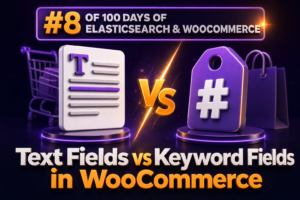
Text Fields vs Keyword Fields in WooCommerce

In Elasticsearch, choosing between text and keyword fields directly affects how WooCommerce product data is searched, filtered, sorted, and aggregated. The distinction is especially important for agencies building catalog search, layered navigation, reporting, and integrations that synchronize products from WordPress and WooCommerce. What is a text field? A text field is designed for full-text search. Elasticsearch analyzes the value when it indexes the document. Analysis commonly includes tokenization, lowercasing, stemming, stop-word removal, or other language-specific processing. For example, a WooCommerce product title such as Organic Cotton Running Shirt might be indexed as separate terms such as organic, cotton, running, and shirt. A search for cotton shirt can then match the product even though the query does not exactly reproduce the stored title. { "product_name": {

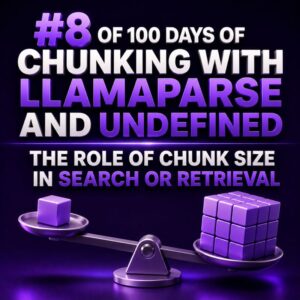
The Role of Chunk Size in Search or Retrieval

Chunk size is one of the highest-impact configuration choices in a retrieval-augmented search system. It determines how much text is embedded and returned as a single unit, which affects retrieval precision, context completeness, latency, storage cost, and the quality of answers generated from the retrieved content. For a WooCommerce agency, this decision matters whenever a system searches product documentation, support tickets, store policies, implementation notes, theme files, or customer-facing content. A chunk that is too small may match a query precisely but omit the conditions needed to interpret the match. A chunk that is too large may contain the answer, but bury it among unrelated content and reduce retrieval precision. What chunk size controls A chunk is usually measured in tokens, although some systems configure

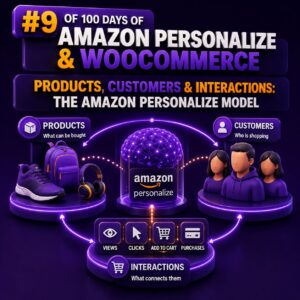
Products, Customers & Interactions: The Amazon Personalize Model

Amazon Personalize uses three core data concepts to understand an ecommerce catalog: users, items, and interactions. For a WooCommerce implementation, these map closely to customers, products, and customer activity. The quality of this mapping determines whether recommendations reflect real shopping behaviour or merely reproduce the most frequently viewed products. The three Personalize dataset types A dataset group in Amazon Personalize can contain a Users dataset, an Items dataset, and an Interactions dataset. Each dataset serves a different purpose, and the identifiers connecting them must remain consistent across historical imports and real-time events. Users: representing WooCommerce customers The Users dataset describes the people receiving recommendations. The required identifier is USER_ID. Additional fields can provide customer attributes that are useful to recipes capable of using user metadata.

When Should You Use Algolia?

Algolia is most useful when WooCommerce search is a core part of the buying journey rather than a secondary navigation feature. It can provide fast, typo-tolerant search, faceting, filtering, autocomplete, merchandising controls, and analytics without requiring the WordPress database to handle every complex product query. Use Algolia When Search Drives Product Discovery Algolia is a strong candidate for stores where customers search by product name, SKU, specification, compatibility, brand, or category. This is especially common in large catalogs, wholesale stores, parts suppliers, and stores with technical products. For example, a customer searching for bosch gsb 18v drill may expect results for spelling variations, related product titles, product attributes, and compatible accessories. A basic WordPress or WooCommerce query may return incomplete results or require expensive database
How AI Chatbots Understand Product Intent

For a WooCommerce chatbot, understanding product intent means identifying what a shopper is trying to accomplish—not merely matching the words in a message. A request such as “I need waterproof shoes for winter under $150” contains several signals: a product category, a use case, a functional attribute, a seasonal requirement, and a price constraint. Reliable intent detection converts that natural-language request into structured information that the chatbot can use to search the catalog, ask a useful follow-up question, and recommend products that are actually purchasable. What Product Intent Contains Product intent is usually composed of multiple parts rather than one fixed label. A practical WooCommerce implementation should extract the following elements: Task: The shopper may want to find, compare, filter, configure, reorder, track, or troubleshoot

How to Build a Higher-Converting WooCommerce Store

A higher-converting WooCommerce store is rarely created by changing one button color or adding more promotional banners. Conversion rate improves when the entire buying journey becomes clearer, faster, more trustworthy, and easier to complete. For agencies, the most effective approach is to treat conversion optimization as a structured process that combines analytics, user experience, merchandising, performance, and testing. Start with a conversion diagnosis Before recommending design changes, establish where shoppers are abandoning the funnel. Review the path from landing page to purchase and separate the major conversion events: Product view to add to cart Add to cart to checkout Checkout start to payment completion First purchase to repeat purchase Use WooCommerce analytics, Google Analytics 4, server-side order data, and session recordings where appropriate. Compare conversion

How Personalization Changes the Shopping Journey

Personalization changes more than the products a shopper sees. It can alter how a customer discovers a store, evaluates products, completes checkout, and returns for a subsequent purchase. For WooCommerce agencies, the most effective implementations map personalization to each stage of the shopping journey rather than treating it as a single recommendation widget. Map personalization to the customer journey A useful journey model includes five stages: Discovery: The shopper arrives through search, advertising, social media, email, or a referral. Evaluation: The shopper compares products, reads reviews, checks availability, and considers delivery or returns. Conversion: The shopper adds items to the cart and completes checkout. Post-purchase: The store supports delivery, product use, replenishment, and returns. Retention: The store gives the customer relevant reasons to return without

Most Stores Don’t Learn From Their Customers

Most WooCommerce stores collect customer signals but rarely turn them into decisions. Search queries, zero-result searches, filter usage, product comparisons, cart removals, support questions, reviews, and returns all reveal what shoppers want. When those signals remain in separate dashboards or spreadsheets, the store continues presenting the same products, categories, and content that failed to help customers in the first place. For an agency, the opportunity is to make customer learning part of the conversion-rate optimization system. WPSOLR can provide a more useful search and discovery layer by indexing WooCommerce product data and exposing the attributes customers actually use to narrow their choices. The important step is not simply installing better search. It is creating a repeatable process for converting search behavior into merchandising, content, and

Your First Weaviate Collection

In Weaviate, a collection is the top-level container for a type of object. For a WooCommerce agency, a collection might represent products, product documentation, orders, support articles, or store policies. It defines the properties stored on each object and the vector configuration used for semantic search. Choose a collection boundary Start with one business concept rather than creating a single collection for every record in a store. A Product collection is a sensible first example because product data commonly supports search, recommendations, merchandising, and support workflows. A useful product record might include: sku for the WooCommerce product identifier name for the product title description for searchable product content categories for taxonomy values price for filtering or display metadata permalink for linking search results back to

Indexing WooCommerce Categories in Vespa

WooCommerce categories carry more than display metadata. They provide a stable way to filter products, build landing pages, generate facets, and preserve the structure of a store’s catalog. In Vespa, the most useful design is usually to store category membership directly on product documents and optionally index categories as their own documents when category pages need search, ranking, or independent metadata. Choose the category representation There are two common models for WooCommerce category data: Embedded category membership: each product contains its category IDs, slugs, names, and ancestor IDs. This is the best model for category filters and product search. Category documents: each WooCommerce category becomes a Vespa document. This is useful when category pages need descriptions, images, SEO fields, product counts, or search. These models

Building Your First WooCommerce RAG Pipeline

A WooCommerce retrieval-augmented generation (RAG) pipeline combines store data retrieval with an AI model so answers are grounded in products, orders, policies, and operational documentation. The first production version should be narrow, observable, and permission-aware rather than attempting to index every table and answer every question. Define the first WooCommerce use case Start with a question set that has a clear source of truth. Good first use cases include: Answering product questions from descriptions, attributes, specifications, and manuals. Finding the correct shipping, returns, warranty, and payment policy. Helping support staff locate order-handling procedures. Searching internal documentation about subscriptions, refunds, stock statuses, or integrations. Avoid using the first pipeline to make autonomous decisions about refunds, cancellations, stock adjustments, or customer eligibility. Those workflows require authorization, deterministic

Choosing the Right Elasticsearch Field Types

Field types determine how Elasticsearch indexes WooCommerce data and what operations are available at query time. A product name needs full-text analysis, while a SKU must support exact matching. A price should be numeric, and product attributes may require nested documents when each attribute combination must remain associated with the correct variation. Start with the operation, not the source value The same WooCommerce value can be represented differently depending on how the store searches and filters it. Before defining a mapping, list the required operations: Full-text search: Use text for product names, descriptions, and other prose. Exact matching: Use keyword for SKUs, brand slugs, order statuses, and identifiers. Filtering and aggregations: Use keyword, numeric types, boolean, or date. Sorting: Use a numeric, date, or keyword

Understanding Elements Before Creating Chunks

Chunking should begin with an understanding of the elements in a document, not with an arbitrary character limit. For a WooCommerce agency, this distinction matters because product guides, setup manuals, refund policies, API references, and support exports all contain different structures. A heading, table, warning, code sample, and paragraph should not be treated as interchangeable text. What an element represents An element is a meaningful unit produced during parsing. Depending on the parser and output format, an element may represent a title, heading, paragraph, list item, table, image description, code block, page header, page footer, or other document component. Before creating chunks with LlamaParse and Undefined, inspect the parsed output and identify which fields describe: Content: the visible text or structured data. Type: whether the

The 3 Data Sets Behind Personalization

Amazon Personalize is built around three core data sets: Interactions, Users, and Items. For a WooCommerce agency, understanding how these data sets relate is more important than choosing a recipe. The quality, consistency, and coverage of these records determine whether recommendations are useful across product pages, cart pages, email campaigns, and other customer experiences. 1. Interactions: what shoppers do The Interactions data set records events between a user and an item. Typical WooCommerce events include product views, searches, add-to-cart actions, purchases, wish-list additions, and product ratings. The minimum useful relationship is usually represented by a user ID, an item ID, and a timestamp. A typical event record might look like this: { "USER_ID": "customer-1842", "ITEM_ID": "product-742", "TIMESTAMP": 1714478400, "EVENT_TYPE": "purchase", "EVENT_VALUE": 2 } The exact

Algolia vs Database Search: What’s the Difference?

WooCommerce stores commonly start with database-backed search and later add Algolia when shoppers need faster, more relevant product discovery. These systems solve related problems, but they operate at different layers and have different strengths. What database search means in WooCommerce Database search runs a query against WordPress and WooCommerce data, usually in MySQL or MariaDB. Product names, SKUs, descriptions, attributes, taxonomies, prices, stock status, and custom fields are stored in relational tables and queried when a shopper submits a search. A basic implementation may use a query equivalent to: SELECT ID, post_title FROM wp_posts WHERE post_type = 'product' AND post_status = 'publish' AND post_title LIKE '%boots%'; Production WooCommerce searches are usually more complex. They may join product metadata, lookup tables, taxonomy relationships, visibility rules, multilingual

WooCommerce AI Chatbot Architecture

A production WooCommerce AI chatbot is not simply a chat interface connected directly to the store database. It is an application layer that coordinates conversation state, product and order data, WooCommerce actions, access control, and external AI services. A sound architecture keeps those responsibilities separate so agencies can support multiple stores, change AI providers, and enforce predictable business rules. Reference architecture A practical implementation can be divided into six layers: Chat client: The storefront widget, customer account interface, or support dashboard that collects messages and displays responses. Conversation API: An authenticated endpoint that validates requests, identifies the customer or guest session, applies rate limits, and orchestrates the response. AI orchestration: The service that manages prompts, conversation history, tool selection, retrieval, model calls, and response validation.

What Data Does Amazon Personalize Need?

Amazon Personalize does not need your entire WooCommerce database. It needs a well-structured record of interactions between shoppers and products, with optional product and customer attributes to improve recommendations and support cold-start scenarios. For most WooCommerce implementations, the quality of the interaction data matters more than the volume of unrelated customer fields. A smaller, consistent dataset of product views, add-to-cart events, purchases, and meaningful engagement is usually more useful than a large export containing incomplete or inconsistent records. The core datasets Amazon Personalize uses Amazon Personalize organizes data into dataset groups. The most common datasets for a WooCommerce store are Interactions, Items, and Users. Interactions dataset The Interactions dataset records what a shopper did with a product. This is the most important dataset for user-personalization

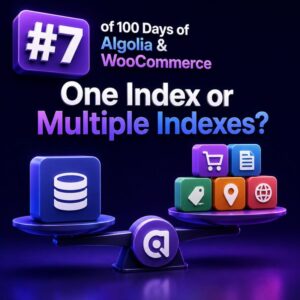
One Index or Multiple Indexes?

The decision to use one Algolia index or several should follow the search experience, data boundaries, and operational requirements of the WooCommerce store. It should not be based only on how the catalog is organized in WordPress. What an Algolia index represents An Algolia index is a searchable collection of records with its own settings, searchable attributes, ranking configuration, synonyms, rules, and replicas. In a WooCommerce implementation, an index might contain products, product variations, blog content, documentation, or records from several stores. The right design starts with the question: Do these records need to be searched, ranked, filtered, secured, and maintained in the same way? If the answer is yes, a shared index is often simpler. If the answer is no, separate indexes may be

Building Your First WooCommerce AI Chatbot

A WooCommerce AI chatbot should begin as a narrowly scoped commerce assistant, not as an unrestricted agent with access to every store operation. The first production version should answer a small set of high-value questions, retrieve current catalog information, and hand off sensitive or ambiguous requests to a human. This approach gives an agency measurable results without introducing unnecessary order, privacy, or fulfillment risk. Define the chatbot’s first release Before selecting a model or writing an integration, define the exact jobs the chatbot is allowed to perform. A practical first release usually includes: Answering product questions using current product and variation data. Helping shoppers find products based on attributes such as size, color, price, or use case. Explaining shipping, returns, payment, and store policies from

How RAG Improves WooCommerce Product Search

WooCommerce product search often fails for reasons that have little to do with the catalog itself. Customers search with use cases, attributes, compatibility requirements, and informal language, while product data is usually organized around titles, SKUs, taxonomies, and custom fields. Retrieval-augmented generation (RAG) improves this experience by combining product retrieval with a language model that can interpret the shopper’s request and present grounded results. What RAG Adds to WooCommerce Search A conventional WooCommerce search generally matches query terms against product titles, descriptions, SKUs, categories, tags, and selected metadata. This works well for exact terms such as a SKU or brand name, but it is weaker for queries such as “a waterproof jacket for cold cycling commutes” or “replacement filter for the compact espresso machine.” A

How AI Chatbots Change WooCommerce Shopping

AI chatbots are changing WooCommerce shopping by moving customers from keyword-based browsing to guided, conversational buying journeys. Instead of asking shoppers to navigate categories, filters, product pages, and support articles independently, a chatbot can interpret intent, retrieve store data, compare suitable products, and help complete the next step. For WooCommerce agencies, the important distinction is between a chatbot that only generates text and one that can safely use real store data. A production shopping assistant should combine a language model with product catalogs, inventory, shipping rules, customer context, and controlled WooCommerce actions. How conversational shopping differs from traditional WooCommerce browsing Traditional shopping usually follows a path such as category page, filters, product detail, cart, and checkout. This works well when shoppers know the product name

RAG vs Fine-Tuning for WooCommerce Stores

WooCommerce agencies often start with the same question when building an AI assistant: should the model retrieve information from the store, or should it be fine-tuned on the store’s data? For most WooCommerce implementations, retrieval-augmented generation (RAG) is the better first choice because store information changes frequently and must remain traceable. What RAG means for WooCommerce RAG combines a language model with a retrieval system. Before the model generates an answer, the application searches approved WooCommerce content and includes the most relevant results in the prompt. A typical WooCommerce RAG request might follow this sequence: A shopper asks, “Can I return a sale item after 30 days?” The application identifies the intent and searches indexed policies, product information, and relevant store documentation. The retriever returns

AI Chatbot vs Traditional WooCommerce Search

WooCommerce agencies often treat conversational shopping and site search as interchangeable because both help customers find products. They solve different problems, however. Traditional search is optimized for fast retrieval from a product catalog, while an AI chatbot is designed to interpret intent, ask follow-up questions, explain options, and support a longer buying journey. How traditional WooCommerce search works A conventional WooCommerce search typically matches a query against product titles, descriptions, SKUs, attributes, categories, tags, and sometimes custom fields. Depending on the implementation, it may use WordPress database queries, a search plugin, or an external index such as Elasticsearch or OpenSearch. For example, a customer searching for men's waterproof hiking boots under $150 may receive results based on indexed words such as men's, waterproof, and hiking.

What Is RAG and Why Does WooCommerce Need It?

Retrieval-augmented generation (RAG) is an architecture that gives a large language model access to relevant business data at request time. Instead of relying only on information learned during training, the application retrieves matching content from a controlled knowledge source and includes that content in the prompt used to generate the response. For a WooCommerce store, that knowledge source can include product data, attributes, variation details, shipping rules, refund policies, documentation, order records, and internal agency procedures. The model generates the response, but the retrieved store data provides the facts. How RAG works A typical RAG request follows several stages: Ingest: Product descriptions, documentation, policies, and other approved data are collected from WooCommerce and connected systems. Chunk: Long documents are divided into smaller passages that can

What Is an AI Chatbot for WooCommerce?

An AI chatbot for WooCommerce is a conversational software system that helps shoppers interact with an online store using natural-language messages. It can answer product questions, explain shipping and returns, recommend products, check order status, and hand complex conversations to a human agent. Unlike a basic live-chat widget or a fixed decision tree, an AI chatbot can interpret different ways of asking the same question and use store data to produce a relevant response. For a WooCommerce site, that data may include products, variations, prices, stock status, attributes, orders, customer accounts, shipping zones, payment methods, and store policies. How an AI Chatbot Fits Into WooCommerce A production chatbot normally sits between the customer-facing chat interface and the store’s operational systems. A typical implementation includes four

20 Small WooCommerce Changes That Can Increase Revenue

Revenue growth in WooCommerce is often available in small improvements rather than a complete redesign. For agencies, the most effective changes are usually measurable, low-risk adjustments to product pages, checkout, merchandising, and retention. The following changes can be tested individually and prioritized according to a store’s traffic, margins, catalog, and operational capacity. 1. Rewrite product titles for clarity Product titles should identify the product, its key differentiator, and the most relevant specification. Replace vague titles such as “Everyday Backpack” with “Water-Resistant 20L Laptop Backpack.” Clear titles improve scanability in category pages, search results, and paid campaigns. 2. Put the primary benefit above the fold Use the short description near the product summary to explain the outcome customers care about. For example, a skincare store could

Recommendations Are More Than a “You May Also Like” Widget

The placement changes the job In WooCommerce, recommendations are often treated as a single component: a row of products below the product description. That limits their value. A useful recommendation system changes its purpose according to the shopper’s context. On a product page, the goal may be comparison or discovery. In the cart, it may be completing an order. After checkout, it may be replenishment or a logical next purchase. Each placement should use different inputs, copy, and success criteria. WooCommerce already separates several merchandising relationships: Related products are commonly generated from shared categories and tags. Up-sells are products selected by the store team to replace or upgrade the current product. Cross-sells are products selected for display in the cart. These relationships are useful, but

Your Search Box Is a Sales Machine

Why on-site search deserves conversion attention In a WooCommerce store, a visitor who uses search has already expressed intent. They are not casually browsing a category; they are naming a product, model, problem, or specification they want to solve. That makes the search box one of the highest-value conversion surfaces on the site. A weak search experience turns that intent into dead ends: no results for a SKU, irrelevant products for a broad phrase, or a long list with no way to narrow it down. A well-configured search experience helps shoppers reach the right product quickly and gives agencies measurable opportunities to improve revenue per search session. WPSOLR can extend WordPress and WooCommerce search with a dedicated search index, relevance controls, filters, and support for

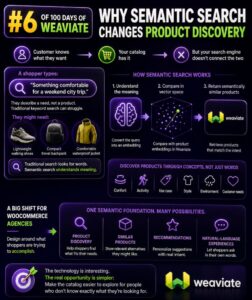
Why Semantic Search Changes Product Discovery

Search That Understands Shopping Intent Traditional WooCommerce search usually matches the words in a query against product titles, descriptions, SKUs, categories, and attributes. That works well when a shopper knows the exact product name, but it struggles when the shopper describes a need instead. A customer searching for “comfortable shoes for walking around a city all day” may be interested in cushioned sneakers, lightweight walking shoes, or supportive casual trainers. A keyword-only search may return products containing “city” or “walking,” while ignoring products that satisfy the underlying need. Semantic search represents the meaning of queries and products, allowing the search system to identify related concepts even when the wording differs. For product discovery, that changes search from a text-matching feature into an intent-matching feature. Keyword

Product Titles, Descriptions and Attributes in Vespa

Model the Product Data Before You Rank It WooCommerce product data usually arrives as a combination of post fields, taxonomy terms, custom attributes, and variation records. Vespa works best when those values are mapped deliberately into a document schema rather than copied into one large text field. A practical product document might contain: product_id as the stable WooCommerce product identifier. title for the customer-facing product name. description for the long description and relevant short-description content. brand, category, and attribute_* fields for filtering and structured matching. price, stock_status, and visibility for commerce constraints. popularity, sales signals, or business rules used during ranking. Keep identifiers and filterable values separate from prose. A title such as “Red Cotton T-Shirt” is useful for full-text search, while the color and

Indexing Product Titles, SKUs and Descriptions

Define the product document before indexing A reliable WooCommerce search experience starts with a deliberate Elasticsearch document structure. Do not send the entire wp_posts row or raw post metadata and expect Elasticsearch to infer the right behavior. Build one search document per product, or per variation when customers need to search and filter variations independently. A typical product document can contain separate fields for the values customers search as text and the values they match exactly: { "product_id": 1842, "title": "Organic Cotton Crew Neck T-Shirt", "sku": "TSH-COT-ORG-BLK-M", "description": "A lightweight crew neck T-shirt made from certified organic cotton.", "short_description": "Certified organic cotton T-shirt.", "status": "publish", "stock_status": "instock", "categories": ["T-Shirts", "Organic Clothing"] } Keep the source fields in the document even if you also create a

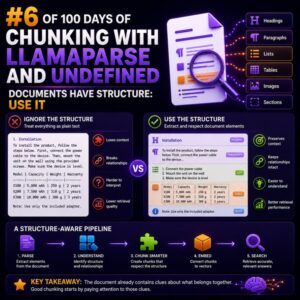
Documents Have Structure: Use It

Why flat text creates weak search results WooCommerce projects depend on documents whose meaning is tied to structure. A return policy, product catalog, installation guide, and shipping matrix do not communicate information in the same way. If each document is converted into one uninterrupted stream of text and split every 500 words, important relationships are lost. A chunk might contain a heading without the section it describes, a table row without its column labels, or a product specification separated from the product name. The resulting search result may contain the right words but still be unusable to an agency team, store manager, or support specialist. Chunk by document boundaries Start with the structure already present in the source document. Useful boundaries include: Document title and

How Amazon Personalize Learns From Customers

Customer behaviour is the training signal Amazon Personalize does not understand a WooCommerce catalogue or customer base automatically. It learns from the interaction records, user attributes, and item attributes that an agency sends to an Amazon Personalize dataset group. For a WooCommerce store, useful interaction records can include: A product detail view A search or product-list click An add-to-cart event A completed purchase A product rating or favourite action Each record should identify the customer, the product, the event type, and the time of the event. A typical interaction might contain USER_ID, ITEM_ID, EVENT_TYPE, and TIMESTAMP. The event type is important because a purchase usually represents stronger intent than a product view. What Amazon Personalize learns from an interaction Consider a customer who views running

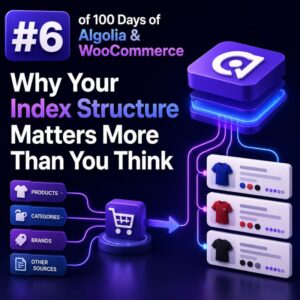
Why Your Index Structure Matters More Than You Think

Index structure is a search decision, not a database export For a WooCommerce store, an Algolia index should be designed around the questions shoppers ask, not around the tables produced by WordPress and WooCommerce. A product record that mirrors every post field, taxonomy relationship, and metadata value may look convenient, but it often produces large records, inconsistent relevance, and difficult facet behavior. Start by defining the search experience. If shoppers need to find products by name and SKU, filter by brand and size, and sort by price or popularity, the index should contain those values in a predictable shape. Data that has no role in search, filtering, ranking, display, or analytics usually does not belong in the record. A practical WooCommerce product record A product

How to Find and Fix WooCommerce Conversion Killers

Start With Evidence, Not Assumptions WooCommerce conversion problems are rarely caused by one obvious issue. A slow checkout, unclear shipping costs, payment failures, or a poor mobile layout can each reduce revenue, and their effects often overlap. Agencies should diagnose the store with a combination of analytics, session behavior, technical testing, and customer feedback before recommending changes. Begin by mapping the purchase funnel: Product or landing-page view Add to cart Cart view Checkout start Billing and shipping completion Payment submission Order confirmation Use Google Analytics 4, a compatible WooCommerce analytics integration, or the client’s reporting platform to measure progression between these stages. Compare the results by device, browser, country, traffic source, and new versus returning customer. A 70% mobile checkout abandonment rate may point to

Why Showing the Same Products to Everyone Is Costing You Sales

The merchandising problem behind missed sales A WooCommerce store that shows the same products, sorting, promotions, and recommendations to every visitor is treating different buying intentions as if they were identical. A first-time visitor researching options, a returning customer who has purchased twice, and a wholesale buyer looking for case quantities may all see the same storefront. That approach is simple to maintain, but it can reduce product discovery and make the store less relevant. When shoppers cannot quickly find products that match their needs, they are more likely to leave, search elsewhere, or buy only the item they already had in mind. Why one catalogue experience underperforms A standard catalogue usually reflects the store’s internal structure: categories, featured products, recent products, or best sellers.

Every Click Is a Conversion Signal

Clicks Are Behavioral Data, Not Just Traffic In a WooCommerce store, a click is often the first measurable indication that a shopper has found something relevant. A click on a search result, product filter, recommendation, size guide, or add-to-cart button can reveal intent before a purchase is completed. For agencies, the practical opportunity is to treat these interactions as conversion signals. The goal is not to count every click as a success. The goal is to connect each interaction with the shopper’s context and use that information to improve search relevance, merchandising, and automated follow-up. Separate Click Types by Intent A product-listing click and an add-to-cart click should not receive the same weight. Create an event taxonomy that reflects the customer journey: Discovery: search submission,

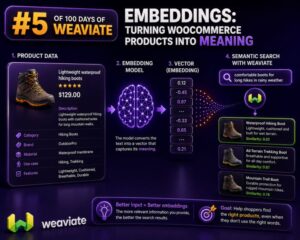
Embeddings: Turning WooCommerce Products Into Meaning

Why product data needs more than keywords WooCommerce search usually starts with exact fields: product title, SKU, attributes, categories, and description. That works when a shopper searches for a phrase stored on the product. It becomes less reliable when the shopper describes an intent instead: “A waterproof jacket for city cycling” “A quiet keyboard for an open-plan office” “Gift ideas for someone who likes espresso” An embedding converts text into a numerical vector that represents its meaning. Products with related descriptions are positioned near one another in vector space, even when they do not share the same words. A WooCommerce agency can use those vectors to build semantic product search, related-product features, catalog recommendations, and support tooling. What to embed from a WooCommerce product Do