Uncategorized guides for WordPress & WooCommerce

Why Tables Are Difficult for Search

Tables look structured to a human reader, but they are often one of the least reliable document elements for search and retrieval. A person can identify the column headers, follow a row across the page, and understand that a value belongs to a particular product or condition. A search index usually receives a sequence of extracted text with much of that spatial and relational meaning removed. Why table meaning gets lost Most search systems work best with text that has a clear reading order. Tables do not naturally have one. A parser may return cells row by row, column by column, or in the order that the PDF stores drawing objects. Those orders are not always equivalent to the way the table appears visually. Consider

Most Viewed Products with Amazon Personalize and WooCommerce

A “most viewed” product block is often requested as a simple popularity widget, but the implementation details matter. WooCommerce agencies need to decide whether the ranking should represent raw product page views, meaningful shopping activity, a time window, or a personalized interpretation of popularity. Amazon Personalize can provide the ranking when view events are sent as interactions, while WooCommerce can remain the source of product catalog and merchandising rules. Define what a view means A product page request is not automatically a useful view. Bots, crawlers, repeated refreshes, prefetching, and authenticated administrative traffic can distort the ranking. Before creating the dataset, define the event that should count. Product view: a shopper has loaded a product detail page and the product is available for purchase. Qualified

Why Your Index Structure Matters More Than You Think

In a WooCommerce search implementation, the index is not merely a copy of the product catalog. It is the structure that determines what Algolia can match, filter, sort, rank, and return quickly. A well-designed index can make a modest catalog feel precise and responsive. A poorly designed one can produce irrelevant results, expensive indexing jobs, awkward facet behavior, and search interfaces that require constant exceptions. What the index structure controls Algolia searches records, not WooCommerce objects. Each record is a JSON document with an objectID and the attributes needed by the search experience. The decisions made when transforming products into those records affect several parts of the application: Relevance: The fields available to search, and their order in searchableAttributes, influence which products rank first. Filtering:

Why WooCommerce Chatbots Need RAG

A WooCommerce chatbot is only as useful as the store knowledge it can access. A general-purpose language model may understand product language and customer questions, but it does not automatically know a store’s current catalog, shipping policy, return rules, subscription terms, or operational procedures. Retrieval-augmented generation (RAG) connects the model to that information at the time of the conversation. What RAG adds to a WooCommerce chatbot RAG uses two separate steps: Retrieval: The system searches approved store data for content relevant to the customer’s question. Generation: The language model uses the retrieved content to formulate an answer. For example, when a customer asks, “Can I return a personalized product after 30 days?”, the chatbot should retrieve the store’s return policy and any product-specific exception before


WPSOLR vs FacetWP: Features, Architecture and Use Cases

WPSOLR and FacetWP can both add faceted product discovery to WordPress and WooCommerce, but they solve different architectural problems. WPSOLR delegates search and filtering to an external search platform such as Elasticsearch, OpenSearch, or Apache Solr. FacetWP maintains a WordPress-side index and uses WordPress queries, usually with AJAX-powered facet updates. That distinction affects scalability, relevance tuning, hosting, indexing workflows, WooCommerce compatibility, and the amount of infrastructure an agency must operate. The right choice depends less on the visual facet controls and more on where the product catalogue, filters, and search logic will be executed. At-a-glance comparison Area WPSOLR FacetWP Primary architecture External search engine integration for WordPress WordPress plugin with its own indexed data and WordPress query integration Best fit Large catalogues, advanced relevance, distributed

How to Turn More WooCommerce Visitors Into Buyers

Increasing WooCommerce revenue does not always require more traffic. Many stores already have enough visitors to grow substantially; the larger opportunity is removing the friction that prevents those visitors from completing a purchase. Agencies can create measurable gains by treating conversion optimization as a structured program rather than a collection of design changes. 1. Establish a reliable conversion baseline Before recommending changes, define the existing funnel and confirm that its data is trustworthy. At minimum, measure: Product page views Add-to-cart rate Checkout initiation rate Checkout completion rate Purchase conversion rate Average order value Revenue per visitor Segment these metrics by device, traffic source, landing page, product category, new versus returning visitors, and country. A store may have an acceptable overall conversion rate while mobile visitors

Which Product Properties Should You Send to Recombee?

The quality of a Recombee recommendation model depends heavily on the product catalog supplied to it. Sending only a product ID and name gives the system limited context. Sending every WooCommerce field without a consistent design creates a noisy catalog that is difficult to maintain and can produce weak recommendations. For most WooCommerce implementations, the right approach is to send a deliberately selected set of product properties. The catalog should describe what the product is, how it can be purchased, where it belongs in the store, and whether it is currently eligible for recommendation. Start with a stable product identifier Every item sent to Recombee needs a stable identifier. Use an identifier that remains unchanged when the product title, price, stock level, or permalink changes.

A Product View Is a Buying Signal

A product view is more than a page impression. In a WooCommerce store, it is an observable buying signal: the shopper has moved beyond a broad category or search query and has invested attention in a specific product. That signal is not proof of purchase intent. Some visitors are comparing products, checking specifications, or browsing casually. Its value comes from combining the view with context such as the originating search, the number of views, stock status, price, device, and whether the shopper returns. Why a product view matters in the conversion funnel Search and category activity reveal a need. A product view reveals consideration. This distinction is important when designing conversion-rate automation for WooCommerce. Search interaction: The shopper expresses a problem, product type, or attribute.

Importing a WooCommerce Catalog Into Weaviate

A WooCommerce catalog is a practical first dataset for a product search, recommendation, or shopping assistant built with Weaviate. The import needs to preserve structured commerce fields such as SKU, price, stock status, categories, attributes, and product URLs while also creating searchable text from the product name and description. For an agency, the importer should be repeatable. It should handle pagination, avoid duplicate objects, support incremental updates, and keep Weaviate in sync when products are edited or deleted in WooCommerce. Plan the product representation Before importing products, decide which WooCommerce fields should be stored as properties and which should contribute to the vectorized text. A useful product object commonly includes: Identity: WooCommerce product ID, SKU, slug, and product URL. Commerce data: regular price, sale price,

Keeping a Vespa Product Index in Sync with WooCommerce

A Vespa product index is only useful when it reflects the current WooCommerce catalog. Price changes, stock updates, product edits, variations, unpublished products, and deletions must all reach Vespa reliably. For an agency managing several stores, synchronization should be treated as an integration with clear ownership, idempotency, retry handling, and reconciliation rather than as a one-time import. Choose the document model first The most important design decision is what a Vespa document represents. A common approach is one document per WooCommerce product, with variations stored as nested data or flattened fields. This works well when customers search for products and the parent product is the result. For stores where customers search by SKU, variation-level price, availability, or attributes, create one Vespa document per variation. Use

WooCommerce + RAG: Where Should You Store Your Vectors?

Choosing where to store vectors is an architectural decision, not merely a database preference. For a WooCommerce retrieval-augmented generation system, the vector store must support product, variation, category, attribute, order, and documentation data while preserving the relationships and permissions that make the retrieved context useful. The right choice depends on catalog size, query volume, filtering requirements, operational expertise, and how closely semantic search must work with transactional WooCommerce data. What the vector store needs to support A WooCommerce RAG implementation typically stores more than an embedding array. Each vector should be associated with the content used to create it and enough metadata to filter, identify, refresh, and authorize the result. Embedding: The numeric vector generated by the selected embedding model. Searchable text: The product description,

Term Queries for Exact WooCommerce Matches

For WooCommerce search features, an exact match is often different from a relevant text match. A shopper searching for SKU TSHIRT-BLU-M should not receive products whose descriptions merely contain similar words. Elasticsearch’s term query is designed for this type of lookup, provided that the target field is mapped as a keyword or another non-analyzed field. What a term query does A term query looks for the exact indexed term supplied in the query. Elasticsearch does not analyze, stem, tokenize, or otherwise process the value in the same way that it does for a typical match query. {"query":{"term":{"sku.keyword":{"value":"TSHIRT-BLU-M"}}}} This query is appropriate when sku.keyword contains the complete SKU as one indexed value. It will not match a different SKU such as TSHIRT-BLU-L, and it may not

Parsing PDFs Without Losing Their Structure

PDFs are convenient for publishing product catalogs, installation guides, compliance documents, invoices, and technical manuals. They are much less convenient for retrieval systems. A parser that extracts only the visible words can destroy the relationships that make the document useful: a price can become separated from its product, a table row can be read in the wrong order, and a heading can be detached from the section it describes. For WooCommerce agencies, this matters when building search, support assistants, catalog importers, or internal knowledge tools. The goal is not simply to turn a PDF into plain text. The goal is to preserve enough structure that downstream chunking and retrieval still represent the source accurately. Why ordinary PDF text extraction fails A PDF usually stores text

Customers Who Viewed This Also Viewed

“Customers Who Viewed This Also Viewed” is an item-to-item recommendation pattern for WooCommerce product pages. Instead of asking which products are generally popular, it asks which products tend to appear in the same browsing journeys as the product currently being viewed. For an agency, this is useful on product detail pages, quick-view panels, and post-purchase browse experiences. Amazon Personalize can generate the recommendations from catalog data and real-time or historical interaction events, while WooCommerce remains responsible for product availability, pricing, links, and presentation. What the recommendation represents The model learns relationships between viewed products. If many shoppers view Product A and then view Product B during the same browsing session, Product B can become a candidate when Product A is displayed. The relationship does not

Searchable Attributes: The Most Important Setting You’ll Configure

For a WooCommerce search experience, few settings have as much influence as searchableAttributes. This setting tells Algolia which product fields can match a query and, just as importantly, establishes the priority of those fields. If a shopper searches for a product name, SKU, category, or brand, the result quality depends on whether that value is indexed as searchable. Adding more fields is not automatically better. A broad, poorly ordered configuration can make descriptions outrank product names or cause weak matches to appear above highly relevant products. What searchableAttributes controls Algolia evaluates the fields listed in searchableAttributes when matching text queries. The order of the attributes affects relevance: an attribute listed earlier generally has more importance than an attribute listed later when other ranking criteria are

AI Chatbot vs RAG for WooCommerce: Choosing the Right Architecture

For WooCommerce projects, “AI chatbot” and “RAG” are often discussed as competing technologies. They are not the same thing. An AI chatbot is the customer-facing application that accepts questions and produces responses. Retrieval-augmented generation, or RAG, is a method for giving that application access to relevant, up-to-date information before it generates an answer. For agencies, the distinction matters because it affects architecture, implementation effort, data governance, operating cost, and the type of customer experience a store can reliably provide. What an AI chatbot does An AI chatbot provides a conversational interface. On a WooCommerce site, it may answer questions, guide product discovery, explain shipping options, or help a shopper locate an order. The chatbot typically includes: A chat interface embedded in the storefront or customer

WPSOLR vs FiboSearch: Features, Architecture and Use Cases

Choosing between WPSOLR and FiboSearch depends primarily on search scope, infrastructure, catalog size, and how much control an agency needs over indexing and relevance. Both can improve WooCommerce product discovery, but they solve different classes of problems. Executive comparison Area WPSOLR FiboSearch Primary role Search integration for WordPress and WooCommerce backed by external search engines Fast AJAX product search focused on WooCommerce storefronts Search backends Supports services and engines such as Elasticsearch, OpenSearch, and Apache Solr, depending on the configured integration Primarily uses WordPress and WooCommerce data with plugin-managed indexing and search behavior Search scope Products, posts, pages, custom post types, taxonomies, and other indexed content Primarily WooCommerce products and related product data Faceted navigation Designed for faceting, filtering, aggregations, and large result sets Provides

How Better WooCommerce Search Drives More Revenue

On many WooCommerce stores, shoppers who use search are among the most valuable visitors. They have already expressed intent, often know what they want, and are closer to a product decision than someone browsing a category page. When search fails to understand that intent, revenue is lost through zero-result pages, irrelevant products, and unnecessary support requests. For agencies, improving search is not just a usability task. It is a measurable conversion and merchandising project. A stronger search experience can increase product discovery, add-to-cart rate, average order value, and the return from paid traffic. Start with search revenue metrics Before changing the search interface or installing a search extension, establish a baseline. Track at least the following segments separately: Visitors who use search versus visitors who

Your Product Catalog Is the Foundation of Personalization

Personalization is only as reliable as the product data behind it. Recommendations, dynamic category pages, email segments, search results, and targeted promotions all depend on being able to identify products consistently and describe them accurately. For a WooCommerce agency, this means the catalog is not just a merchandising resource. It is the shared data layer used by storefront features, marketing integrations, analytics, and personalization services. Why catalog quality determines personalization quality A personalization system needs more than a product name and price. It needs structured signals that describe what a product is, who it is for, how it relates to other products, and whether it is currently available. For example, a recommendation such as Customers interested in this trail shoe also viewed these products is

You’re Probably Ignoring Your Best Conversion Signals

Most WooCommerce teams monitor sessions, traffic sources, product views, and completed orders. Those metrics are useful, but they often describe what happened after a shopper made a decision. The strongest conversion signals can appear earlier, inside the site search experience. A shopper who searches for a specific SKU, brand, compatibility term, or product attribute has already revealed intent. When that search is followed by a filter change, a product click, or an add-to-cart event, the signal becomes even more valuable. WPSOLR can help agencies turn these interactions into measurable data and actionable conversion workflows. Why internal search behavior is a high-value signal Internal search is different from a general page view. A visitor who searches for black waterproof hiking boots size 10 has supplied product

How Weaviate Stores Product Vectors

In a WooCommerce search integration, a product vector is the numerical representation of product information such as its name, description, attributes, categories, and selected custom fields. Weaviate stores that vector alongside the product object and maintains a vector index so semantic searches can find products by meaning rather than by exact keyword matches. A Product in Weaviate Has Data and a Vector A typical product object contains ordinary properties and a vector. The properties might include the WooCommerce product ID, title, description, SKU, price, stock status, categories, and attributes. The vector is an array of floating-point numbers generated by an embedding model. { "id": "2f4f7b7e-8c39-4f90-a832-3cc7e7b8a9c1", "properties": { "wooCommerceId": 1842, "name": "Waterproof trail running jacket", "description": "Lightweight shell for wet and windy mountain runs", "categories": ["Running",

Feeding WooCommerce Products into Vespa

Vespa can provide fast keyword, filtering, ranking, and semantic retrieval for a WooCommerce catalog, but it needs a deliberate feed design. The integration should turn each WooCommerce product into a stable Vespa document, keep the document schema aligned with the search experience, and update Vespa whenever catalog data changes. Choose the Vespa document model A practical starting point is one Vespa document per searchable WooCommerce product. Use the WooCommerce product ID as the stable identifier rather than the product name or slug. This keeps updates and deletes deterministic even when a product is renamed. For variable products, agencies usually choose one of two models: Parent-product documents: Store the variable product as one document with aggregated attributes such as available sizes, colors, and price range. Variation

Vector Databases for WooCommerce RAG

A WooCommerce retrieval-augmented generation (RAG) system is only as reliable as the retrieval layer behind it. When a shopper asks, “Which waterproof hiking boots are available in size 10 under $150?”, the application must find relevant product information, apply structured filters, and provide current inventory or policy details to the language model. A vector database helps with semantic retrieval, but it should be treated as one part of a broader search and data architecture. What a vector database does in a WooCommerce RAG system A vector database stores numerical representations of content called embeddings. An embedding model converts text such as a product description, return policy, or shipping guide into a vector that captures semantic meaning. At query time, the shopper’s question is embedded using

Match Queries for Better WooCommerce Search

WooCommerce product search often starts with a simple keyword query, but a match query provides much better control over how Elasticsearch interprets customer input. It analyzes the search text, converts it into terms using the field’s analyzer, and finds documents that contain matching terms rather than requiring an exact field-value match. Why use a match query for WooCommerce? Product titles, descriptions, SKUs, and attributes are usually indexed as analyzed text. A customer may search for waterproof hiking boots, while the indexed product title contains Men’s Waterproof Boots for Hiking. A match query can analyze both the indexed content and the search input so that relevant products are returned even when the word order differs. By comparison, a term query is intended for exact, un analyzed

What LlamaParse Brings to Document Processing

WooCommerce projects often depend on documents that were never designed for machine processing. Vendor catalogs arrive as PDFs, supplier price lists contain merged cells, product specifications use inconsistent headings, and tax or shipping policies may be scanned images. Extracting text from these files is only the first step. The useful information must also retain its structure, relationships, and context before it can be searched, chunked, or used in an automation. LlamaParse is a document parsing service designed for this kind of workload. It converts complex files into representations that are more useful to downstream retrieval and language-model applications than a basic text extractor. From raw files to usable document content A conventional PDF-to-text utility may return the characters on a page while losing the relationships

Frequently Bought Together for WooCommerce

A “Frequently Bought Together” module is a different problem from a “you may also like” carousel. The goal is to identify products that customers commonly purchase in the same order as the product currently being viewed or added to the cart. For a WooCommerce agency, that distinction affects the event model, Amazon Personalize recipe, API placement, merchandising rules, and the way results are measured. Model the recommendation around completed orders Use WooCommerce order data as the primary signal for this use case. A completed order should produce one purchase event for each product in the order. If an order contains product A, product B, and product C, the training data should contain the customer’s interaction with all three items at the order timestamp. Cart additions

What Should You Put in an Algolia Index?

Designing an Algolia index is not the same as exporting your WooCommerce database. An index should contain the smallest useful search document for the experiences your store needs to support: product discovery, filtering, sorting, merchandising, autocomplete, or a combination of these. For an agency, the right schema usually begins with the storefront search requirements rather than with the fields available in WordPress. Start with the Search Experience Before selecting fields, document what shoppers must be able to do. A typical WooCommerce catalog may require shoppers to: Search product names, SKUs, brands, categories, and selected specifications. Filter by price, stock status, brand, category, size, color, or other attributes. Sort by relevance, price, newest products, popularity, or rating. See product cards with the correct image, price, sale

How to Build a Product-Aware WooCommerce Chatbot

A WooCommerce chatbot becomes significantly more useful when it understands the products a shopper is actually considering. Instead of returning generic answers such as “check the product page,” it can compare products, explain attributes, identify compatible variations, check current availability, and guide the shopper toward an appropriate purchase. For agencies, the key design principle is to separate conversational intelligence from store data. The model can interpret a shopper’s intent, but WooCommerce should remain the source of truth for prices, stock, variations, purchase restrictions, and cart operations. Define what product-aware means A product-aware assistant should be able to work with structured product facts and shopper context. Typical capabilities include: Finding products based on natural-language requirements such as size, material, use case, budget, or color. Comparing selected

WPSOLR vs SearchWP: Features, Architecture and Use Cases

Choosing between WPSOLR and SearchWP is primarily an architecture decision. Both can improve WordPress and WooCommerce search, but they solve different operational problems. SearchWP is designed to provide a tightly integrated WordPress search experience with a managed index stored in the WordPress environment. WPSOLR connects WordPress to dedicated search platforms such as Elasticsearch, OpenSearch, or Apache Solr, making it suitable for larger catalogs, advanced filtering, and teams that already operate search infrastructure. For an agency, the right choice depends on catalog size, query volume, filtering requirements, hosting constraints, and how much control the client needs over search relevance and infrastructure. Architecture and indexing SearchWP architecture SearchWP builds its own search index from WordPress content. The index can include post content, titles, excerpts, taxonomies, custom fields,

From Traffic to Revenue: Optimizing the WooCommerce Funnel

Traffic is only the first measurable step in a WooCommerce customer journey. Revenue growth depends on how effectively a store turns qualified visitors into product views, engaged shoppers, completed orders, and repeat customers. Agencies can improve performance by treating the funnel as a connected system rather than optimizing isolated pages or campaigns. Map the WooCommerce funnel before changing it Start by documenting the journey from acquisition to retention. A practical funnel usually includes these stages: Acquisition: A visitor arrives from paid search, organic search, social media, email, an affiliate, or a referral. Engagement: The visitor views a product, uses site search, reads product information, or adds an item to the cart. Evaluation: The shopper compares products, reviews shipping details, checks availability, and considers trust signals.

10 Recommendation Placements That Can Increase Revenue

Recommendation modules are most effective when they appear at moments of clear shopping intent. A product detail page can support discovery, while the cart and checkout can support complementary purchases. For WooCommerce agencies, the placement should be treated as part of the merchandising strategy rather than as a component that is added everywhere by default. How to evaluate a recommendation placement Before selecting a location, identify the customer action the module should influence. A recommendation can help a shopper find an alternative product, add a complementary item, increase order value, or return to a product they viewed earlier. Track recommendation impressions, clicks, add-to-cart events, attributed revenue, conversion rate, average order value, and revenue per session. < Keep the attribution window and reporting rules consistent across

Build a WooCommerce Store That Gets Smarter

A WooCommerce store gets smarter when every search, filter interaction, product view, add-to-cart event, and purchase becomes useful input for the next optimization. The objective is not to add automation for its own sake. It is to create a reliable feedback loop that helps shoppers find relevant products faster and helps the merchandising team identify where revenue is being lost. WPSOLR can provide the search foundation for this process by connecting WooCommerce product data to a search engine and exposing tools such as relevance tuning, autocomplete, facets, synonyms, and product filtering. The conversion improvement comes from combining those capabilities with disciplined measurement and targeted changes. Start with a measurable feedback loop Before changing search behavior, define the events that indicate whether the change helped. At

Product Titles, Descriptions, Attributes and Variations

WooCommerce agencies often start product search projects by embedding only the product name. That is rarely enough. A product title may identify the item, while the description explains use cases, attributes define constraints, and variations determine purchasable combinations such as size, color, capacity, or finish. A Weaviate implementation should represent these fields deliberately so semantic retrieval improves discovery without weakening exact catalog filters. Separate searchable text from structured product data Use a single combined text value for semantic similarity, but retain the original fields as typed properties. The combined value can contain the product title, short description, long description, category context, and important attribute labels. Structured properties should hold values needed for filtering, sorting, synchronization, and display. A practical product record might contain properties such

Indexing Product SKUs and Exact Identifiers

Product SKUs, GTINs, MPNs, barcodes, and supplier codes are not ordinary product-search text. Store managers and customers usually expect an identifier lookup to return the product whose identifier matches the input, not products that happen to contain similar words. In Vespa, the cleanest design is to model identifier retrieval separately from descriptive search and make the matching behavior explicit. Separate identifiers from descriptive content A WooCommerce product document may contain several identifier fields. A simple product could use the SKU from _sku, while a variable product may expose a parent SKU, variation SKU, GTIN, or manufacturer part number. Do not combine these values into the product title or a general full-text field. Keeping them separate lets the query decide whether an identifier match should be

Choosing the Right Embedding Model for WooCommerce

Embedding models determine how WooCommerce content is converted into vectors for semantic search. Choosing the model affects retrieval quality, latency, storage requirements, multilingual support, and operating cost. For an agency building retrieval-augmented generation (RAG) features for product support, catalog search, order assistance, or internal operations, the best model is not necessarily the largest or newest one. It is the model that represents the store’s language and product relationships reliably within the project’s constraints. Start with the retrieval task Before comparing models, define what the system must retrieve. A product discovery assistant, a customer-support assistant, and an internal catalog tool may use the same WooCommerce data but require different semantic behavior. Product discovery: Match customer language such as “waterproof hiking shoes for winter” with product titles,

Understanding Elasticsearch Relevance Scores

When a shopper searches a WooCommerce catalog, Elasticsearch does more than identify products containing the search terms. It calculates a relevance score for each matching document and uses that score to order the results. Understanding how _score is produced helps agencies diagnose poor search results, tune product queries, and explain ranking behavior to store owners. What the _score value represents The _score is a numeric estimate of how well a document matches a query. A higher score generally means a stronger match, but the number has no universal meaning outside the request that produced it. A score of 8.4 is not automatically better than a score of 4.2 from a different query, index, or shard configuration. For example, a WooCommerce product with the title Waterproof

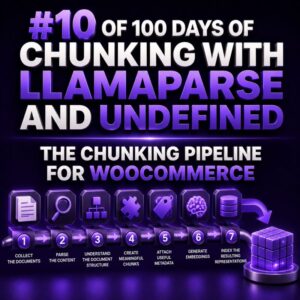
The Chunking Pipeline for WooCommerce

WooCommerce content is rarely organized in the way a retrieval system needs. A single product may contain a short description, a long description, attributes, variations, shipping restrictions, return rules, and purchase instructions. Store policies may live on separate pages, while operational details are buried in FAQs or customer-service documents. A reliable chunking pipeline turns these sources into small, self-contained records without losing the relationships that make the information useful. For agencies, the goal is not simply to split text into equal lengths. The goal is to produce chunks that can answer questions such as Which size should I order?, Can this product ship to Alaska?, or What is the return window for sale items? with the correct store and product context. 1. Define the retrieval

“Recommended for You” on WooCommerce

A “Recommended for You” component is one of the most visible ways to apply personalization in a WooCommerce store. When implemented well, it helps shoppers discover relevant products without forcing them to search through the entire catalog. For agencies, the challenge is not simply displaying a product carousel. The implementation must collect useful behavioral data, request recommendations efficiently, respect WooCommerce product visibility and inventory rules, and render a useful fallback when personalization is unavailable. What “Recommended for You” means A personalized recommendation block typically appears on the shop homepage, account page, product detail page, cart, or post-purchase screen. The recommendation strategy depends on the page and the available context. Homepage: Recommend products based on the shopper’s recent interactions, purchases, or inferred interests. Product page: Show

How to Design the Perfect Algolia Record

An Algolia record should be shaped around the way shoppers search, filter, sort, and select products—not around the entire WooCommerce product payload. A strong record is deliberately small, stable, and explicit about the values that matter to the search experience. Start with one clear indexing unit Decide whether an Algolia hit represents a product, a variation, or another sellable unit before writing the feed. For most WooCommerce stores, a product-level record is the best default when shoppers select size or color on the product page. A variation-level record is more appropriate when each variation has its own stock status, price, image, URL, or search relevance. Use a stable objectID. It should not change when a product title, price, or taxonomy changes. A WooCommerce product ID

Using WooCommerce Product Data in an AI Chatbot

A WooCommerce chatbot becomes substantially more useful when it can answer questions from current product data instead of relying on a static prompt or a manually maintained knowledge base. Product name, description, attributes, variations, price, stock status, categories, shipping dimensions, and downloadable-product details can all support customer conversations. The important implementation decision is to give the chatbot controlled access to product information rather than exposing the entire store database or allowing unrestricted API requests. Decide Which Product Questions the Chatbot Should Answer Start by defining the product questions that matter to shoppers and support teams. Common examples include: Which products match a set of requirements? Is a particular product or variation in stock? What sizes, colors, materials, or other attributes are available? What is the

WPSOLR vs Relevanssi: Features, Architecture and Use Cases

Choosing a WordPress search layer for a WooCommerce project is an architectural decision, not just a matter of comparing search widgets. WPSOLR and Relevanssi can both improve relevance over the default WordPress search, but they operate very differently. WPSOLR delegates indexing and querying to an external search engine, while Relevanssi keeps the search index inside WordPress and queries it through WordPress and MySQL. At-a-glance comparison Area WPSOLR Relevanssi Search architecture External Solr, Elasticsearch, or OpenSearch engine connected to WordPress WordPress plugin with an internal search index stored in the WordPress database Best fit Large catalogs, advanced filtering, high query volume, and search-heavy stores Small to medium sites that need better relevance without operating another service Faceting Designed for engine-level facets and aggregations Possible through WordPress

How to Turn More Product Views Into Sales

Product views are only valuable when the product page helps shoppers answer three questions quickly: Is this right for me? Can I trust this store? What happens after I buy? WooCommerce agencies can improve the view-to-sale rate by treating the product detail page as a conversion system rather than a collection of images, copy, and add-to-cart buttons. Measure the product-view funnel before changing the page Start by defining the events that connect a product view to a completed order. At minimum, track product views, variation selections, add-to-cart events, checkout starts, and purchases. Segment the data by device, traffic source, product type, and customer status. A useful baseline is: Product view to purchase rate = Purchases attributed to product views / Product detail page views ×

Where Should You Put Recommendations in a WooCommerce Store?

Recommendation placement is a merchandising decision, not just a widget decision. The same product rule can perform very differently depending on whether a shopper is researching a product, comparing alternatives, reviewing the cart, or completing an order. WooCommerce agencies should map each recommendation to the shopper’s current intent and the amount of friction that placement can introduce. 1. Product pages: support the decision without competing with the primary product The product page is usually the most important recommendation surface. Shoppers have already demonstrated interest in a specific product, so recommendations can help them find a better fit, add complementary items, or understand the product range. Related products below the main product content Place complementary or similar products below the description, specifications, reviews, or buying guidance.

Your Customers Are Training Your Store

Every search box interaction is a signal about what your catalog, navigation, and merchandising are failing to communicate. A customer who searches for “black running shoes,” reformulates the query as “men’s trail sneakers,” and then filters by size is showing you how they think about your products. A customer who searches for a product name and receives no useful result is identifying a content or indexing problem. For WooCommerce agencies, the opportunity is to treat these interactions as operational data rather than isolated support issues. WPSOLR can make the catalog easier to search, but the strongest results come from using customer behavior to improve the search configuration continuously. What customer behavior can teach you Search terms: The words shoppers use may differ from product titles,

Which WooCommerce Product Data Should You Index?

Index product data according to how shoppers search For a WooCommerce agency, indexing every available product field is rarely the best approach. Product records often contain duplicated descriptions, HTML fragments, operational metadata, serialized custom fields, and values that change frequently. A useful Weaviate schema should reflect the queries the store needs to answer, not simply mirror the WooCommerce database. Start by listing the search and recommendation experiences you need to support: Keyword search for product names, descriptions, brands, and features. Natural-language discovery such as “waterproof hiking boots under $150.” Structured filters for price, stock status, categories, attributes, and ratings. Product recommendations based on descriptions, categories, and compatible items. Exact lookups by SKU, product ID, slug, or an external catalog identifier. Each use case determines whether

Handling WooCommerce Variations in Vespa

WooCommerce variable products require more than a simple product-level search document. A parent product such as a T-shirt may have dozens of variations, each with its own SKU, price, stock state, image, and attribute combination. For agencies building search with Vespa, the central design decision is whether to index the parent product, each variation, or both. Choose a variation indexing model For most WooCommerce catalogs, indexing one Vespa document per variation is the most reliable starting point. Each document represents a purchasable SKU and carries a reference to its parent product. Variation document: Stores the variation ID, parent product ID, SKU, price, stock state, attributes, and searchable text. Parent product: Stores the product title, description, categories, brand, and shared merchandising content. Relationship: The variation contains

How to Turn WooCommerce Products Into RAG Knowledge

WooCommerce product data is structured for storefronts, not for retrieval-augmented generation. A product record contains titles, descriptions, attributes, variations, prices, stock status, categories, taxonomies, and custom fields, but those values are often scattered across database tables and rendered templates. Before an LLM can answer product questions reliably, an agency must turn that data into well-scoped, searchable knowledge. The goal is not to copy the entire product catalog into a vector database. The goal is to create retrieval units that preserve product meaning, expose useful metadata for filtering, and remain synchronized with WooCommerce. Define the questions the catalog must answer Start with the questions customers and support teams actually ask. Typical examples include: Which waterproof jackets are available in medium? Does this product include a mounting

Building Your First WooCommerce Elasticsearch Query

Your first Elasticsearch query for WooCommerce should answer a specific storefront question, such as: “Which published products match a customer’s search for waterproof hiking boots?” Start with a small, readable query and add filters only when the business requirement is clear. Understand the indexed product document Elasticsearch searches the document that was indexed, not the WooCommerce database directly. The exact field names depend on your indexing pipeline or search extension. A product document might contain fields like name, description, sku, categories, attributes, stock_status, price, status, and visibility. Before writing a query, inspect a document and its mapping: GET wc_products/_mapping GET wc_products/_search { "size": 1, "query": { "match_all": {} } } Replace wc_products with the index used by your environment. The mapping tells you whether a