

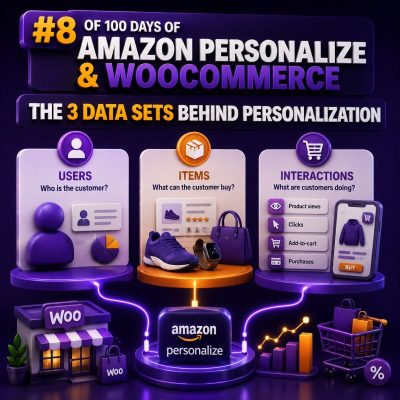
Amazon Personalize is built around three core data sets: Interactions, Users, and Items. For a WooCommerce agency, understanding how these data sets relate is more important than choosing a recipe. The quality, consistency, and coverage of these records determine whether recommendations are useful across product pages, cart pages, email campaigns, and other customer experiences.
1. Interactions: what shoppers do
The Interactions data set records events between a user and an item. Typical WooCommerce events include product views, searches, add-to-cart actions, purchases, wish-list additions, and product ratings.
The minimum useful relationship is usually represented by a user ID, an item ID, and a timestamp. A typical event record might look like this:
{
  "USER_ID": "customer-1842",
  "ITEM_ID": "product-742",
  "TIMESTAMP": 1714478400,
  "EVENT_TYPE": "purchase",
  "EVENT_VALUE": 2
}
The exact fields depend on the Amazon Personalize schema and recipe. USER_ID and ITEM_ID should use stable identifiers that your WooCommerce integration can reproduce consistently. Do not use a session-specific identifier for a logged-in customer in one request and a WordPress user ID in another. If the same shopper appears under multiple IDs, Personalize cannot build a reliable history.
Batch and real-time interactions
Historical order and browsing data can be loaded through an Interactions dataset import job. New activity can be sent through the Amazon Personalize event ingestion API using an event tracker. A practical implementation often imports the last several months of orders and then sends new views, carts, and purchases in real time.
Event names should reflect business intent. A purchase is generally stronger evidence of preference than a product view, while a cart abandonment may need to be treated differently from a completed order. The chosen recipe may use event types and event values differently, so the agency should document the event taxonomy before building the integration.
2. Users: who the shopper is
The Users data set contains attributes about a customer or visitor. It can include a customer ID, age range, membership level, region, language, acquisition channel, or other information that is appropriate and legally permitted for personalization.
For example:
{
  "USER_ID": "customer-1842",
  "MEMBERSHIP_TIER": "gold",
  "REGION": "GB",
  "LANGUAGE": "en",
  "CUSTOMER_TYPE": "business"
}
User attributes are useful for segmentation and for improving recommendations when interaction history is limited. They can also help an agency evaluate whether recommendations behave differently for customer groups such as wholesale buyers, retail customers, or loyalty members.
Keep user attributes relatively stable and operationally meaningful. A temporary cart token, a frequently changing session value, or unrestricted free-text profile data is usually a poor fit. Avoid sending sensitive personal data unless there is a clear lawful basis, a documented purpose, and an appropriate data-processing design.
3. Items: what can be recommended
The Items data set describes the products, variations, or other catalog entities that Amazon Personalize may recommend. Common fields include an item ID, product name, category, brand, price range, stock status, and publication status.
{
  "ITEM_ID": "product-742",
  "TITLE": "Waterproof Hiking Jacket",
  "CATEGORY": "Outdoor Clothing",
  "BRAND": "North Ridge",
  "PRICE_BAND": "100-149",
  "AVAILABLE": "true"
}
The item ID must match the identifier used in interaction records. If WooCommerce sends a parent product ID in the catalog but a variation ID in purchase events, the model will see them as different items. Choose a recommendation unit deliberately: products, variations, bundles, or another catalog level. Then apply that choice consistently in the feed, event tracking, and recommendation display.
Catalog synchronization also needs to account for product lifecycle changes. Draft, deleted, discontinued, and out-of-stock products should not appear in customer-facing recommendations. Availability can be represented as an item attribute, but WooCommerce should still apply real-time eligibility rules before rendering a recommendation because inventory can change after the catalog import.
How the three data sets work together
Interactions provide behavioral evidence, Users provide customer context, and Items provide catalog context. Consider a customer who views several trail-running products, belongs to a premium loyalty tier, and purchases a hydration vest. Personalize can combine that interaction history with the customer attributes and product metadata to identify relevant products for a subsequent recommendation request.
Each data set solves a different problem:
- Interactions: Which products does a shopper view, buy, or otherwise engage with?
- Users: What customer or visitor attributes can help distinguish one shopper from another?
- Items: What does each product represent, and is it eligible for recommendation?
WooCommerce implementation checklist
- Define a canonical ID strategy for WordPress users, guest visitors, products, and variations.
- Map WooCommerce actions to a small, documented set of event types.
- Export enough historical interaction data to establish useful behavioral coverage.
- Synchronize product metadata whenever products are created, updated, unpublished, or removed.
- Validate that every interaction item ID exists in the intended Items data set.
- Filter recommendations against current catalog rules, permissions, stock, price, and product visibility.
- Test anonymous, logged-in, new, returning, and wholesale customer journeys separately.
Common data problems
A large event count does not guarantee a useful model. Duplicate purchase events can exaggerate preferences. Missing timestamps can distort recency. Inconsistent capitalization or category naming can fragment item metadata. Sending only purchases may leave the system with too little signal for lower-volume stores, while sending every minor event without a clear purpose can add noise.
Agencies should monitor data quality with checks for duplicate events, invalid IDs, stale catalog records, missing required fields, and unexpected event-volume changes. It is also useful to compare the number of active users and items in Amazon Personalize with the corresponding counts in WooCommerce.
Designing for cold-start shoppers and products
New shoppers have little or no interaction history, and new products have no established behavioral history. User and item metadata become especially important in these cases, but they do not replace a coherent event stream. A WooCommerce implementation should provide sensible fallback recommendations, such as popular products within an eligible category, while Personalize gathers enough new interactions to improve individual results.
The three data sets should therefore be designed as one contract: stable identifiers connect them, timestamps establish behavioral sequence, and metadata supplies context. That contract is the foundation for reliable personalization across a WooCommerce storefront.