

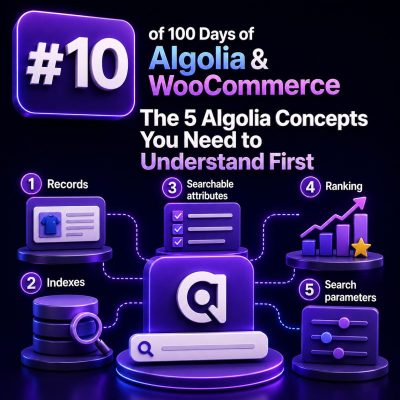
Before connecting Algolia to a WooCommerce store, it helps to understand the objects and decisions that control how search behaves. Algolia is not a drop-in replacement for the WordPress or WooCommerce database query layer. It is a hosted search engine that receives prepared product data, builds an index, and answers search requests against that index.
The following five concepts provide the foundation for designing a reliable WooCommerce integration.
1. Indexes Are Searchable Product Collections
An Algolia index is a collection of records that can be searched. For WooCommerce, an index commonly represents a product catalog such as products_production or products_staging.
An index is more than a database table. Its settings determine which fields are searchable, which fields can be used for filtering, how results are ranked, and which attributes are returned to the browser. The same product data can therefore produce very different search results depending on the index configuration.
Use separate indexes when the search experience or data lifecycle is meaningfully different. Typical examples include:
- A production index and a staging index.
- Separate indexes for different storefronts or languages.
- A product index for customer search and a suggestion index for autocomplete.
- Replica indexes for alternate sort orders such as price ascending or newest first.
For most WooCommerce projects, avoid creating an index for every category or product attribute. Categories and attributes are usually better represented as record fields and facets. Maintaining one primary product index makes synchronization and search configuration easier to manage.
2. Records Are the Documents Algolia Searches
A record is a JSON document stored in an index. In a WooCommerce integration, one record usually represents one searchable product or one product variation, depending on the requirements of the catalog.
A simple product record might look like this:
{"objectID":"wc_product_1842","product_id":1842,"name":"Waterproof Trail Jacket","sku":"TRAIL-JACKET-BLK-M","price":129.99,"categories":["Men","Jackets"],"in_stock":true,"brand":"North Ridge"}Records should contain the fields required for search, filtering, sorting, and rendering results. They do not need to reproduce every column in the WordPress database. Sending only relevant, normalized data generally makes indexing faster and reduces the amount of data exposed to the frontend.
Decide early whether variable products should be indexed as parent products, individual variations, or both. Indexing variations can improve searches for attributes such as size, color, and variation-specific SKU, but it can also create duplicate-looking results. If variations are indexed individually, include a stable parent product identifier and define how the frontend groups or labels them.
The objectID Is the Record’s Identity
Every Algolia record needs a unique objectID. It is used when updating or deleting a record, so it must remain stable across synchronization jobs. A product ID is often sufficient, but a variation-aware integration might use a value such as wc_variation_1842_311.
Do not generate a random object ID each time a product is synchronized. That creates new records instead of updating existing ones and can leave deleted or outdated products in the index.
3. Attributes Control Search, Filtering, and Display
Algolia treats record fields differently according to the index settings. An attribute can be searchable, filterable, sortable, or simply returned for display. These are separate decisions.
- Searchable attributes: Fields Algolia examines when matching a query, such as product name, SKU, brand, and selected descriptive text.
- Faceting attributes: Fields used for filters and facet counts, such as brand, category, color, size, and stock status.
- Attributes for faceting: The Algolia setting that declares which fields can be used in filters or facets.
- Custom ranking attributes: Numeric or boolean fields used to influence ordering after textual relevance, such as sales velocity or merchandising priority.
- Displayed attributes: Fields returned in search responses, which can be limited to reduce response size.
For example, a WooCommerce index might use the following configuration:
{"searchableAttributes":["name","brand","categories","sku","description"],"attributesForFaceting":["searchable(brand)","searchable(categories)","color","size","in_stock"],"customRanking":["desc(featured_score)","desc(popularity)"]}Use searchable(...) for facets when shoppers should be able to search within facet values, such as a long list of brands. Do not add every product field to searchableAttributes. Relevance becomes harder to predict when low-value content, internal metadata, or long descriptions can outweigh the product name and SKU.
4. Search Requests Contain the User’s Intent
A search request is the query sent to Algolia, together with parameters that describe how the request should be handled. The text entered by the shopper is only one part of that request.
A WooCommerce category page might send an empty query with filters, while a sitewide search box might send a text query with no category restriction. A product listing page could use a request like this:
const response = await index.search('trail jacket', { filters: 'categories:"Jackets" AND in_stock:true', facets: ['brand', 'size', 'color'], hitsPerPage: 24, attributesToRetrieve: ['objectID', 'name', 'price', 'image', 'url', 'brand'] });Common request parameters include:
query, which contains the shopper’s text.filtersorfacetFilters, which restrict results to selected categories, brands, prices, stock states, or other conditions.facets, which requests counts for available filter values.numericFilters, which handle ranges such as price or rating.hitsPerPageandpage, which control pagination.attributesToRetrieve, which limits the product data returned to the browser.
Keep user-controlled filters separate from server-enforced constraints. For example, a storefront may allow the shopper to choose a brand but should always apply in_stock:true or a catalog visibility filter when those rules are required by the business. Validate and construct filters deliberately rather than concatenating unchecked request values into a filter string.
5. Relevance Is Determined by Ranking Rules
Algolia does not simply return records in the order they were imported. It evaluates matching records through ranking rules. Understanding this is essential when a client says that a product is “in the index” but is not appearing where expected.
The default ranking process considers factors such as textual matching, typo tolerance, proximity, and exactness. The order of searchable attributes also matters. If name appears before description, a match in the product name generally carries more importance than the same match found only in the description.
After textual relevance, custom ranking can apply business signals. For example:
{"customRanking":["desc(merchandising_priority)","desc(in_stock)","desc(popularity)"]}Use custom ranking carefully. A popular product should not automatically outrank a highly relevant product, and a merchandising score should have a documented range and update process. A common WooCommerce approach is to index fields such as:
merchandising_priorityfor an explicitly managed boost.popularitybased on sales or verified product views.in_stockwhen available items should precede unavailable items.price_sortor another numeric field when a dedicated replica supports a different sort order.
Search relevance and catalog sorting are different requirements. If shoppers need “price: low to high” and “price: high to low,” use replica indexes configured for those sort orders rather than trying to force every ordering through one custom ranking configuration. This preserves the default relevance behavior for ordinary text searches while giving the storefront predictable sort options.
Applying the Concepts to a WooCommerce Build
A practical first implementation can follow this sequence:
- Define whether each Algolia record represents a product or a variation.
- Create stable object IDs and a repeatable synchronization process for creates, updates, and deletions.
- Choose a small, intentional record schema containing product content, URLs, images, prices, inventory state, taxonomy, and merchandising fields.
- Configure searchable attributes, facets, displayed attributes, and ranking rules in a staging index.
- Implement search requests that combine text queries with validated WooCommerce filters and pagination.
- Test relevance with real queries, including SKU searches, misspellings, category restrictions, out-of-stock products, and products with variations.
These decisions should be documented alongside the integration code. When the product feed, index settings, and frontend query parameters agree on the same data model, Algolia becomes a predictable search layer rather than a second, disconnected product catalog.