Uncategorized guides for WordPress & WooCommerce

Using RAG to Answer Product Compatibility Questions

Product compatibility questions are among the most valuable support queries in a WooCommerce store. Shoppers want to know whether a replacement filter fits a specific appliance, whether a phone case works with a particular model, or whether a plugin supports their current WordPress environment. These questions often require combining product attributes, variation data, manuals, compatibility tables, and customer-specific context. Retrieval-augmented generation (RAG) can answer these questions more reliably than a general-purpose chatbot, provided that the retrieval layer is designed to distinguish between compatible, incompatible, and unknown combinations. Why compatibility questions are difficult A compatibility answer rarely depends on a single product description. It may require several related records: The product or variation being purchased. The customer’s existing product, model number, version, or dimensions. A compatibility

Handling Typo-Tolerant Product Search

Customers do not always enter product names exactly as they appear in the catalog. A shopper may search for wireles headphones, iphon case, or stainles steel bottle and still expect relevant products. Typo-tolerant search uses Elasticsearch’s fuzzy matching to recover from small spelling errors without requiring a perfect query. How fuzzy matching works Elasticsearch fuzzy matching compares terms using edit distance. An edit can be an insertion, deletion, substitution, or transposition. For example, headphons can match headphones because only a small number of edits are required. The fuzziness option controls the permitted edit distance. A practical starting point is AUTO, which selects a distance based on the length of the term. For more predictable behavior, an agency may use an explicit value such as 1

Why Section Boundaries Matter

In a WooCommerce knowledge base, a chunk is not just a fixed number of characters. It is a unit of meaning that a retrieval system can return to an agent, developer, or support specialist. Section boundaries are one of the strongest signals for deciding where that unit should begin and end. When a parser ignores document structure, it can split a setup instruction from its prerequisite, separate a pricing table from its explanatory notes, or combine unrelated policies into the same embedding. The resulting chunks may still look readable in isolation, but retrieval quality declines because the context no longer matches the question. What a section boundary represents A section boundary usually appears as a heading, subheading, page transition, table boundary, list boundary, or change

Tracking Category Browsing

Category pages are often the first meaningful signal in a WooCommerce shopping journey. A shopper may browse running shoes, coffee grinders, or summer dresses without opening a product page or adding anything to the cart. If that behaviour is not captured, Amazon Personalize has less context when it generates recommendations later in the session. What category browsing should represent A category browse event should identify the taxonomy context the shopper viewed, for example: The WooCommerce product category ID and slug. The full category path, such as shoes/running. The page type, such as product category, brand archive, or custom collection. The products displayed on the page, when impression tracking is part of the implementation. Do not treat a category as a product unless categories are deliberately

WPSOLR vs Doofinder: Features, Architecture and Business Model

WPSOLR and Doofinder solve the same broad problem—improving search and product discovery in WordPress and WooCommerce—but they use very different delivery models. WPSOLR connects a WordPress site to a search engine that the site owner or agency controls. Doofinder is a hosted search and merchandising platform delivered as a SaaS service. That distinction affects architecture, data ownership, deployment, customization, operating costs, and the responsibilities of the agency maintaining the store. Executive comparison Area WPSOLR Doofinder Primary model WordPress plugin connected to Elasticsearch, OpenSearch, Amazon OpenSearch Service, or Apache Solr, depending on the implementation Hosted SaaS search and product-discovery platform Where indexing and queries run On the search infrastructure configured by the site owner or agency In Doofinder’s managed cloud environment WordPress integration Deep integration through

10 WooCommerce Personalization Ideas Agencies Can Sell

Personalization is one of the clearest ways an agency can move a WooCommerce engagement beyond theme changes and one-off campaigns. When recommendations, offers, content, and merchandising reflect a shopper’s context, stores can often improve conversion rate, average order value, repeat purchases, and customer lifetime value. The strongest agency opportunities combine strategy, data, implementation, testing, and ongoing optimization. Below are ten personalization services that WooCommerce agencies can package and sell to merchants. 1. Personalized product recommendations Use browsing behavior, purchase history, product attributes, and cart contents to show shoppers products that are more relevant to them. Recommendation placements can include the product page, cart, checkout, order-received page, and customer account area. Common recommendation types include “frequently bought together,” “similar products,” “complete the look,” and “you may

Content-Based Recommendations vs. Collaborative Filtering

Recommendation systems for WooCommerce usually rely on two complementary approaches: matching products to the characteristics of an item or customer, and learning patterns from the behavior of many shoppers. Choosing the right approach affects relevance, implementation effort, reporting, and the experience of new or low-traffic stores. Content-based recommendations Content-based recommendations use product attributes and the properties of the product a shopper is viewing or has interacted with. A system can compare categories, tags, brands, price ranges, attributes, descriptions, and custom product metadata to identify similar items. For example, on a product page for a waterproof hiking jacket, a content-based engine might recommend other waterproof jackets, hiking trousers, technical fleeces, or products with overlapping attributes such as activity=hiking, season=autumn, and feature=waterproof. Typical WooCommerce inputs Product categories

Stop Choosing Related Products Manually

WooCommerce product relationships are often maintained one product at a time: an administrator opens a product, selects upsells or cross-sells, saves the product, and repeats the process for the rest of the catalog. That approach becomes expensive to maintain and usually produces uneven results as inventory, pricing, and merchandising priorities change. A better approach is to let the product index identify relevant items dynamically. With WPSOLR acting as the retrieval layer, agencies can build related-product recommendations from searchable product data instead of relying exclusively on manually curated relationships. Why manual product relationships do not scale Manual recommendations can be useful for a small, tightly curated catalog. They become a maintenance problem when a store has hundreds or thousands of products. New products are not automatically

Hybrid Search: Keyword + Semantic Search

WooCommerce search has to handle two different kinds of intent. A shopper searching for waterproof trail shoes expects relevant concepts and attributes, while a shopper searching for SKU TRL-204-BLK expects an exact lexical match. Hybrid search combines keyword relevance with semantic similarity so agencies can support both behaviors in one query. What hybrid search combines Weaviate’s hybrid operator combines a keyword search, typically BM25, with a vector search. BM25 rewards exact terms, term frequency, and useful matches across configured properties. The vector component compares the query embedding with product embeddings, allowing related wording such as rainproof hiking footwear to match a product described as waterproof trail shoes. The alpha value controls the balance: alpha=0 favors keyword search. alpha=1 favors vector search. A middle value, such

Fuzzy Product Search with Vespa

WooCommerce shoppers do not always search with the exact product name. They may type iphnoe case, omit part numbers, or use a brand spelling that differs from the catalog. Vespa can handle these near matches with its fuzzy query operator while retaining structured filters such as stock status, price, category, and product visibility. For a WooCommerce agency, the practical pattern is to keep WooCommerce as the source of product and order data, replicate searchable product fields into Vespa, and send catalog search requests to Vespa. Fuzzy matching is then applied only to fields where spelling variation is useful, rather than indiscriminately across the entire document. When fuzzy search is appropriate Fuzzy search compares terms within a configurable edit distance. An edit is an insertion, deletion,

RAG for WooCommerce Customer Questions

WooCommerce customer questions often look simple but require several sources of truth. “Where is my order?” depends on the customer’s identity, order status, shipment data, and possibly a carrier API. “Can I return this item?” depends on the product, purchase date, order status, store policy, and sometimes the customer’s location. Retrieval-augmented generation (RAG) can make these conversations more useful by retrieving the relevant store information before generating an answer. The important design decision is to separate general store knowledge from private, customer-specific data. What RAG should answer in WooCommerce A WooCommerce support assistant commonly handles three categories of questions: Store-policy questions: “How long do I have to return an item?” or “Do you ship to Canada?” Product questions: “Is this jacket waterproof?” or “Which size

Words vs Proximity: How Algolia Understands Queries

For WooCommerce stores, a shopper’s query is rarely an exact product title. A search such as waterproof trail shoes may match product names, categories, attributes, descriptions, and synonyms. Algolia’s ranking system evaluates both how many query words a record matches and how close those words appear to one another. These concepts are related, but they solve different problems. What Algolia means by “words” The words ranking criterion rewards records that match more of the words in the query. If a shopper searches for waterproof trail shoes, a product matching all three terms generally has an advantage over one matching only shoes. This is a relevance signal, not a simple exact-string comparison. Algolia tokenizes the query and searches for matching terms across the configured searchableAttributes. The

AI Chatbots for “Which Product Should I Buy?”

Product-selection questions are among the most valuable conversations an ecommerce assistant can handle. A shopper who asks for a recommendation has usually moved beyond general browsing and is looking for help connecting a need, preference, or constraint to a specific product. For a WooCommerce store, an AI chatbot can turn that conversation into a guided shopping experience without forcing the customer to navigate filters, categories, and comparison tables alone. What the chatbot should actually do The chatbot should not guess based only on product names or popularity. It should collect enough context to make a defensible recommendation, explain why the product fits, and provide a clear path to the product page. A useful flow normally identifies: The customer’s intended use case Budget or price range

WPSOLR Use Case: Search on the White House Website

Making public information easier to find The White House website is a major public information resource, providing access to official announcements, communications, and policy information. Website scale: Third-party traffic estimates have placed the website at around 7.4 million visits per month. Powered by Apache Solr The website used WPSOLR with Apache Solr to provide key search capabilities: Search: Find relevant content across the website. Faceting: Narrow results by date and topic. Sorting: Organize search results to make information easier to browse. These features help visitors explore public information and focus on content relevant to their interests. Implementation by an independent consultant The WPSOLR license was purchased, and the integration was completed by an independent consultant—not by the WPSOLR team. This use case demonstrates how WPSOLR can

Fuzzy Search for Misspelled Product Names

Misspelled product names are a common reason shoppers abandon WooCommerce searches. A customer may search for wireles headphones, stainles steel bottle, or runing shoes and still expect the correct products to appear. Elasticsearch can handle these mistakes with fuzzy matching, provided the query is configured carefully and integrated with WooCommerce product rules. How Elasticsearch fuzzy matching works Fuzzy matching uses edit distance to find terms that are within a small number of character changes from the search term. The supported changes include inserting, removing, replacing, or transposing characters. For example, a search for headphons can match headphones. Elasticsearch exposes this behavior through the fuzziness option on queries such as match and multi_match. For product search, AUTO is usually a good starting point because Elasticsearch selects

Chunking by Title with Unstructured

For WooCommerce agencies, a useful chunking strategy should preserve the structure that gives a document meaning. A returns policy, shipping guide, or product implementation manual is not just a sequence of paragraphs: headings define the scope of the content that follows. Unstructured’s title-based chunking strategy uses those section boundaries when creating chunks. What title-based chunking does Unstructured first partitions a source document into semantic elements such as titles, paragraphs, list items, and tables. The by_title strategy then groups those elements into chunks while avoiding unnecessary movement across section boundaries. This is useful for retrieval systems because a chunk headed International Returns is more meaningful than a character window that begins halfway through a section and ends inside a different topic. Basic implementation The following example

Tracking Search Behavior

Search behavior is one of the strongest signals available to a WooCommerce personalization strategy. A product view shows interest in an item, but a search query reveals the shopper’s current intent, including needs that may not be satisfied by the first results page. For an agency, the goal is not simply to count searches. It is to capture consistent, privacy-conscious search events that can be joined with purchases, product views, add-to-cart events, and conversions in Amazon Personalize. What to Track in a WooCommerce Search Event A useful search event should contain enough context to support analysis without storing unnecessary personal data. At minimum, capture: Session identifier: A stable identifier for the current browsing session. Visitor identifier: A customer or anonymous browser identifier, subject to the

Exact Match vs Partial Match

Search behavior has a direct effect on product discovery, conversion rate, and support volume in WooCommerce stores. A shopper searching for hoodie should usually find hoodies, while a shopper searching for a highly specific SKU may expect only an exact result. Algolia can support both behaviors, but exact and partial matching solve different problems and should not be treated as interchangeable. What exact matching means in Algolia Exact matching means that the query term matches a complete indexed word or a deliberately constrained query expression. For example, a search for SKU-4812 should favor a product containing that complete identifier rather than products containing only a similar prefix. In Algolia, exactness is primarily influenced by the engine’s ranking and matching configuration. The exact ranking criterion helps

AI Chatbots for Product Compatibility Questions

Product compatibility questions are among the highest-value conversations in WooCommerce. Customers want to know whether a charger fits a device, whether a replacement part works with a specific model, or whether two products can be used together. An AI chatbot can answer these questions instantly, but only when it uses reliable product data and applies clearly defined compatibility rules. Why compatibility questions need more than product search A standard product search can find products containing terms such as “USB-C,” “MacBook,” or “2023 model.” Compatibility requires a relationship between products, customer-provided specifications, and business rules. The chatbot may need to compare: Brand, model, generation, and revision Dimensions, voltage, connector type, thread size, or capacity Supported operating systems, platforms, or software versions Product variants and their individual

WPSOLR Use Case: A Scalable Knowledge Pipeline for an Internal AI Chatbot

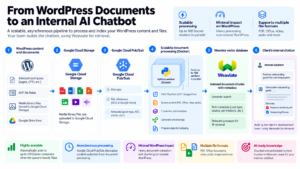
Turn WordPress content and documents into AI-ready knowledge—without burdening WordPress Organizations store valuable knowledge across WordPress custom post types, media libraries, ACF file fields, and external documents hosted on Google Drive. Making this information available to an internal AI assistant requires a pipeline that can process large volumes of documents without slowing down the website. In this use case, WPSOLR supports the content ingestion and indexing workflow. The client’s development team built the internal chatbot, using Weaviate as its vector database for retrieval. 1. Collect WordPress content and document links The pipeline collects selected WordPress post types and their associated ACF file fields, including links to media library files and Google Drive documents. WordPress media files are stored in Google Cloud Storage, providing a central

WPSOLR Use Case: Multilingual Product Search and Faster Order Lookup

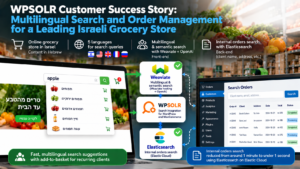
One e-commerce website, two search engines, two distinct challenges An Israeli online grocery retailer with Hebrew product content needed to serve customers searching in multiple languages while making internal order lookup fast enough for everyday customer service operations. WPSOLR connects two search engines to support these different requirements: Weaviate for customer-facing semantic search and Elasticsearch for internal order search. 1. Frontend: multilingual search that understands customer intent The storefront uses Weaviate hosted by Weaviate for multilingual and semantic product search, combined with OpenAI technology to help address the challenges of searching Hebrew product content using queries in five languages. Instead of relying only on exact keyword matches, semantic search helps customers find relevant products when their query expresses an intent, describes a need, or uses

WPSOLR Use Case: How WPSOLR connects 3 WooCommerce sites with 3 million products to OpenSearch

The customer: A US retailer with multiple showrooms This customer is a US kitchen and bath retailer combining multiple physical showrooms with a substantial e-commerce business. Its online catalog spans three WooCommerce sites, each containing approximately one million products — around 3 million products in total. At this scale, choosing the right search infrastructure is critical. The retailer needed a search solution that could accommodate its large catalogs while integrating with its existing WooCommerce environment. The challenge: Elasticsearch indexing issues The customer initially used Elasticsearch through Elastic Cloud (elastic.co) to power product search. However, indexing issues led us to reconsider the search infrastructure. For a retailer managing millions of products across multiple sites, indexing is fundamental to keeping product data available to shoppers. We needed

WPSOLR vs Jetpack Search: Features, Architecture and Use Cases

For WooCommerce agencies, the choice between WPSOLR and Jetpack Search is primarily an architectural decision. Both can improve WordPress search beyond the default database-backed query, but they target different operating models: WPSOLR gives teams control over the search engine and indexing design, while Jetpack Search provides a managed search service connected to WordPress.com infrastructure. Architectural difference WPSOLR: a configurable search-engine integration WPSOLR is a WordPress search integration layer that connects a site to search engines such as Elasticsearch, OpenSearch, or Apache Solr, depending on the supported version and deployment configuration. WordPress remains the system of record, while the selected search engine stores an index of posts, pages, products, taxonomies, custom fields, and other indexed data. A typical request flow looks like this: A visitor submits

How Personalization Can Increase WooCommerce Revenue

Personalization helps WooCommerce stores show more relevant products, offers, and messages to each shopper. When implemented carefully, it can increase conversion rate, average order value, repeat purchases, and customer lifetime value without relying solely on additional traffic. Where Personalization Creates Revenue Personalization can influence several stages of the customer journey: Product discovery: Display relevant categories, products, and search results based on browsing behavior, purchase history, or customer preferences. Conversion: Use targeted product recommendations, reassurance messages, and tailored offers to address a shopper’s likely needs. Average order value: Recommend complementary products, bundles, subscriptions, or accessories at the right point in the buying process. Retention: Send replenishment reminders, post-purchase education, and cross-sell campaigns based on previous orders. Agencies should connect each personalization tactic to a measurable commercial

Collaborative Filtering Explained Without the Math

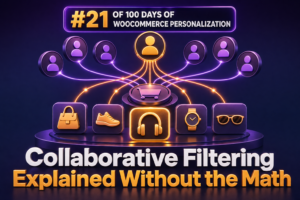
Collaborative filtering recommends products based on patterns in customer behavior. Instead of relying only on product attributes such as category, brand, or price, it asks a practical question: which customers behave similarly, and what did one customer interact with that another customer has not seen yet? For a WooCommerce store, this can produce recommendations such as “Customers who bought this also bought…” or “Recommended for you.” The system learns from events including product views, searches, add-to-cart actions, purchases, wishlist additions, and review activity. What collaborative filtering means Collaborative filtering uses the behavior of many customers to make recommendations for an individual customer. The products do not need to share the same category, attributes, or keywords. The relationship comes from customer activity. For example, suppose the

Your “Related Products” Aren’t Really Related

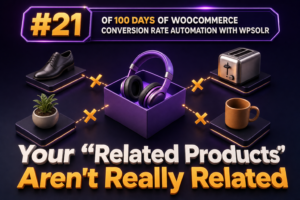
WooCommerce’s Related Products block often answers a taxonomy question rather than a customer question. A product may be placed beside another item because both share a category or tag, even when the products differ in use case, price, compatibility, or buying stage. That creates a familiar failure pattern: a customer views a laptop sleeve and sees unrelated accessories, a replacement part is paired with a different model, or a premium product is surrounded by low-value items. The store technically displays recommendations, but the recommendations do not reduce decision friction. Why the default relationship is often weak WooCommerce can select related products using product taxonomies and catalog rules. Those relationships are useful for broad merchandising, but they are usually too coarse for stores with large catalogs,

Why WooCommerce Search Needs More Than One Search Method

WooCommerce search is not one problem. A shopper looking for a specific SKU, a product category, a compatible accessory, or an idea such as “a lightweight jacket for rainy commutes” is expressing a different type of intent. Treating every query as a keyword lookup creates avoidable gaps in relevance and conversion. For agencies, the practical solution is to combine multiple search methods and route each query through the method, or combination of methods, that best matches the shopper’s intent. Keyword search handles exact product intent Traditional lexical search is still essential for WooCommerce stores. It performs well when the query contains a product name, SKU, brand, model number, or other text that should match directly. SKU queries: TSHIRT-BLU-M Brand queries: TrailMaster boots Product names: stainless

Phrase Matching for Better WooCommerce Search

Phrase matching helps WooCommerce search distinguish between products whose words are present individually and products whose names contain the customer’s intended wording. A search for wireless charging stand should usually rank “Wireless Charging Stand for iPhone” above a product that mentions “wireless accessories” and “desktop phone stand” in separate parts of its description. For agencies, phrase matching is most useful when product catalogs contain repeated attributes, long descriptions, variations, and similar SKUs. It can improve relevance without forcing every query to behave like an exact product-name lookup. What phrase matching does A phrase query requires the query terms to occur next to one another and in the same order within the matched text field. This is different from a normal multi-term query, where each term

Building a WooCommerce AI Shopping Assistant With RAG

A WooCommerce shopping assistant built with retrieval-augmented generation (RAG) can answer product questions using a store’s own catalog, policies, documentation, and inventory data. For agencies, the important engineering challenge is not simply connecting a language model to a chat box. It is designing a reliable commerce workflow that retrieves current information, respects customer permissions, produces grounded answers, and hands off transactional actions to WooCommerce APIs. This approach is especially useful for stores with large catalogs, technical products, complex variations, compatibility requirements, or detailed shipping and return policies. Instead of expecting a model to remember every product attribute, the application retrieves relevant records at request time and supplies them as context for the response. Define the shopping assistant’s responsibilities Start by separating informational questions from transactional

Phrase Matching for WooCommerce Search

Phrase matching is useful when WooCommerce shoppers enter a sequence of words that should remain together, such as stainless steel bottle, wireless gaming mouse, or men's running shoes. Unlike a broad full-text query, a phrase query checks both the presence and the order of the terms. This can make product search results more predictable without requiring an exact match of the entire product title. Why phrase matching matters in WooCommerce WooCommerce catalogs often contain overlapping terms. A search for wireless gaming mouse should usually prioritize products containing that sequence over products that mention wireless, gaming, and mouse in unrelated parts of the description. A regular match query analyzes the input and generally matches the terms independently. A match_phrase query adds a positional requirement: the analyzed

Basic Chunking with Unstructured

WooCommerce search and retrieval systems usually receive content in uneven shapes: product descriptions, attribute lists, shipping policies, order documentation, support pages, and exported catalog files. Before embedding that content, an agency needs a predictable way to divide it into retrieval-sized pieces. Unstructured provides a straightforward pipeline for doing this: partition a document into typed elements, then combine those elements into chunks with controlled size and overlap. Partitioning and chunking are different operations Unstructured first parses a source document into elements such as Title, NarrativeText, ListItem, Table, and Image. Partitioning is responsible for identifying those elements. Chunking is the later step that combines or splits element text so it fits the limits of an embedding model or retrieval system. This distinction matters for WooCommerce projects. A

Why Purchase Events Matter So Much

For a WooCommerce store, a product view shows interest. A search shows intent. An add-to-cart event shows stronger intent. A purchase event shows that the recommendation influenced—or at least accompanied—a completed commercial decision. That distinction makes purchase data one of the most valuable signals available to Amazon Personalize. When an agency implements event tracking, purchase events should be treated as a first-class part of the integration rather than an optional analytics enhancement. Purchase events represent confirmed customer behavior Amazon Personalize learns from interaction data. Depending on the recipe and configuration, that data can include views, clicks, searches, add-to-cart actions, and purchases. These events do not all carry the same level of intent. View: The customer saw an item, but may have had little interest. Click:

When Typo Tolerance Makes Search Worse

Typo tolerance is intended to rescue shoppers who search for “sneekers” instead of “sneakers” or “iphnoe” instead of “iPhone.” In a WooCommerce catalog, however, the same behavior can make search less useful when every character matters. Product codes, model numbers, sizes, measurements, and brand names often contain short tokens where a one-character edit changes the intended product completely. Why more matches can mean worse search Algolia can find records that differ from the query by one or more character edits. This is valuable for natural-language product searches, but it can reduce precision for structured catalog terms. SKU searches: A query such as ABC-123 may match ABC-128 after typo tolerance is applied. Model numbers: X100 and X110 may represent different generations or accessories. Sizes: A search

AI Chatbots for Product Comparisons

Product-comparison questions are among the most valuable interactions an AI chatbot can handle in a WooCommerce store. Shoppers often know the job they need to accomplish but do not know which product attributes matter. A chatbot can narrow the catalog, explain trade-offs, and present a small set of relevant products without forcing the customer to compare multiple product pages manually. For agencies, the important distinction is between a chatbot that retrieves product facts and one that invents comparisons. A reliable implementation should use WooCommerce data as its source of truth, apply explicit comparison logic, and show customers why a product was recommended. Define the comparison problem before choosing a model Start by identifying the product families that customers commonly compare. Comparison logic is usually category-specific.

WPSOLR vs ElasticPress: Features, Architecture and Use Cases

For WooCommerce agencies, the choice between WPSOLR and ElasticPress is primarily an architecture and project-fit decision. Both move search work away from MySQL and into a dedicated search engine, but they differ in provider flexibility, WordPress integration, indexing workflows, and the amount of search behavior that can be configured without custom development. WPSOLR is designed as a configurable search layer that connects WordPress and WooCommerce to engines such as Apache Solr and, depending on the version and configuration, Elasticsearch or OpenSearch. ElasticPress is more tightly aligned with Elasticsearch and the WordPress query model, with ElasticPress.io available as a managed hosting option. The appropriate choice depends on the agency’s preferred infrastructure, catalog complexity, operational skills, and need for WordPress-specific search features. High-level comparison Search engine strategy:

Why Product Discovery Is the Next CRO Opportunity

Most WooCommerce conversion-rate optimization programs focus on the product page, cart, and checkout. Those areas matter, but many stores lose revenue earlier: shoppers cannot quickly discover the products that match their needs. Product discovery is the set of experiences that helps a visitor move from a broad intent to a relevant product. It includes navigation, category pages, filters, on-site search, merchandising, recommendations, internal links, and the language used to describe products. Improving these paths can increase revenue without changing checkout or discounting products. Why product discovery is a CRO opportunity A visitor who cannot find a suitable product cannot convert, even if the store has an excellent checkout. Discovery problems are especially costly for stores with large catalogs, variable products, technical specifications, seasonal ranges, or

The Recommendation Engine Is Only as Good as Its Data

Recommendation quality is usually treated as an algorithm problem, but the algorithm can only work with the signals it receives. In WooCommerce, incomplete catalog attributes, inconsistent product relationships, duplicate customer identities, and unreliable event tracking can produce recommendations that are technically valid but commercially irrelevant. For agencies, this means recommendation projects should begin with a data-quality assessment rather than a model selection exercise. A simpler model operating on complete, trustworthy data will often outperform a sophisticated model built on missing or misleading inputs. Start with the product catalog Product data is the foundation of most recommendation placements. Related products, frequently bought together widgets, category recommendations, and personalized search all depend on a catalog that accurately describes what each product is and how it can be

The Feedback Loop Behind Smarter WooCommerce Stores

A WooCommerce search experience improves when every interaction becomes evidence for the next improvement. Search queries, zero-result events, product clicks, add-to-cart actions, and completed orders can form a feedback loop that helps an agency refine relevance, merchandising, catalog data, and conversion paths. What the feedback loop looks like A shopper expresses intent. They submit a search such as waterproof hiking boots, black USB C cable, or replacement filter. The store returns results. The search engine matches the query against product titles, SKUs, descriptions, attributes, categories, and other indexed fields. The shopper provides implicit feedback. A result click, filter selection, add-to-cart event, or purchase indicates whether the result set helped. The agency analyzes patterns. High-volume searches, zero-result queries, abandoned searches, and low-conversion result pages reveal opportunities.

Multilingual Product Search with Weaviate

WooCommerce stores often contain product information in several languages: translated titles, localized descriptions, category names, attributes, and search synonyms. A multilingual vector search layer can connect a shopper’s query with the right product even when the wording differs across languages. Weaviate is useful for this because the same product can be represented as a semantic vector while retaining structured properties for filtering, sorting, stock checks, and WooCommerce identifiers. Design the product representation Start by deciding which localized fields should contribute to the product vector. A practical representation usually includes the product name, short description, long description, categories, attributes, and relevant search keywords. Keep operational fields such as SKU, price, stock status, language availability, and product URL as properties rather than mixing them into the searchable

Full-Text Product Search with Vespa

WooCommerce search often begins with a database query over product titles, SKUs, descriptions, and taxonomy terms. That approach can work for a small catalog, but it becomes harder to tune when an agency is managing large catalogs, multilingual content, frequent inventory updates, and merchandising requirements. Vespa provides a dedicated search layer that can index WooCommerce product content and rank matching documents in real time. This implementation focuses on full-text product search: matching a shopper’s words against indexed product fields and returning the most relevant products. Filtering, personalization, semantic retrieval, and recommendations can be added later without replacing the product-search foundation. Choose the WooCommerce fields to index Start by defining which fields contain searchable language and which fields are primarily used for filtering or display. A

RAG for WooCommerce Product Recommendations

For WooCommerce stores, product recommendations need to account for more than semantic similarity. A shopper may ask for a waterproof jacket under $150, compatible with a specific camera, or a replacement part for an older product. A retrieval-augmented generation (RAG) system can interpret that request, retrieve relevant catalog data, and generate a useful response without inventing products or attributes. What RAG contributes to product recommendations Traditional recommendation systems usually depend on behavioral signals such as views, purchases, cart additions, and product similarity. RAG adds a grounded natural-language layer. It can retrieve current catalog information and explain why a product matches a shopper’s request. A practical implementation separates three responsibilities: Intent extraction: identify the shopper’s requirements, preferences, exclusions, budget, and compatibility constraints. Catalog retrieval: find products

Boosting Your Most Important Product Fields

Not every product field deserves equal influence in search results. For most WooCommerce catalogs, a match in the product name is a stronger signal than a match in a long description, while an exact SKU match may be more important than either. Elasticsearch lets you express those priorities with field boosts. What a field boost does A field boost changes how strongly a match contributes to a document’s relevance score. In a multi_match query, a boost is added to the field name with the ^ notation: { "query": { "multi_match": { "query": "waterproof hiking boot", "fields": [ "name^5", "sku^8", "short_description^2", "description", "categories.name^3", "attributes.value^2" ], "type": "best_fields" } } } In this example, a match in sku receives the highest preference, followed by the product name.

Understanding Unstructured Elements

When a document is parsed for retrieval-augmented generation, the parser does more than return one long string. It identifies meaningful parts of the source and represents them as elements. A heading, paragraph, table, list, image, or page break can become a separate element with its own text and metadata. Understanding these elements is important when building a knowledge system for WooCommerce agencies. Product specifications, implementation guides, support procedures, and client documentation often contain a mixture of prose, tables, lists, screenshots, and code. Treating every source as plain text can destroy the structure that makes the information useful. What an unstructured element represents An unstructured element is a parsed unit that combines content with information about its role and origin. A typical element may contain: Text:

Tracking Purchases

Purchase events are the most important conversion signal in an Amazon Personalize integration. Product views and cart additions describe intent, but a completed purchase tells Personalize which recommendations contributed to revenue. For WooCommerce agencies, reliable purchase tracking is therefore more important than simply increasing the number of events sent to the service. What a purchase event represents Amazon Personalize receives purchase activity through the event tracker associated with a dataset group. A purchase event normally contains the customer or anonymous visitor identity, the session identifier, the WooCommerce product or variation identifier, the event type Purchase, and an event timestamp. For an order containing multiple products, send one purchase event for each purchased line item. Keep the same session identifier and order context for all events

Typo Tolerance: Why Algolia Still Finds ‘Iphoen’

Customers do not search like database administrators. They type quickly on mobile keyboards, miss adjacent letters, omit characters, or submit a query before noticing a spelling mistake. Algolia’s typo tolerance is designed to keep those searches useful. That is why a query such as Iphoen can still return products containing iPhone. What Algolia sees in “Iphoen” The difference between Iphoen and iPhone is an adjacent transposition: the final two letters appear in the wrong order. Algolia treats this type of edit as a typo and can match the query to the indexed product text when typo tolerance is enabled. Conceptually, the search engine compares the query tokens with indexed tokens using edit-distance-style rules. Depending on the token length and configuration, an accepted variation can include

AI Chatbots for Product Discovery

AI chatbots can turn conversational product discovery into a practical WooCommerce shopping workflow. Instead of requiring shoppers to know the exact product name, SKU, category, or filter combination, a chatbot can translate natural-language needs into structured catalog queries and guide the customer toward suitable products. What product discovery means in WooCommerce Product discovery covers the steps between a shopper expressing a need and selecting a relevant product. A customer might ask, “I need a waterproof jacket for winter hiking under $200,” or “Which coffee grinder works best for espresso?” The chatbot must identify the important requirements, search the catalog, explain the results, and ask targeted follow-up questions when the request is ambiguous. For an agency implementation, the chatbot should be treated as a conversational search

WPSOLR vs WooCommerce Product Search: Features and Architecture

For a WooCommerce agency, choosing between WPSOLR and WooCommerce Product Search is primarily an architecture decision. Both can improve product discovery beyond the basic WordPress and WooCommerce query stack, but they place search indexing, filtering, scaling, and operations in different layers. Executive comparison Area WPSOLR WooCommerce Product Search Search engine External Solr, Elasticsearch, or compatible search infrastructure, depending on the configured WPSOLR integration and version WordPress and WooCommerce database infrastructure with plugin-managed product search indexes Primary strength Advanced relevance, large catalogs, distributed search, and integration with broader WordPress content Native WooCommerce product discovery with comparatively simple WordPress hosting operations Operational model Requires provisioning, securing, monitoring, and maintaining a search service Usually keeps the search workload within the existing WordPress hosting environment Catalog and content scope

From Search to Sale: Optimizing the WooCommerce Search Journey

On a WooCommerce store, the search box is often the shortest path between purchase intent and revenue. Visitors who search usually know what they want, but they can still leave when results are incomplete, irrelevant, slow, or difficult to refine. Agencies can improve conversion rates by treating search as a complete journey rather than a single input field. Audit the existing search experience Start by reviewing the journey from the first keystroke to the order confirmation page. Test searches on desktop and mobile using product names, SKUs, categories, attributes, misspellings, synonyms, and natural-language phrases. Record what happens when a query returns: One exact product Several relevant products Products with different variations No results Archived, out-of-stock, or discontinued products A common spelling mistake or alternate term