

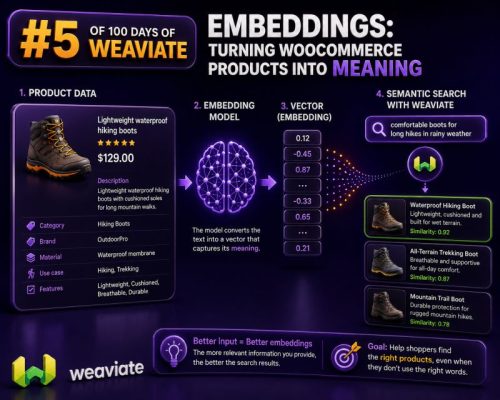
Why product data needs more than keywords
WooCommerce search usually starts with exact fields: product title, SKU, attributes, categories, and description. That works when a shopper searches for a phrase stored on the product. It becomes less reliable when the shopper describes an intent instead:
- “A waterproof jacket for city cycling”
- “A quiet keyboard for an open-plan office”
- “Gift ideas for someone who likes espresso”
An embedding converts text into a numerical vector that represents its meaning. Products with related descriptions are positioned near one another in vector space, even when they do not share the same words. A WooCommerce agency can use those vectors to build semantic product search, related-product features, catalog recommendations, and support tooling.
What to embed from a WooCommerce product
Do not send an unstructured database row directly to an embedding model. First create a consistent text representation containing the fields that matter to shoppers and search results.
For a product, useful fields commonly include:
- Product name
- Short description and full description
- Product categories and tags
- Attributes such as size, material, color, compatibility, and intended use
- Brand and product type
- Important variation details
- Searchable custom fields
A practical representation might look like this:
Product: Alpine Waterproof Cycling Jacket
Brand: North Ridge
Category: Cycling > Jackets
Description: Lightweight shell for commuting and wet-weather rides. Packs into its own pocket and includes reflective panels for low-light visibility.
Features: Waterproof, windproof, reflective details, packable
Use cases: City cycling, commuting, rainy weather
Sizes: S, M, L, XL
The labels are not required by the embedding service, but they make the input predictable and easier to inspect. Keep transactional and operational fields such as price, stock quantity, internal IDs, and shipping cost as metadata rather than embedding them as the primary meaning of the product.
Store vectors separately from WooCommerce fields
WooCommerce remains the system of record for product content, prices, stock, orders, and customer data. A vector database such as Weaviate should hold the searchable representation and a reference back to the WooCommerce product.
A product object can include properties such as:
{
  "productId": "1842",
  "sku": "NR-JACKET-ALPINE",
  "name": "Alpine Waterproof Cycling Jacket",
  "url": "https://example.com/product/alpine-waterproof-cycling-jacket/",
  "categories": ["Cycling", "Jackets"],
  "brand": "North Ridge",
  "price": 129.00,
  "currency": "GBP",
  "stockStatus": "instock",
  "attributes": {
    "waterproof": true,
    "packable": true,
    "sizes": ["S", "M", "L", "XL"]
  },
  "contentHash": "8b3d..."
}
The vector is generated from the prepared product text. The metadata supports filtering, display, access control, and synchronization. Keeping those responsibilities separate prevents a price change from requiring a new semantic representation when the product wording has not changed.
Define a collection that matches your search model
With Weaviate, define a collection for the objects you want to search. The exact configuration depends on the embedding provider and deployment model. If vectors are generated outside Weaviate, use a self-provided vector configuration and import the vectors explicitly. If Weaviate is configured with a supported vectorizer, it can generate vectors for imported text and query text using the same configuration.
A conceptual collection might contain:
Collection: WooProduct
Properties:
  productId        text
  sku              text
  name             text
  searchableText   text
  url              text
  categories       text[]
  brand            text
  price            number
  currency         text
  stockStatus      text
  contentHash      text
  updatedAt        date
Use the same vectorizer, model, and preprocessing rules for product documents and user queries. Vectors produced by incompatible models cannot be compared reliably, even if both are stored as arrays of numbers.
Sync products when content changes
A production integration should be event-driven where possible. A typical WooCommerce synchronization flow is:
- Create or update the product in WooCommerce.
- Build the normalized searchable text.
- Compute a content hash from the fields used for embedding.
- Compare the hash with the previously indexed value.
- Generate a new vector only when the searchable content changed.
- Upsert the Weaviate object using a stable product identifier.
- Update metadata such as price and stock independently when only commerce fields changed.
- Delete or deactivate the vector object when the product is permanently removed or should no longer appear in search.
WooCommerce webhooks can notify an integration about product events. For reliability, pair webhooks with a scheduled reconciliation job. Webhooks can be delayed, duplicated, or missed, so the reconciliation process should compare the catalog with the indexed object IDs and retry failed records.
A stable identifier is important. Do not use a random vector database UUID for every import, because repeated synchronization would create duplicates. Use a deterministic ID based on the WooCommerce product ID, or store the WooCommerce ID as a unique external key and upsert against it.
Example indexing flow
The following pseudocode shows the separation between WooCommerce retrieval, text preparation, embedding generation, and Weaviate upsert:
const product = await getWooCommerceProduct(productId);

const searchableText = [
  `Product: ${product.name}`,
  `Brand: ${product.brand || ""}`,
  `Categories: ${(product.categories || []).join(", ")}`,
  `Description: ${stripHtml(product.description || product.short_description || "")}`,
  `Attributes: ${formatAttributes(product.attributes)}`
].join("\n");

const contentHash = sha256(searchableText);
const existing = await getIndexedProduct(product.id);

if (existing?.contentHash !== contentHash) {
  const vector = await createEmbedding(searchableText);

  await weaviate.objects.upsert({
    collection: "WooProduct",
    id: `woo-${product.id}`,
    properties: {
      productId: String(product.id),
      sku: product.sku || "",
      name: product.name,
      searchableText,
      url: product.permalink,
      categories: product.categories.map(category => category.name),
      price: Number(product.price || 0),
      currency: product.currency,
      stockStatus: product.stock_status,
      contentHash,
      updatedAt: new Date().toISOString()
    },
    vector
  });
}
The API methods differ by Weaviate client version, but the design principles remain the same: normalize input, use deterministic IDs, avoid unnecessary re-embedding, and make retries safe.
Run semantic search with business filters
A semantic query should usually combine vector similarity with WooCommerce rules. For example, a shopper may search for “warm boots for walking in snow,” while the store still needs to return only products that are in stock, within a price range, and available in the shopper’s market.
Conceptually, the query contains:
const query = "warm boots for walking in snow";
const queryVector = await createEmbedding(query);

const results = await weaviate.query.nearVector({
  collection: "WooProduct",
  vector: queryVector,
  limit: 12,
  filters: {
    stockStatus: "instock",
    price: { gte: 50, lte: 250 },
    categories: { contains: "Footwear" }
  },
  returnProperties: ["productId", "name", "url", "price", "currency"]
});
Use metadata filters for exact constraints such as stock status, region, brand, size, and price. Do not expect semantic similarity to enforce these rules. A product can be semantically relevant but unavailable, too expensive, or the wrong size.
For large catalogs, consider a two-stage search. First retrieve a broader set using vector similarity and filters. Then apply WooCommerce-specific ranking rules, such as margin, popularity, stock depth, or merchandising boosts. This allows meaning-based retrieval without giving up commercial control.
Handle variable products carefully
Variable products need an explicit indexing strategy. Indexing only the parent product is simpler, but it can hide variation-specific facts such as size, color, compatibility, or availability. Indexing every variation improves precision but increases object count and synchronization work.
Common approaches include:
- Index the parent product and include all searchable variation attributes in its text.
- Index each variation as a separate object, with a
parentProductIdproperty. - Use parent-level semantic search followed by a WooCommerce lookup for valid variations.
- Index parent products for discovery and variation objects only when shoppers search by variation-specific properties.
If a shopper searches for “large blue waterproof jacket,” variation-level indexing is usually more accurate. If the storefront presents one product page with selectable options, parent-level indexing may be sufficient, provided the indexed text describes the available variations accurately.
Improve data quality before changing models
Embedding quality is often limited by catalog quality. Before tuning distance thresholds or changing infrastructure:
- Remove duplicated descriptions copied across unrelated products.
- Strip navigation, HTML boilerplate, and hidden admin text.
- Expand ambiguous abbreviations used by the catalog team.
- Normalize units such as
500 ml,0.5 L, and500ml. - Include synonyms that are specific to the store’s market.
- Keep discontinued products out of the active search collection.
- Preserve product names and category terms exactly enough for display and debugging.
Do not combine every review, order note, and support message into the product vector. Those sources represent different concepts and may contain personal or temporary information. If reviews are needed for search, index them as a separate collection linked to the product, then combine the results deliberately.
Measure results with real catalog queries
Create a test set from actual search behavior. Include natural-language searches, product names, attributes, misspellings, and queries with commercial constraints. For each query, record the products that should appear and whether the result satisfies filters such as stock, price, and region.
Useful measurements include:
- Recall at a selected result count: whether relevant products appear at all.
- Precision at a selected result count: how many returned products are relevant.
- Filter accuracy: whether unavailable or disallowed products are excluded.
- Zero-result rate.
- Click-through and add-to-cart rates after deployment.
- Index freshness after a product update.
Review false positives manually. A high similarity score does not guarantee that a product matches the shopper’s required material, size, compatibility, or budget. Those attributes should be represented as structured metadata and validated separately from semantic relevance.