

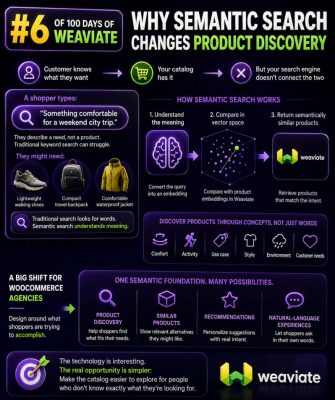
Search That Understands Shopping Intent
Traditional WooCommerce search usually matches the words in a query against product titles, descriptions, SKUs, categories, and attributes. That works well when a shopper knows the exact product name, but it struggles when the shopper describes a need instead.
A customer searching for “comfortable shoes for walking around a city all day” may be interested in cushioned sneakers, lightweight walking shoes, or supportive casual trainers. A keyword-only search may return products containing “city” or “walking,” while ignoring products that satisfy the underlying need.
Semantic search represents the meaning of queries and products, allowing the search system to identify related concepts even when the wording differs. For product discovery, that changes search from a text-matching feature into an intent-matching feature.
Keyword Search and Semantic Search Compared
Keyword search depends on shared terms. A query for “waterproof trail shoes” is likely to find products that contain those exact words. It may miss a product described as “weather-resistant hiking footwear”, even though that product could be a strong match.
Semantic search converts text into numerical representations called embeddings. Similar meanings produce vectors that are close together in a vector index. The search system can then compare the shopper’s query with product content and rank results according to contextual similarity.
Semantic search does not make keyword search obsolete. Exact matching remains important for SKUs, model numbers, brand names, and technical specifications. In most WooCommerce projects, a hybrid approach is more reliable:
- Lexical search handles exact terms, SKU searches, brand names, and uncommon product codes.
- Semantic search handles natural-language descriptions, use cases, and related terminology.
- Business rules and filters enforce stock status, price ranges, product visibility, category constraints, and merchandising priorities.
What Semantic Search Changes for Product Discovery
It supports need-based queries
Many shoppers do not know the catalog vocabulary. They search for “a gift for someone who loves pour-over coffee” rather than a specific grinder or kettle. Semantic retrieval can connect that query to products whose descriptions discuss brewing methods, coffee preparation, or related equipment.
It reduces dependence on perfect product copy
Customers may use “rain jacket” while a catalog uses “shell jacket,” “waterproof outer layer,” or “technical rainwear.” Semantic matching can bridge those variations, although product data still needs to be clear and complete. Search cannot reliably retrieve information that is absent from the indexed content.
It improves discovery across categories
A query such as “everything needed for a weekend camping trip” may relate to tents, sleeping bags, lighting, cookware, and storage. A semantic system can surface relevant products across categories, while category and attribute filters help the shopper narrow the results.
It makes long-tail search more useful
Long-tail queries often contain several signals, such as budget, activity, audience, and constraints. For example, “quiet keyboard for shared office under $100” expresses use case, environment, and price. Semantic retrieval can identify relevant products, while a price filter and attribute-aware ranking should enforce the explicit budget and feature requirements.
A WooCommerce Example
Consider a store selling outdoor equipment. A shopper enters “lightweight shelter for two people in wet weather.”
A keyword search may prioritize products containing “lightweight,” “two,” or “wet.” A semantic search system can identify that the shopper is probably looking for a two-person waterproof tent or similar shelter. It can use product titles, short descriptions, long descriptions, categories, attributes, and selected custom fields to rank likely matches.
The result should still apply structured rules. Products should be in stock, visible in the catalog, and compatible with the requested capacity. If “wet weather” maps to a waterproof or water-resistant attribute, that attribute should be available as a filter or ranking signal rather than relying only on vector similarity.
How Agencies Can Implement It
1. Audit the catalog data
Start with the fields that will be indexed. Review product titles, descriptions, categories, attributes, tags, brand data, variation values, and custom metadata. Remove boilerplate that appears on every product and identify missing information such as dimensions, materials, use cases, compatibility, or supported conditions.
For variable products, decide whether to index the parent product, each variation, or both. Variations may need separate records when size, color, capacity, or compatibility affects search results. The storefront should still avoid displaying duplicate or confusing results.
2. Create a search document for each product
Rather than embedding only the product title, build a controlled text representation containing the fields that describe the product’s meaning. A document might include the product name, brand, category, intended use, key features, materials, compatibility, and variation details.
Keep operational fields separate from the semantic text. Stock status, price, publication status, catalog visibility, and product IDs should be stored as metadata for filtering and access control. They should not be treated as ordinary descriptive text.
3. Generate and index embeddings
An embedding model converts each product document into a vector. The vector is stored in a vector-capable search system, along with the WooCommerce product ID and filterable metadata. When a shopper submits a query, the query is embedded using the same model, and the system retrieves nearby product vectors.
The embedding model, dimensions, distance metric, and index configuration should remain consistent between product and query vectors. When product content changes, the affected embeddings need to be regenerated and reindexed. A reliable synchronization process is essential for price, stock, visibility, and content updates.
4. Add hybrid retrieval and reranking
Use lexical retrieval for exact terms and semantic retrieval for intent-based matches, then combine the results. A reranking stage can consider text relevance, vector similarity, inventory, popularity, margin, category rules, and other approved merchandising signals.
Do not let business signals overwhelm relevance. A highly profitable product should not rank first for an unrelated query simply because it has a strong commercial priority. Define explicit weighting and test it against real searches.
5. Apply WooCommerce filters after or during retrieval
Price, stock, brand, category, size, color, and other structured constraints should be represented as filterable fields. Depending on the search platform, filters can be applied during vector retrieval or immediately afterward. Applying them early is usually more efficient and prevents unavailable products from occupying result positions.
Be careful with variation-level inventory. A parent product may be available while the specific size or color requested by the shopper is out of stock. Availability rules should reflect the storefront’s actual purchasing behavior.
Practical Query Handling
Semantic search should preserve explicit constraints instead of treating every word as a general concept. A query such as “black waterproof hiking boots size 10 under $180” contains both semantic intent and structured requirements.
- The semantic portion describes the product type and intended use.
- “Black” and “size 10” should map to variation or attribute filters.
- “Waterproof” should map to a product attribute or verified feature.
- “Under $180” should become a numeric price filter.
Query processing can extract these constraints before retrieval, but extraction should be conservative. If the system is uncertain whether a term is a brand, feature, or use case, it should avoid applying a restrictive filter that could hide relevant results.
Evaluation Metrics for Agency Projects
Search quality should be measured with more than conversion rate. Track zero-result searches, result clicks, add-to-cart rate from search, search exit rate, refinement behavior, and the percentage of queries returning an in-stock relevant product.
Create a test set from real customer searches and label whether the top results are relevant. Include exact SKU searches, brand searches, misspellings, vague use-case queries, technical queries, and queries containing price or attribute constraints. Compare the existing search, semantic search, and hybrid search against the same test set.
Monitor latency separately from relevance. Vector retrieval may be fast, but query parsing, multiple data sources, reranking, and WooCommerce API calls can make the complete request slow. Cache repeated queries where appropriate and avoid loading full product objects when the result page only needs selected fields.
Common Implementation Mistakes
- Indexing only product titles: this limits semantic context and makes similar products difficult to distinguish.
- Ignoring structured filters: vector similarity alone can return the wrong size, price range, or stock status.
- Replacing exact search entirely: customers searching for SKUs and model numbers need deterministic matching.
- Embedding boilerplate: repeated shipping or marketing text can make unrelated products appear similar.
- Failing to synchronize updates: stale vectors or metadata can expose discontinued, hidden, or unavailable products.
- Assuming similarity equals relevance: products can be conceptually related without satisfying the shopper’s specific requirements.
- Skipping human review: merchandising teams should inspect high-value queries and define rules for sensitive categories.
Where Semantic Search Fits in the WooCommerce Stack
Semantic search can sit behind the existing WooCommerce search interface without changing the catalog management workflow. The storefront sends the query and selected filters to a search service, which returns product IDs and ranking information. WooCommerce or the application layer then renders the products using the store’s normal pricing, tax, availability, and purchase logic.
For smaller catalogs, a managed search service may reduce operational work. Larger catalogs or stores with complex personalization may need a dedicated indexing pipeline, background synchronization, observability, and more control over ranking. In either case, keep the search index decoupled from checkout and order processing so a search outage cannot compromise transactions.
Implementation Checklist
- Define the query types the store needs to support.
- Audit and normalize product content before generating embeddings.
- Separate semantic text from filterable and operational metadata.
- Index product and variation data according to the storefront’s display and stock rules.
- Combine semantic retrieval with lexical matching for exact terms.
- Apply price, stock, category, brand, and attribute constraints explicitly.
- Build a labeled test set from real WooCommerce search queries.
- Measure relevance, business outcomes, latency, and zero-result behavior after launch.
- Reindex products whenever searchable content or important metadata changes.