

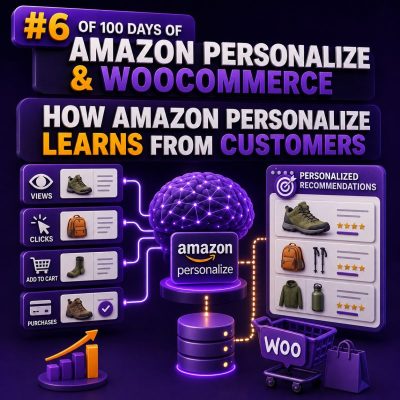
Customer behaviour is the training signal
Amazon Personalize does not understand a WooCommerce catalogue or customer base automatically. It learns from the interaction records, user attributes, and item attributes that an agency sends to an Amazon Personalize dataset group.
For a WooCommerce store, useful interaction records can include:
- A product detail view
- A search or product-list click
- An add-to-cart event
- A completed purchase
- A product rating or favourite action
Each record should identify the customer, the product, the event type, and the time of the event. A typical interaction might contain USER_ID, ITEM_ID, EVENT_TYPE, and TIMESTAMP. The event type is important because a purchase usually represents stronger intent than a product view.
What Amazon Personalize learns from an interaction
Consider a customer who views running shoes, adds a pair to the cart, and later purchases socks and a running jacket. When these events are supplied consistently, Amazon Personalize can identify relationships between the customer, the products, and similar customers’ behaviour.
It can learn patterns such as:
- Products frequently purchased together
- Products that tend to follow a particular product view
- Categories or brands that interest a customer
- Changes in interest over time
- Products that are popular with customers who have similar activity
The service does not need a manually written rule for every recommendation. The selected recipe uses the available interaction data to calculate recommendations or ranked product lists.
Event quality matters more than event volume
A large volume of inconsistent data can produce weaker results than a smaller, well-defined event stream. WooCommerce agencies should define an event taxonomy before connecting the store.
For example, an agency might use:
| WooCommerce action | Amazon Personalize event | Typical meaning |
|---|---|---|
| Product page loaded | View | Low or medium purchase intent |
| Add to cart | AddToCart | Stronger product interest |
| Order paid | Purchase | Confirmed conversion |
| Product review submitted | Rating | Explicit customer feedback |
Event names should be used consistently. If one part of the integration sends purchase and another sends completed_order for the same behaviour, Amazon Personalize treats them as different event types.
Historical data and real-time events serve different roles
Historical interactions give Amazon Personalize enough context to identify patterns when a solution version is trained. A WooCommerce migration project might upload several months of order and browsing history through the Amazon Personalize datasets.
After the storefront is live, the site can send new events through the Amazon Personalize event tracker and the PutEvents API. A WooCommerce plugin or middleware service can send an event after a product view, cart action, or successful payment.
Real-time events help maintain a current view of the customer’s activity and can influence real-time recommendations. They do not replace periodic solution-version training. Agencies should establish a retraining schedule appropriate to the store’s traffic and product turnover, then evaluate whether newer data improves the chosen metric.
Example: connecting a WooCommerce order
Suppose order 10482 contains product IDs 581 and 742, and the authenticated customer is represented by the identifier customer-319. After payment is confirmed, the integration can send a purchase event for each purchased item rather than waiting for a nightly export.
{
  "userId": "customer-319",
  "sessionId": "checkout-10482",
  "eventType": "Purchase",
  "itemId": "581",
  "sentAt": "2025-02-14T15:21:00Z",
  "properties": "{\"order_id\":\"10482\",\"quantity\":1}"
}
The exact request is made through the Amazon Personalize Events API and must include the event tracker and the required authentication details. The item identifier must match the identifier used in the Items dataset or in the interaction data. If WooCommerce uses variation IDs, the integration should decide whether recommendations operate at parent-product level or variation level and use that choice consistently.
Customer identity must remain stable
Amazon Personalize can only connect a customer’s events when the same logical customer is represented by a consistent USER_ID. A logged-in WooCommerce customer might use a stable customer ID, while an anonymous visitor can use a session or browser identifier.
When an anonymous visitor logs in, the implementation should have a deliberate identity strategy. Automatically treating the anonymous ID and account ID as two unrelated customers can split the customer’s history. The integration should also avoid sending raw email addresses as identifiers where a stable internal ID or a suitably managed pseudonymous identifier is available.
Item data adds useful context
Interactions show what customers did. The Items dataset describes what the products are. For WooCommerce, useful item fields can include product ID, category, brand, price, availability, and creation timestamp. Custom metadata can also represent attributes such as colour, material, gender, or compatible device.
For example, if a new product has no purchase history, item metadata can help a recipe that supports item attributes identify related products. This is especially useful for stores with frequent catalogue changes. Keep the values aligned with the interaction IDs and update availability and catalogue status when products are discontinued.
Context can improve the current recommendation
Some recommendation requests can include context, such as device type, membership tier, location, or time of day. Context should describe information known at request time, not information inferred from the recommendation result.
For example, a WooCommerce agency could request recommendations for a logged-in member on mobile during a seasonal campaign. The storefront can then place the returned item IDs in a personalised block, such as “Recommended for you” or “You may also like.” The application remains responsible for fetching current product names, prices, stock status, links, and images from WooCommerce or its catalogue service.
Measure outcomes with the same business definition
Amazon Personalize can report offline metrics for a solution version, but agencies should also measure live WooCommerce outcomes. Define the business event before implementation: revenue per session, add-to-cart rate, product-page engagement, or completed orders attributable to a recommendation placement.
Use a control group or an A/B test where possible. Track the recommendation request, returned item IDs, placement, and subsequent customer action. This makes it possible to distinguish a recommendation that was displayed from one that was clicked and one that contributed to a purchase.
Operational checks for an agency integration
- Validate that every event contains a valid customer or session identifier.
- Confirm that item IDs match the WooCommerce catalogue representation used by Amazon Personalize.
- Record timestamps in a consistent format and timezone.
- Prevent duplicate purchase events when WooCommerce order status webhooks are retried.
- Exclude cancelled or refunded orders from purchase signals when the business definition requires it.
- Keep out-of-stock and discontinued products out of the final storefront display, even if an older recommendation contains them.
- Monitor event delivery failures, API throttling, missing fields, and sudden changes in event volume.
The practical principle is straightforward: Amazon Personalize learns from the behavioural signals a WooCommerce implementation defines and delivers. Accurate identities, meaningful event types, current catalogue data, and measured outcomes are the foundation of recommendations that remain relevant as customer preferences and store inventory change.