

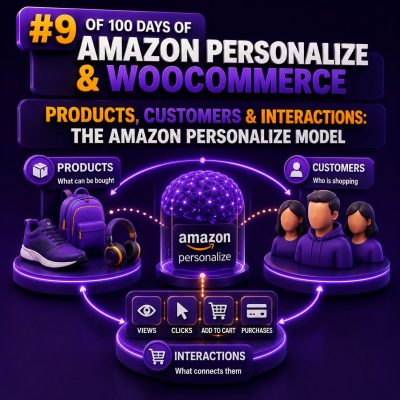
Amazon Personalize uses three core data concepts to understand an ecommerce catalog: users, items, and interactions. For a WooCommerce implementation, these map closely to customers, products, and customer activity. The quality of this mapping determines whether recommendations reflect real shopping behaviour or merely reproduce the most frequently viewed products.
The three Personalize dataset types
A dataset group in Amazon Personalize can contain a Users dataset, an Items dataset, and an Interactions dataset. Each dataset serves a different purpose, and the identifiers connecting them must remain consistent across historical imports and real-time events.
Users: representing WooCommerce customers
The Users dataset describes the people receiving recommendations. The required identifier is USER_ID. Additional fields can provide customer attributes that are useful to recipes capable of using user metadata.
A WooCommerce agency might create a Users record from the customer account table using a stable, pseudonymous identifier:
USER_ID,customer_segment,region,preferred_language
wc_18472,trade,GB,en
wc_21904,consumer,US,en
Do not send names, email addresses, telephone numbers, or other unnecessary personal data to Personalize. A generated customer key or a consistently hashed internal identifier is generally more appropriate. The same identifier must be used when importing historical interactions and when sending live events from the storefront.
Guest shoppers require a deliberate identity strategy. You can assign a temporary session or browser identifier for anonymous activity, then associate future activity with a customer identifier after login or checkout. Do not silently merge anonymous and authenticated histories unless your consent, privacy, and identity rules support that operation.
Items: representing WooCommerce products
The Items dataset represents the products that Personalize can recommend. Its required identifier is ITEM_ID. In WooCommerce, this is commonly the product ID, but an agency should choose the level at which recommendations will be displayed before designing the feed.
For a store that displays parent products, use parent product IDs. For a store where colour, size, inventory, and pricing are managed at the variation level, variation IDs may be more appropriate. Mixing parent and variation IDs without a clear presentation and availability strategy can produce recommendations that cannot be rendered correctly.
Useful item attributes can include product category, brand, price band, seasonal status, and textual metadata:
ITEM_ID,CATEGORY,BRAND,PRICE_BAND,IS_SEASONAL,TEXT_INFORMATION
wc_501,coffee-machines,acme,premium,true,"automatic espresso machine stainless steel"
wc_742,coffee-grinders,acme,mid,true,"burr grinder with adjustable settings"
Keep item identifiers stable. If a product is renamed, its identifier should normally remain unchanged. When a product is discontinued, remove it from the serving catalog or apply an availability filter rather than deleting historical interactions that explain customer behaviour.
Interactions: representing customer behaviour
The Interactions dataset records relationships between users and items over time. The core fields are USER_ID, ITEM_ID, and TIMESTAMP. An EVENT_TYPE field distinguishes the kind of behaviour, such as a product view, add-to-cart action, or purchase.
USER_ID,ITEM_ID,TIMESTAMP,EVENT_TYPE,EVENT_VALUE,IMPRESSION
wc_18472,wc_501,1715260800,view,1,
wc_18472,wc_501,1715260920,add-to-cart,1,
wc_18472,wc_501,1715261400,purchase,1,"wc_501|wc_742|wc_811"
The timestamp should represent when the interaction occurred, not when a nightly export happened. Use one time standard consistently, normally Unix epoch seconds in UTC. Event names must also be consistent: add_to_cart, add-to-cart, and cart_add should not be treated as interchangeable values in different parts of the integration.
Mapping WooCommerce events to Personalize interactions
A practical event taxonomy gives each action a clear business meaning:
- view: a product detail page was viewed.
- search-click: a shopper selected a product from search results.
- add-to-cart: a product was added to the cart.
- wishlist: a product was saved for later.
- purchase: an order was successfully paid or reached the agency’s defined completed state.
- remove-from-cart: a product was removed, where negative or corrective behaviour is relevant to the chosen implementation.
Purchases usually provide a stronger signal than product views, but views are valuable when purchase volume is low. Agencies should avoid sending every WooCommerce lifecycle event as an interaction. Payment retries, order status synchronisation, admin edits, and subscription renewals can create duplicate or misleading signals unless they have a defined recommendation use case.
For order data, send one interaction per purchased item rather than one interaction for the order as a whole. If order 1001 contains three products, the historical feed should contain three product-level purchase records. This allows Personalize to learn relationships between individual items.
Historical data and real-time events are different inputs
Historical CSV imports establish the initial behavioural record. They are useful for training a solution version and should normally include enough history to represent the store’s meaningful buying cycles. The correct period depends on the catalogue, purchase frequency, and seasonality; a short window may omit useful preferences, while very old activity can make current recommendations less relevant.
After launch, the storefront can send new activity through Amazon Personalize Events using an event tracker. A simplified event payload might look like this:
{
  "eventType": "add-to-cart",
  "itemId": "wc_501",
  "sentAt": 1715260920,
  "eventValue": 1
}
The request also needs the appropriate user or session context according to the integration design. The server-side WooCommerce plugin or middleware should validate the product ID, prevent duplicate submissions where possible, and avoid blocking the shopper’s request if the analytics call fails.
Real-time events do not replace catalogue synchronisation. A product that is out of stock, hidden, or excluded from a sales channel still needs to be handled by the WooCommerce integration and recommendation-serving layer. Personalize can rank an item, but it does not replace WooCommerce’s inventory, pricing, tax, visibility, or eligibility rules.
Choosing identifiers and handling product variants
Identifier design is one of the most important agency decisions. Use the same representation in all of these locations:
- the Items dataset;
- the Interactions dataset;
- real-time event payloads;
- recommendation response handling;
- WooCommerce product and variation lookups;
- availability and merchandising filters.
If Personalize returns wc_501 but the frontend expects a variation key or an external ERP SKU, the recommendation cannot be rendered reliably. A small identifier mapping table can solve this, but it should be treated as production data with monitoring and versioned changes.
For variations, one common approach is to train on parent products and select an in-stock variation after recommendation. Another is to train directly on variations when shoppers interact with specific sizes or colours. The second approach provides more granular signals but can fragment activity across many low-volume IDs. Test the choice against catalogue size, variation usage, and the way products are presented in the storefront.
Event values, event types, and business meaning
EVENT_TYPE identifies what happened. EVENT_VALUE can carry a numeric value associated with the event, such as an order value or a rating, when the selected schema and recipe use it. Do not assume that placing a high monetary value in every purchase event automatically makes Personalize optimise for revenue. The recipe, schema, filters, and evaluation design determine how the data is used.
If the business wants purchase-focused recommendations, agencies should compare configurations using a consistent evaluation period. One implementation might include views and purchases with distinct event types; another might train primarily on purchases. The result should be measured against a holdout period and WooCommerce metrics such as click-through rate, add-to-cart rate, conversion rate, and revenue per recommendation impression.
Interactions are not the same as impressions
An interaction records that a shopper engaged with an item. An impression records that the shopper was shown an item, whether or not they clicked it. Impression data can help Personalize understand which products were available to the shopper and can support recommendation evaluation, but it must be captured accurately.
When a recommendation widget renders five products, record the complete recommendation context where the integration requires it, rather than recording only the product that was clicked. The implementation should also distinguish an item shown in a recommendation slot from an item displayed in a category grid or search result. Otherwise, agencies may attribute performance to the wrong placement.
Recommended WooCommerce data pipeline
- Extract: export customers, products, order lines, and selected behavioural events from WooCommerce and related systems.
- Normalize: standardize IDs, timestamps, event names, product status, and variation handling.
- Protect: pseudonymize customer identifiers and exclude unnecessary personal information.
- Validate: check that every interaction references a valid item and that required fields are populated.
- Import: load the Users, Items, and Interactions datasets into the appropriate dataset group.
- Stream: send approved storefront events through the event tracker after the initial data load.
- Serve safely: apply stock, visibility, region, customer-group, and compliance rules before displaying results.
- Monitor: track event volume, unknown IDs, delayed events, duplicate purchases, recommendation latency, and widget performance.
A useful validation query is a referential-integrity check: every ITEM_ID in the Interactions dataset should exist in the Items dataset, and every authenticated USER_ID should follow the same identifier policy as the Users dataset. Failures in this check often explain empty recommendations, poor cold-start behaviour, or products appearing in the wrong storefront context.
Cold-start handling in WooCommerce
New products have no interaction history, and new shoppers may have no user history. Item metadata, popularity-based fallbacks, contextual placement, and carefully selected business rules are important during this period. A new product should be added to the Items dataset promptly, with usable category and textual attributes, even though it has not yet received interactions.
For a new or anonymous visitor, the site can use session activity when supported by the integration, show category-specific popular products, or fall back to manually curated recommendations. These paths should be explicit in the implementation rather than treating an empty Personalize response as an application error.
Agency implementation checklist
- Define whether the recommendation unit is a parent product or a variation.
- Document the canonical formats for
USER_IDandITEM_ID. - Agree on event names and the exact WooCommerce state that constitutes a purchase.
- Exclude test orders, cancelled orders, bot traffic, and administrative activity from training data where appropriate.
- Use UTC timestamps and verify timestamp conversion with known orders.
- Keep catalogue availability separate from behavioural history.
- Record recommendation impressions if attribution and evaluation require them.
- Build a fallback for anonymous users, new products, API errors, and empty recommendation responses.
- Test duplicate events, retries, refunds, deleted products, and variation changes before launch.