Uncategorized guides for WordPress & WooCommerce

Autocomplete Is More Than a Text Box

In a WooCommerce store, autocomplete is often treated as a small search-field enhancement. That approach leaves substantial value on the table. A well-designed Algolia autocomplete experience can guide shoppers, expose product categories, surface popular queries, and help customers reach the right product before they submit a full search. Autocomplete is an interface, not just an input A basic implementation waits for a shopper to type a phrase and then displays matching products. A production implementation treats each keystroke as an opportunity to provide useful, structured results. For example, a shopper entering run could receive: Product suggestions such as running shoes and running jackets Category suggestions such as Running Shoes Query suggestions such as running shoes for flat feet Brand suggestions such as RunFast Recent searches

Combining AI Chatbots With Faceted Search

Faceted search and AI chatbots solve different parts of the product-discovery problem. Faceted search gives shoppers precise controls such as size, brand, price, color, and availability. A chatbot lets shoppers describe their needs naturally and receive guided recommendations. Combining the two creates a discovery experience in which the chatbot translates conversational intent into structured filters, while the faceted-search interface remains the source of truth for product results. Use the chatbot as a query interpreter The chatbot should not replace the store’s search and filtering system. Its primary role is to interpret natural-language requests and produce a validated search request that the existing catalog infrastructure can execute. For example, a shopper might ask, “Show waterproof women’s hiking boots under $180 in size 8.” The chatbot can

WPSOLR vs SearchWP: Indexing, Relevance and Custom Fields

For WooCommerce agencies, the choice between WPSOLR and SearchWP is primarily an indexing and search-architecture decision. Both can improve WordPress and WooCommerce search, but they solve the problem at different layers. SearchWP maintains a WordPress-native search index, while WPSOLR connects WordPress to an external Solr or Elasticsearch-compatible search service. That distinction affects deployment, indexing workflows, relevance tuning, custom-field handling, scaling, and the amount of operational responsibility an agency takes on for each client. Core architecture: WordPress-native versus external search SearchWP SearchWP builds its own index from WordPress content and exposes configurable search engines inside WordPress. An agency can define which sources are searchable, assign weights to fields, and create separate engines for different search contexts. The search index is managed through WordPress. This generally makes

Beyond Recommendations: Building Personalized WooCommerce Journeys

Product recommendations are useful, but they are only one component of personalization. A stronger WooCommerce strategy adapts the entire customer journey: the landing page, merchandising, messaging, checkout experience, post-purchase communications, and retention offers. For agencies, this creates more valuable work than adding a recommendation widget because the result is a coordinated system tied to commercial goals. Start with journey intent, not customer labels Segments such as “returning customer” or “high-value customer” are useful for reporting, but they do not explain what a shopper is trying to accomplish. Build personalization around observable intent and the next action the store wants to encourage. Discovery: The visitor is comparing categories, brands, or use cases. Evaluation: The shopper is reviewing product details, delivery information, reviews, or compatibility. Purchase: The

One Recommendation Model Should Not Power Your Entire Website

A single recommendation model can be useful for proving the value of personalization, but it is rarely a good fit for every recommendation slot on a WooCommerce site. A product detail page, cart, category archive, search results page, and post-purchase email serve different customer intents. They also have different space constraints, performance requirements, and commercial goals. Using one model everywhere usually means optimizing for an average interaction that does not exist. The result may be acceptable recommendations in one location and irrelevant, repetitive, or commercially risky recommendations in another. Why recommendation context matters Recommendation quality depends on the question being answered. A shopper viewing a product detail page may be asking, “What else works with this product?” A shopper in the cart may be asking,

Make Every Product Page Smarter

A product page should do more than display a name, price, gallery, and add-to-cart button. It should help shoppers answer their next question: Which product is right for my use case, what else do I need, and what should I consider if this item is not the best fit? For WooCommerce agencies, WPSOLR can provide the search and product-data foundation for making those decisions faster. By indexing product titles, descriptions, attributes, categories, custom fields, and other searchable content, WPSOLR can support more relevant discovery experiences around the product page instead of limiting search to a separate results screen. Turn product data into decision support Start by identifying the product fields that influence a purchase. Depending on the catalog, these may include: Brand, model, and product

Brands, Product Codes and Exact Matching

WooCommerce search often needs two different kinds of relevance. A shopper may search for “waterproof hiking jacket” and benefit from semantic similarity, while an agency operator searching for SKU-48392-BLK-M expects one exact product. Brand names and product codes should therefore not be treated like ordinary descriptive text. Why exact matching matters in WooCommerce Product codes, SKUs, manufacturer part numbers, EANs, UPCs, and internal identifiers are usually short, structured values. A vector search can return a semantically similar product instead of the product represented by the code. That is unacceptable for stock lookups, product feeds, customer-service tools, and order-management workflows. Brand names have a similar problem. A search for ACME should not automatically rank products from ACME Outdoor, ACME Accessories, or a misspelled brand above the

Combining Text Relevance and Business Signals

WooCommerce product search usually has two competing goals: match what the shopper typed and present products that are commercially useful. Text relevance identifies products that satisfy the query, while business signals such as sales velocity, margin, inventory, rating, and conversion rate help decide the order among relevant products. Vespa is well suited to this problem because text matching and business logic can be expressed in the same ranking pipeline. The important design principle is to let relevance establish a minimum level of usefulness before business signals influence the final order. Separate matching from ordering A product can have excellent sales numbers and still be a poor result for a specific query. For example, a popular blue running shoe should not rank first for a query

Using Reranking to Improve WooCommerce RAG

Vector search is useful for finding potentially relevant WooCommerce content, but the first result is not always the best result. Product descriptions, variation data, shipping policies, and support documentation often contain similar vocabulary. A reranker adds a second relevance pass that examines the user query and each retrieved document together before the context is sent to the language model. Where reranking fits in a WooCommerce RAG pipeline A practical retrieval pipeline usually has these stages: Normalize the customer’s question and identify useful filters such as product category, brand, price range, stock status, or customer role. Retrieve a broad candidate set using vector search, keyword search, or a hybrid of both. Score the candidates with a reranker that considers the complete query-document relationship. Apply business rules

Custom Analyzers for Product Catalogs

Search quality in a WooCommerce catalog depends heavily on how product text is analyzed at index time and query time. The default analyzer is a useful starting point, but agencies often need different behavior for product names, descriptions, brand names, SKUs, and merchandising terms. What an analyzer does An Elasticsearch analyzer converts text into the terms that are stored in the inverted index. An analyzer can contain three stages: Character filters: Modify the original text before tokenization, such as removing HTML markup or replacing selected characters. Tokenizer: Splits the resulting text into tokens. Token filters: Normalize or transform tokens, for example by lowercasing, removing stop words, applying stemming, or generating autocomplete prefixes. For example, the product name Men’s Running-Shoes, Size 10 might be converted into

When to Let the Parser Create Structure

In a WooCommerce retrieval pipeline, chunking should not begin with arbitrary character counts. It should begin with the structure already present in the source document. When a parser can reliably identify headings, tables, lists, paragraphs, and repeated page elements, that structure is usually more useful than a second layer of manual segmentation. What “parser-created structure” means A document parser converts a file into semantic elements instead of returning one unstructured text string. For example, a product feed specification or fulfillment guide might be represented as: { "type": "heading", "level": 2, "text": "Backorder handling" } { "type": "paragraph", "text": "When inventory is unavailable, the store may accept payment and create an order with a backordered line item." } { "type": "table", "headers": ["Status", "Customer email", "Stock

Brands, Attributes and Product Metadata

WooCommerce stores product information in several different places: core product fields, global attributes, custom attributes, taxonomies, brand plugins, and post metadata. Amazon Personalize does not automatically understand that structure. An agency must create a deliberate mapping from WooCommerce product data to the item metadata used by Amazon Personalize. The quality of this mapping affects more than product filtering. Item metadata helps Amazon Personalize identify relationships between products, interpret product categories and brands, and produce recommendations when interaction history is limited. Separate the item identifier from descriptive metadata Every product sent to an Amazon Personalize item dataset needs a stable ITEM_ID. In WooCommerce, this is usually the product ID, provided that the integration consistently uses the same level of the catalog. For example, an integration can

Why Your Search Results Are Relevant — But Still Feel Wrong

A search results page can be technically relevant and still disappoint shoppers. The query may match the product title, description, or attributes, yet the products shown first do not match the shopper’s intent, expectations, or buying context. For WooCommerce stores, this usually happens because relevance is being measured as text similarity while shoppers judge the result by usefulness. A customer searching for black running shoes may technically receive black shoe products, but they may expect adult sizes, in-stock items, popular brands, and products suitable for running—not black dress shoes or accessories. Relevance is not the same as usefulness Algolia can identify records that match a query, but the ranking configuration determines which matching records appear first. If the index contains incomplete attributes, inconsistent values, or

Combining AI Chatbots With Semantic Search

WooCommerce chatbots become substantially more useful when they can retrieve products, policies, and operational content by meaning rather than by exact keyword matches. Combining a conversational model with semantic search allows a customer to ask, “I need a waterproof jacket for winter hiking under $150,” even when the catalog uses different wording. What semantic search adds to a WooCommerce chatbot Traditional search commonly relies on exact terms, token matching, filters, or a combination of keyword queries. It works well when a shopper knows the product name or SKU, but it can struggle with natural language, synonyms, misspellings, and incomplete product descriptions. Semantic search converts text into numerical representations called embeddings. Texts with similar meanings are positioned near one another in a vector space. A chatbot

WPSOLR vs Custom WooCommerce Search: Architecture and Trade-Offs

For a WooCommerce agency, the choice between WPSOLR and a custom search implementation is primarily an architectural decision. It affects where product data is indexed, how queries are executed, which team owns search operations, and how much control the store has over relevance, filtering, and performance. Two different search architectures WPSOLR is an integration layer between WordPress or WooCommerce and an external search engine. Depending on the deployment, that engine may be Apache Solr, Elasticsearch, or an OpenSearch-compatible service. WordPress remains the source of product content, while the search engine maintains an optimized index for retrieval, filtering, sorting, and faceting. A custom WooCommerce search solution can mean several different things: A native WordPress query using WP_Query, WP_Meta_Query, or WooCommerce product queries. A custom database table

How Agencies Can Use Customer Behavior to Increase Revenue

Customer behavior data gives WooCommerce agencies a practical way to improve revenue without relying solely on discounts or increasing traffic. Browsing patterns, product views, searches, cart activity, purchases, refunds, and repeat-order intervals can reveal where shoppers hesitate and which offers are most relevant. The objective is not to collect every possible data point. It is to connect useful behavioral signals to specific commercial actions, such as improving product discovery, recovering high-intent carts, increasing average order value, or encouraging a timely second purchase. Start with a behavior-based measurement plan Before recommending personalization or automation, define the decisions the store needs to make. A useful measurement plan connects each behavior to an action and a business metric. Repeated product views: identify products that attract interest but may

Choosing the Right Recommendation Logic for Your Store

Recommendation quality depends less on adding more products to a carousel and more on choosing logic that matches the store’s catalog, traffic volume, and commercial goals. A new WooCommerce store with limited order history should not use the same approach as a large catalog with strong repeat-purchase data. For agencies, the right decision is usually a combination of recommendation methods rather than a single algorithm. The objective is to select logic that produces relevant suggestions, remains explainable to merchants, and can be measured against revenue and customer experience. Start with the recommendation objective Before selecting an algorithm, define what the recommendation is supposed to achieve. Common objectives include: Discovery: Help shoppers find products they may not have searched for directly. Cross-selling: Suggest complementary products on

What Should This Customer Buy Next?

The best next-product automation starts with a customer’s most recent purchase, not with a generic “You may also like” block. A WooCommerce store can use order data to identify the product family, use WPSOLR to retrieve relevant candidates, and then apply business rules before presenting the recommendation. Define the next-purchase decision Before configuring search or email automation, decide what “next” means for the store. Common objectives include: Consumables: Recommend a refill or replacement after the expected usage period. Accessories: Suggest products that extend or improve the original purchase. Upgrades: Present a higher-capacity or more advanced version when the customer is likely to need one. Complements: Recommend products that are commonly used with the purchased item. Replenishment: Remind customers to reorder products with a predictable consumption

Making SKUs Searchable the Right Way

SKU search looks simple until a store contains values such as TSHIRT-BLK-M, TSHIRT BLK M, shirt_blk_m, and supplier codes with leading zeroes. For a WooCommerce agency, the right implementation separates exact identification from useful discovery instead of treating every SKU as ordinary product text. Start with the search requirement There are usually three different SKU use cases: Exact lookup: an operations user enters a complete SKU and expects one product or variation. Prefix or partial lookup: a user enters part of a code, such as TSHIRT-BLK, to find a family of variations. Mixed product search: a shopper or support agent searches for a SKU alongside product names, brands, and descriptions. These cases should not rely on one field or one ranking strategy. Exact lookup should

Ranking Products with BM25

For WooCommerce product search, BM25 is a strong lexical baseline when customers search with meaningful words such as waterproof hiking jacket, USB-C dock, or organic cotton sheets. Vespa provides BM25 as a rank feature, allowing an agency to combine text relevance with product availability, price, stock status, sales performance, and other business signals. What BM25 contributes to product search BM25 scores how well a query matches a document. It considers term frequency, the rarity of each term across the index, and the length of the matched field. A rare term such as a specific model number can contribute more than a common term such as product. BM25 also limits the benefit of repeating the same term, which makes it more robust than a simple raw

Why BM25 Still Matters in WooCommerce RAG

Retrieval-augmented generation for WooCommerce is often associated with vector embeddings, semantic similarity, and large language models. Those components are valuable, but they do not replace lexical retrieval. BM25 still matters because WooCommerce catalogs contain exact terms that customers, support agents, and merchandising teams expect the search system to recognize precisely. What BM25 contributes to WooCommerce RAG BM25 is a term-based ranking algorithm used by search engines such as Elasticsearch and OpenSearch. It scores documents according to factors including term frequency, inverse document frequency, and field-length normalization. In practical terms, a product is more relevant when it contains the words in the query, especially when those words are uncommon and appear in important fields. That behavior is particularly useful for catalog data. Queries containing an SKU,

Lowercase, Stemming and WooCommerce Search

WooCommerce search quality depends heavily on how product text is analyzed before it is indexed and searched. Two small but important analysis steps are lowercasing and stemming. Lowercasing makes matching consistent across capitalization differences, while stemming can match related word forms such as shirt and shirts or running and run. These features are useful for product titles, descriptions, categories, and attributes, but they should be applied deliberately. An analyzer that is too aggressive can produce irrelevant results, especially for brand names, SKUs, model numbers, and technical terms. What lowercasing does The lowercase token filter converts alphabetic tokens to lowercase during analysis. For example: Women's Running Shoes can be indexed as tokens similar to: women's<br>running<br>shoes A search for RUNNING SHOES can then match the same indexed

Parsing First, Chunking Second

For WooCommerce search, support, and merchandising workflows, chunking should not be the first transformation applied to a document. The reliable order is: parse the source into meaningful structure, normalize that structure, and only then create retrieval chunks. Why parsing must come first A PDF, product export, invoice, or support document is usually organized for human reading rather than machine retrieval. A page may contain a heading, a two-column layout, a table, a footer, and a product note that visually belongs to the heading above it. Splitting the raw file by character count can separate those relationships before the chunker has a chance to use them. Parsing converts the source into text and structural signals such as headings, paragraphs, lists, tables, page boundaries, and metadata. For

Product Prices and Recommendation Logic

Why product price needs deliberate recommendation logic Price is one of the most important signals in a WooCommerce catalog, but it should rarely be treated as a simple rule such as “recommend the cheapest products.” Amazon Personalize can use product metadata alongside interaction data, while WooCommerce remains responsible for displaying the current price, sale status, currency, tax treatment, and customer-specific pricing. For an agency, the practical objective is to separate three concerns: Personalization: Which products are relevant to this shopper? Commercial logic: Which products are eligible to promote for this customer, channel, or campaign? Price presentation: What price should WooCommerce show at request time? This separation prevents an outdated recommendation response from becoming an inaccurate price or an invalid offer. Representing price in the Amazon

WPSOLR vs Custom WordPress Search: Features, Effort and Maintenance

For a WooCommerce agency, the choice between WPSOLR and a custom WordPress search implementation is primarily a trade-off between delivery speed, search depth, infrastructure control, and long-term maintenance. Native WordPress search can be extended considerably, but advanced catalog search usually requires more than modifying a single query. How the two approaches work WPSOLR WPSOLR provides a WordPress and WooCommerce integration layer for an external search engine. Depending on the configured version and deployment, that engine may be Elasticsearch, OpenSearch, or Apache Solr. WordPress content and product data are indexed separately from the normal database query path, and search requests are sent to the search service rather than relying only on MySQL. The plugin supplies much of the integration required for indexing posts, pages, products, variations,

10 Personalized Experiences That Drive More WooCommerce Sales

Personalization is most effective when it removes friction or makes a relevant offer easier to discover. For WooCommerce agencies, the goal is not to make every visitor see a different storefront. It is to use reliable customer, product, and behavioral signals to improve the next buying decision without compromising performance, privacy, or maintainability. The following ten experiences can be implemented independently or combined into a measured personalization program. Each should have a clear audience, a defined business outcome, and a control group where possible. 1. Show returning customers a faster path to repurchase Customers who have already bought from a store often know what they need. Sending them through the same discovery journey as a first-time visitor creates unnecessary friction. A returning customer experience can

Why Different Recommendation Surfaces Need Different Algorithms

Recommendation quality depends on context. A product detail page, cart, checkout, home page, search results page, and post-purchase email each represent a different customer intent. Reusing one recommendation algorithm across all of them usually produces predictable but weak results: the same products appear everywhere, high-margin items are over-promoted, and recommendations ignore what the shopper is trying to do at that moment. For WooCommerce agencies, recommendation surfaces should be treated as separate optimization problems. Each surface needs its own candidate products, ranking signals, business rules, and success metric. Product detail pages: optimize for discovery and comparison A product detail page usually answers one of two questions: “What else might I need?” or “What are comparable alternatives?” Those are different recommendation goals and should not always be

The Automatic Cross-Sell Machine

Cross-sells work best when they answer the shopper’s next question: “What else do I need to use this product?” The challenge for a WooCommerce agency is keeping those recommendations relevant as the catalog, inventory, and customer behavior change. WPSOLR can serve as the discovery layer for an automatic cross-sell workflow. Instead of manually assigning the same related products to every item, use searchable product data, attributes, categories, order history, and query behavior to identify useful complements. WooCommerce can then display those products in product-page, cart, or post-purchase locations. Define the cross-sell relationship before automating it An automatic recommendation is only valuable when the relationship is clear. Common cross-sell relationships include: Compatibility: a case for a specific phone model, or a filter for a particular appliance.

Tokenization: The Hidden Search Quality Problem

Why tokenization can quietly damage WooCommerce search When a shopper searches for a product, the visible query is only the starting point. Before Weaviate can compare the query with indexed content, it breaks text into tokens. Those tokens determine which terms are available to lexical search, including the BM25 component of a hybrid query. This makes tokenization a search-quality issue that is easy to miss. A product title can look highly relevant to a merchandiser while producing weak lexical matches because the query and the indexed value were split differently. For WooCommerce agencies, this is especially important for product names, variation labels, brand names, model numbers, dimensions, and technical specifications. A small punctuation or casing difference can change the search behavior even when the two
Understanding BM25 in Vespa

BM25 is a lexical relevance algorithm that scores how well a document matches the terms in a query. In a WooCommerce search application, it can make product titles, descriptions, attributes, and other indexed fields contribute according to term frequency, document frequency, and field length. Vespa exposes BM25 as a rank feature. This lets an agency define exactly which product fields participate in BM25 scoring and combine the result with business signals such as inventory, margin, popularity, or product quality. What BM25 measures BM25 primarily considers three factors: Term frequency: a term appearing in a document can increase its score, but repeated occurrences have diminishing returns. Inverse document frequency: rare terms contribute more than common terms. A distinctive product model or brand name is therefore more

Hybrid Search for WooCommerce AI

Hybrid search combines lexical search with semantic vector search so a WooCommerce AI assistant can match both exact product language and user intent. This is often more reliable than using either approach alone. Lexical search is strong when the query contains an SKU, brand name, model number, ingredient, or exact product phrase. Vector search is strong when the shopper describes a need using different words from those used in the catalog. A query such as “waterproof jacket for winter cycling” may not contain the exact product title, but semantic search can still identify relevant products. Why WooCommerce AI needs hybrid search WooCommerce stores usually contain several types of searchable information: Product titles, SKUs, attributes, categories, and tags. Long descriptions, short descriptions, and variation-level details. Technical

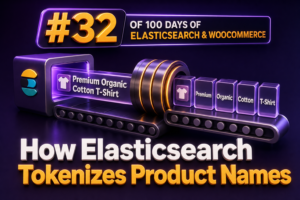
How Elasticsearch Tokenizes Product Names

Product-name search quality depends heavily on how Elasticsearch turns text into tokens. A shopper may search for “men’s waterproof trail shoes”, while the catalog contains “Men’s Waterproof Trail Shoe – Black/Blue, Size 10”. Elasticsearch does not compare these values as raw strings. It analyzes the product name, creates tokens, and uses those tokens in the inverted index. What tokenization means Tokenization is the process of splitting a character sequence into searchable terms. An analyzer usually performs several stages: Character filters modify the original text before tokenization. A tokenizer identifies token boundaries. Token filters normalize or transform the generated tokens. For example, a product name such as Acme Trail-Shoe 2.0 / Women's might be converted into tokens such as acme, trail, shoe, 2.0, and women's, depending

A Hybrid Parsing and Chunking Architecture

A production retrieval system for WooCommerce rarely has one document type or one parsing strategy. Product manuals may arrive as PDFs, supplier catalogs may contain dense tables, policy pages may be HTML, and order or product data may already be structured JSON. Applying the same parser and chunking rule to every input usually produces either incomplete context or unnecessarily large retrieval units. A hybrid architecture separates parsing from chunking and chooses the right strategy for each content region. The parser preserves structure, the router identifies the content type, and the chunker creates retrieval units that match how an agency’s support, merchandising, and operations teams ask questions. Separate the pipeline into distinct stages A useful architecture has five stages: Ingestion: Store the original file, URL, product

Product Categories as Personalization Signals

Product categories are one of the most useful personalization signals available in WooCommerce. They are present on nearly every product, are usually understood by merchandising teams, and can help Amazon Personalize distinguish between different types of customer interest even when a store does not yet have a large volume of behavioral data. For an agency, the important distinction is that a category is not itself a recommendation. It is metadata attached to an item and, when combined with interaction events, helps Amazon Personalize learn patterns such as which customers tend to view, add, or purchase products from related categories. Why category data matters A product ID tells Amazon Personalize which item was interacted with. Category metadata adds context about that item. For example, an interaction

Stop Words, Plurals and Natural Language

WooCommerce shoppers rarely search in the same structured language used by a product catalog. They may enter waterproof hiking boots, boot for hiking, or hiking boot and expect substantially the same products. Algolia can account for some of these variations through stop-word removal and plural handling, but the settings must be configured with the catalog language and business vocabulary in mind. Stop words are useful query noise, not universal noise Stop words are common words that often add little value to a product search. In an English query, words such as the, a, an, and for may not distinguish one product from another. Algolia’s removeStopWords setting allows the engine to ignore language-specific stop words during search. For example, removing for can make shoes for trail

Combining AI Chatbots With Keyword Search in WooCommerce

WooCommerce search and AI chatbots solve different parts of the product-discovery problem. Keyword search is fast, predictable, and effective when shoppers know the product name, SKU, brand, or a specific attribute. An AI chatbot is better at interpreting conversational requests such as “I need a waterproof jacket for winter commuting under $150.” Combining both creates a more reliable shopping assistant than relying on either method alone. Why Use a Hybrid Search Experience? Traditional keyword search matches query terms against product titles, descriptions, SKUs, categories, and attributes. It is easy to measure and can be tuned with synonyms, weighting, filters, and merchandising rules. However, exact or partial keyword matching can struggle with vague requirements, comparative questions, and natural language. An AI chatbot can identify intent, extract

Synonyms: The Simplest Way to Improve Search

When shoppers use a different word from the one stored in your WooCommerce catalog, a technically correct search can still return poor results. A customer may search for sneakers while the product title says trainers, or search for hoodie when the catalog uses sweatshirt. Algolia synonyms solve this mismatch without changing product data. They allow multiple search terms to match the same records, making them one of the fastest improvements an agency can deliver for an existing store. What synonyms do in Algolia A synonym tells Algolia that two or more terms should be treated as related during search. For example, a synonym group containing sneakers and trainers can make products indexed with either term discoverable from both searches. This is different from typo tolerance.

AI Chatbots for WooCommerce Search

AI chatbots can make WooCommerce search more useful when shoppers describe what they need in natural language rather than using exact product names. A customer might ask for “waterproof hiking shoes under $150 in men’s size 10” or “a replacement filter compatible with my 2022 espresso machine.” A conventional keyword search may miss the intent, while a chatbot can interpret the request, identify relevant catalog attributes, and return products with an explanation. For WooCommerce agencies, the important distinction is between a chatbot that merely generates product suggestions and one that performs controlled catalog search. Product recommendations should be based on live WooCommerce data, explicit filters, and verifiable product fields. The language model can translate the shopper’s request into a structured search operation, but it should

WPSOLR vs MySQL Search: Architecture, Performance and Limitations

For a WooCommerce agency, the choice between WPSOLR and MySQL search is an architectural decision rather than a simple plugin comparison. MySQL search is built into the database that already stores WordPress and WooCommerce data. WPSOLR adds a dedicated search layer, typically backed by Apache Solr or a supported Elasticsearch-compatible service, and synchronizes searchable WordPress data into that index. Both approaches can provide a usable product search. They differ substantially in how they handle relevance, filtering, scale, indexing failures, infrastructure, and the operational expectations of a production store. How MySQL search works in WordPress and WooCommerce Native WordPress search usually produces a WP_Query based on the search term. Depending on the query and database configuration, WordPress may search post titles, excerpts, and content using SQL

WPSOLR vs WordPress Native Search: Features and Limitations

For a small WordPress site, the native search feature may be sufficient. For a WooCommerce catalog with thousands of products, variations, attributes, stock states, and custom fields, the choice of search technology has a direct effect on conversion rates, support workload, and infrastructure cost. WPSOLR takes a different approach from WordPress native search. Instead of relying primarily on a database query against WordPress content, it synchronizes content with an external search engine and sends search requests to that index. The result is a more configurable search system, but one that introduces additional infrastructure and operational responsibilities. How WordPress native search works WordPress native search is based on the WP_Query search parameters. A request such as ?s=running+shoes is translated into a database query that looks for

WPSOLR vs ExpertRec: Features, Architecture and Use Cases

For a WooCommerce agency, the choice between WPSOLR and ExpertRec is primarily an architectural decision. Both can improve search beyond the default WordPress query, but they place the search index, configuration, customization, and operational responsibility in different locations. At a glance Area WPSOLR ExpertRec Primary model WordPress plugin connected to a search engine such as Elasticsearch, OpenSearch, or Apache Solr, depending on the configured deployment and version. Hosted search service that crawls or receives site content and delivers search through a WordPress integration and front-end components. Infrastructure ownership The agency, merchant, or hosting provider commonly operates or provisions the search engine. The vendor operates the hosted search infrastructure. WooCommerce depth Designed for deep WordPress and WooCommerce indexing and filtering scenarios. Can support product search and

How to Build a WooCommerce Store That Adapts to Every Shopper

A WooCommerce store should not force every visitor through the same experience. A mobile shopper on a slow connection, a returning customer with saved payment details, a wholesale buyer placing a large order, and a first-time international visitor have different needs. Agencies can increase client revenue by designing a storefront that adapts to those differences without creating a fragile collection of one-off templates and plugins. The goal is not unrestricted personalization. The goal is to remove friction, present relevant information, and preserve a consistent path to purchase across devices, customer types, locations, and accessibility needs. Start with shopper segments and commercial goals Before selecting plugins or writing conditional templates, map the shopper groups that matter to the business. Useful segments may include: New visitors who

Similar Products vs. Personalized Products

WooCommerce stores often use the terms similar products and personalized products interchangeably, but they describe different recommendation strategies. Similar-product recommendations are based primarily on the relationship between products. Personalized-product recommendations are based on the relationship between a product and a particular shopper, session, or customer segment. What similar products mean A similar-product module answers the question: “Which products resemble the item currently being viewed?” The recommendation may use shared categories, tags, attributes, price ranges, product types, or manually assigned relationships. In WooCommerce, the default related-products output is generally driven by shared product categories and tags. It is useful when a shopper is browsing a product and wants alternatives with comparable characteristics. For example, a store selling running shoes might show other running shoes in the

Stop Showing Static Recommendations

Many WooCommerce stores still present the same product recommendations to every shopper. A visitor viewing a premium running shoe may see a fixed list selected months ago, even when inventory, price, category behavior, or the shopper’s search intent has changed. That approach creates maintenance work for agencies and weakens merchandising performance. A better approach is to generate recommendations from the product data and context that are already available in WooCommerce and WPSOLR. Why fixed product selections underperform Manually selected recommendations are easy to launch, but they become unreliable as the catalog evolves. Common problems include: Products go out of stock while remaining in recommendation blocks. New products receive no exposure because they were not included in older layouts. Recommendations ignore the attributes, brands, price ranges,

BM25 and What It Means for Product Search

Product search is often described as a relevance problem, but relevance is not one thing. A shopper searching for black leather boots expects matching products to contain those words, while a shopper searching for waterproof hiking shoes may expect semantic matches even when the exact wording differs. BM25 is one of the most useful foundations for the first category: lexical search based on the terms that appear in product data. What BM25 does BM25, short for Best Matching 25, is a ranking function used by search engines to score how well a document matches a text query. In a WooCommerce catalog, the document is usually a product or a product representation containing fields such as the product name, description, SKU, category, brand, and attributes. BM25

Boosting Product Fields in WooCommerce Search

WooCommerce search quality depends heavily on how product data is represented and weighted. A product title, SKU, brand, category, attributes, and long description do not have equal commercial value, so treating every field as an undifferentiated text blob usually produces weak results. Vespa lets an agency model these fields separately, match queries across the appropriate field set, and apply field-specific relevance weights. Separate searchable product fields Start by mapping WooCommerce data into fields with clear search behavior. Product names and brands should normally contribute strongly to relevance. Descriptions and long-form specifications are useful for recall but should not overpower an exact product or SKU match. SKUs, GTINs, and other identifiers often need exact or near-exact matching rather than ordinary linguistic relevance. A simplified Vespa document

Combining Keyword Search and RAG

WooCommerce search and retrieval-augmented generation solve different parts of the same problem. Keyword search is precise, fast, and easy to constrain with product attributes. RAG is better at interpreting natural-language questions and supplying supporting context to an answer. Combining them produces a retrieval layer that can handle both exact shopping requests and conversational product research. Why WooCommerce stores need both retrieval methods A shopper may search for an exact SKU, such as TSHIRT-BLUE-M, or enter a descriptive request such as “a breathable blue shirt for summer under $40.” These queries should not be handled identically. Keyword search performs well for SKUs, product names, brand names, model numbers, taxonomies, and exact attribute values. Semantic retrieval performs well when the shopper uses synonyms, incomplete descriptions, use cases,

Elasticsearch Analyzers Explained for WooCommerce

Search quality in a WooCommerce store depends on more than matching product titles against a query. Elasticsearch first converts text into searchable terms, and the rules used for that conversion are defined by analyzers. A well-designed analyzer can make searches tolerant of punctuation, capitalization, accents, plurals, and common product terminology without changing the data stored in WooCommerce. For agencies, analyzers are especially important when implementing product search across multiple stores. A suitable configuration must reflect the catalog’s language, SKU conventions, brand names, attributes, and customer search behavior. It must also be introduced safely because analyzer changes generally require a new index and reindexing. What an analyzer does An analyzer is a processing pipeline used for full-text fields. It normally contains three stages: Character filters modify