

Forum Replies Created
-
wpsolrKeymaster6 years, 8 months ago in reply to: Different options to sort #17601
But before, can you delete your index content, and index a few products? Then test again the sort for errors.
wpsolrKeymaster6 years, 8 months ago in reply to: Different options to sort #17600Perfect.
It means your index, for any reason, is not setup as it should. The sort field “algoritme_score_i” should be recognized as a field containing integer numbers, thanks to its extensions “_i”.
You will need to recreate the index.
wpsolrKeymaster6 years, 8 months ago in reply to: Search results for queries with multiple words #17598The Solr query syntax is incredibly flexible. There are literally thousands of ways to customize the user query. And WPSOLR also works with Elasticsearch, and Algolia. Each one with their own syntax.
Therefore, I would say that there is no way to build a generic “Query customizer UI” that a visitor could use.
Also, this use case is a very narrow percentage of the general usage for the plugin (“expert mode” vs “simple mode”).But the plugin provides many hooks, which a clever developer could probably use to tune the query.
For instance, the WooCommerce add-on internally uses those hooks to automatically add a filter on all queries to guarantee that they will only return products (and none posts or pages for instance).
wpsolrKeymaster6 years, 8 months ago in reply to: Search results for queries with multiple words #17596It just mean that fine tuning Solr search is a endless task. As soon as you optimize for some keywords, other keywords are not showing enough (or too many) results. And at the end, it’s almost a keyword by keyword tuning that is required, which is obviously impossible.
wpsolrKeymaster6 years, 8 months ago in reply to: Different options to sort #17594The files are indeed in your server folders. You’ll need to connect with FTP and browse your installation folders.
wpsolrKeymaster6 years, 8 months ago in reply to: Different options to sort #17591(root folder)/wp-config.php
(root folder)/wp-content/debug.logwpsolrKeymaster6 years, 8 months ago in reply to: Yoast SEO documentation #17588Change your permalink value on the color filter. It seems to be set as “{{start}} – {{end}}” instead of “{{value}}”
wpsolrKeymaster6 years, 8 months ago in reply to: Yoast SEO documentation #17585Please check option “Redirect search” as you are using your own theme search bar, which redirects to default “?s=”. This option will forward to the permalink urls.
Notice that “search” home permalink can lead to redirection, as it can be already used by WooCommerce or wordPress. Change it if that is the case.
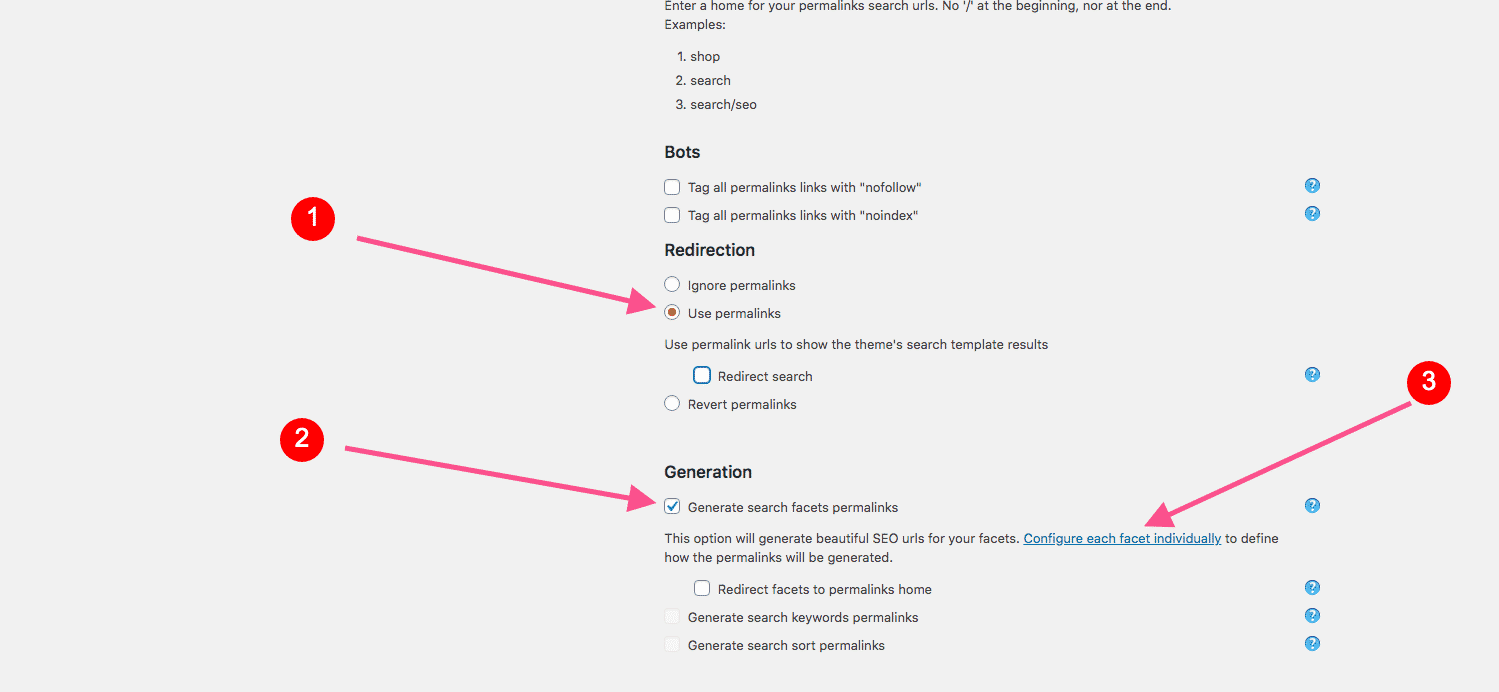
wpsolrKeymaster6 years, 8 months ago in reply to: Yoast SEO documentation #17580Below is the minimum settings to generate your search permalinks with Yoast:
 wpsolrKeymaster6 years, 8 months ago in reply to: Limited options #17578
increase the “No. of values to be displayed by filters” option in screen 2.1 to 2000.
This should do the trick.
wpsolrKeymaster6 years, 8 months ago in reply to: Filter configuration #17574It seems that your select2 filters with the “multi-selection” option are showing up correctly.
Did this solved your issue?
wpsolrKeymaster6 years, 8 months ago in reply to: Link does not work to brands #17571For me, the brands are working fine.
I went to “Merken” page, clicked on the “N” letter, and selected “Nike” brand. Page “/merken/nike” displayed the 751 Nike products with their filters, as expected.
- This reply was modified 6 years, 8 months ago by wpsolr.
wpsolrKeymaster6 years, 8 months ago in reply to: Filter configuration #17570Please create another topic if necessary for Yith brands.
wpsolrKeymaster6 years, 8 months ago in reply to: Different options to sort #17558Can you check in your debug.log for errors? https://wordpress.org/support/article/debugging-in-wordpress/
wpsolrKeymaster6 years, 8 months ago in reply to: Filter configuration #17556It seems that your select2 filters with the “multi-selection” option are showing up correctly.