

Forum Replies Created
-
wpsolrKeymaster8 years ago in reply to: Rejecting mapping update as the final mapping would have more than 1 type #6755
The mapping does not support multiple types in recent ES versions.
WPSOLR provides a new mapping. To use it, create a new index in WPSOLR, use it in screen 2.1, and reindex all your data.
wpsolrKeymaster8 years ago in reply to: Deactivate one site to activate another site #6753I removed your old site’s activation in WPSOLR back-office. You can now activate your new site.
wpsolrKeymaster8 years ago in reply to: Deactivate one site to activate another site #6751Here is the procedure to do just that:
/knowledgebase/bought-licence-domain-name-can-change-another-domain-name/
wpsolrKeymaster8 years ago in reply to: Corrupted license for a site deployed with the boilerplate roots.io/bedrock #6743This is a known issue fixed in WPSOLR 20.9
As your version is < 20.9, we will need to follow these 2 steps:
– I deleted your current activations in our back-office
– Please now apply the workaround Reply To: Corrupted license after cloning a staging environmentwpsolrKeymaster8 years ago in reply to: Ajax search documentation #6681The following videos will guide you through the configuration of this extension
Using your theme search template
- Video: Add Ajax to the current Theme
- Video: WPSOLR + Yith WooCommerce Ajax Search (free) + Elasticsearch
- Video: WPSOLR PRO + Polylang + Ajax + Elasticsearch
- Video: WPSOLR PRO + WPML + Ajax + Elasticsearch
- Video: Setup the Select2 box facets with the Ajax theme templates and local SolrCloud
- Video: Setup the Select2 box facets with the Ajax theme templates and local Elasticsearch
- Video: Setup the Ion.RangeSlider facets with the Ajax / TwentySixteen theme templates and local Elasticsearch
- Video: Setup the Ion.RangeSlider facets with the Ajax / TwentySixteen theme templates and local Apache SolrCloud
- Video: WPSOLR + Ajax + ElasticSearch
Using the Ajax search template (deprecated)
- Video: Setup demo with Ajax template and Searchly ElasticSearch Service
- Video: Setup demo with Ajax template and Bonsai ElasticSearch Service
- Video: Setup demo with Ajax template and Amazon ElasticSearch Service
- Video: Setup demo with Ajax template and local Apache Solr
- Why is my Ajax search box not redirecting to the ajax search page ?
- How does the Ajax search template work ?
wpsolrKeymaster8 years ago in reply to: Advanced scoring documentation #6674The Elasticsearch Advanced Scoring video will guide you through the configuration of this extension.
wpsolrKeymaster8 years ago in reply to: Search through users or members #6518WPSOLR searches in post types (products, posts, job_listing, topics, …).
Other WordPress objects (users), or custom tables, are not supported yet.
But there is a plan to do so.
wpsolrKeymaster8 years ago in reply to: Can WPSOLR search in BuddyPress ? #6508WooCommerce, WP Job Manager, bbPress : yes.
BuddyPress : not yet.
The issue (for WPSOLR) with BuddyPress is that it uses custom tables to store most of it’s data. Mostly for a better performance, as it is intended to work with lot’s of data.
WPSOLR was initially built to deal with any post types, custom fields, and taxonomies. Not custom tables.
But we have already rebuilt the core of WPSOLR, to be able to support both custom post types and custom tables. It is WPSOLR 20.9. See WPSOLR Changelog.
BuddyPress integration is under development.
wpsolrKeymaster8 years ago in reply to: Can I get free seats on my license for my dev/test sites ? #6499Sure.
We can add more seats on one license, on the condition that they are used to activate non-production sites.
wpsolrKeymaster8 years ago in reply to: How do I activate WPSOLR extensions ? #6494Please follow the documentation: Activate Extensions
wpsolrKeymaster8 years ago in reply to: Corrupted license after cloning a staging environment #6485A WPSOLR license is linked to a site url.
If you clone a site, the license is cloned too. But it does not recognise the site url anymore, hence the infamous “corrupted data” error message:

To fix the error, you just have to:
1) Deactivate your cloned license
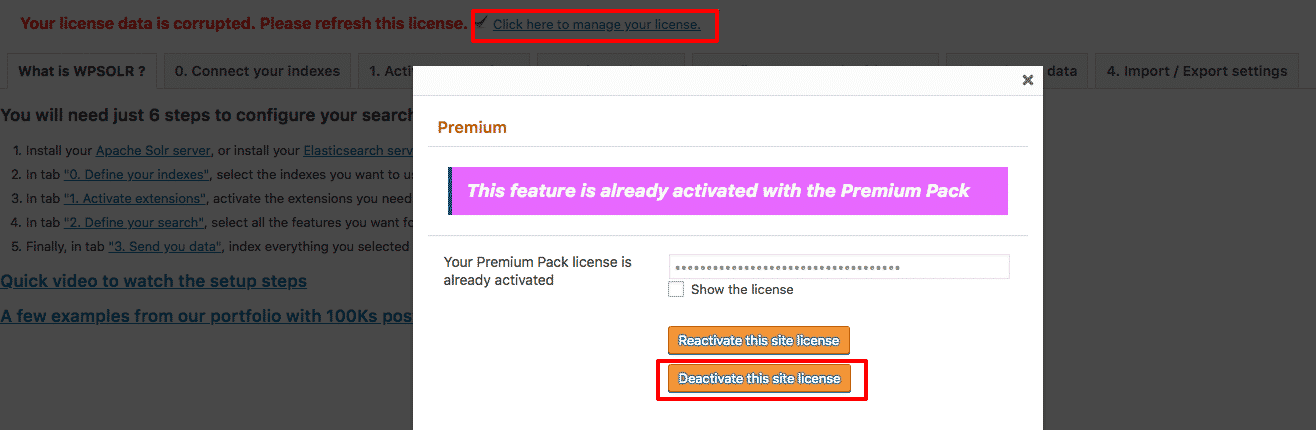
2) Refresh your screen (F5)
3) Activate your cloned license
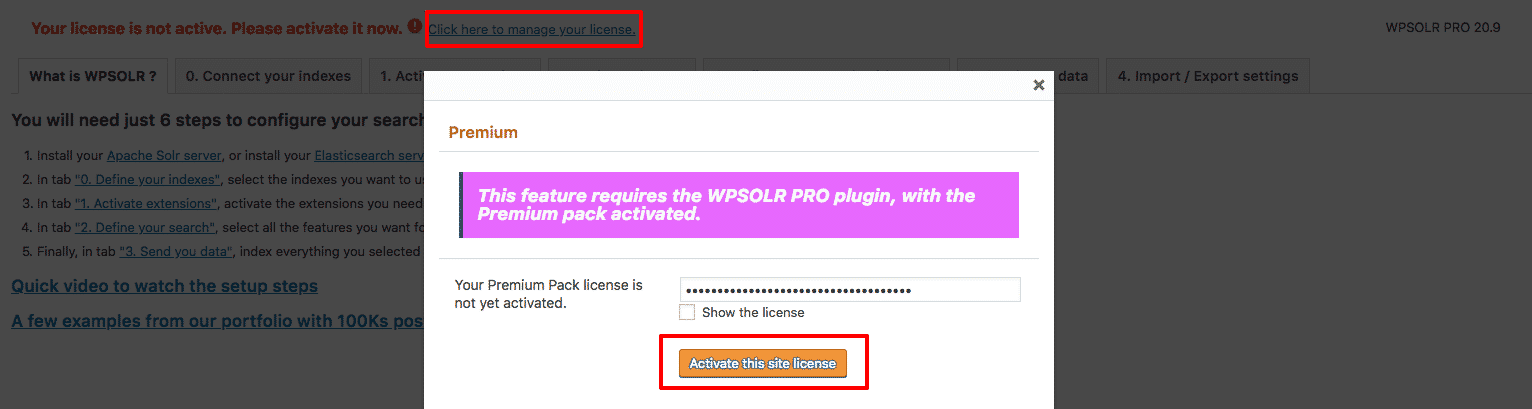
 wpsolrKeymaster8 years ago in reply to: Which Solr hosting solutions for WPSOLR ? #6480
I’d first recommend installing Solr. It’s fast, cheap and reliable (no internet to cross).
Else, you can try one of the Solr and SolrCloud hosting providers we have already tested:
/guide/configuration-step-by-step-schematic/apache-solr-hosting/
.wpsolrKeymaster8 years ago in reply to: Cannot update the plugin after license activation #6474The error message you see is due to WordPress admin’s caching plugin updates.

You can clear the cache with:

When the cache is cleared, WordPress will connect to WPSOLR’s license server, and download the latest version of the plugin.
wpsolrKeymaster8 years ago in reply to: Custom default sort for different searches #6465It is possible using our WP filter /guide/actions-and-filters/search-results-default-sort/
The idea is to use the WPSOLR filter above, and compare the current url to the two target urls (blog search and product search) to return the specific default sort (by relevancy or product price for instance).
You do not need to show a sort listbox if you don’t want to. The correct default search will be applied in the background search query, and the results accordingly sorted.
wpsolrKeymaster8 years ago in reply to: WPSOLR extensions not activating on the free deprecated version #6463You are using the plugin version 20.0. It is the free, deprecated, community version https://wordpress.org/plugins/wpsolr-search-engine/
This free version does not include the paid extensions, which integrate WPSOLR search to well-known plugins (ACF, WooCommerce …) and themes (Listify, Jobify …).
Remove the free plugin, and install the PRO plugin from the download link included in your welcome post-order email. Now you can activate your license, and unlock the WPSOLR extension you bought with your subscription.