

Forum Replies Created
-
wpsolrKeymaster8 years ago in reply to: Are WPSOLR and Pluto theme compatible ? #6921
What do you expect to do exactly ?
wpsolrKeymaster8 years ago in reply to: Custom facets for WooCommerce with 60,000 products #6917I will insist one last time: you should use our filters.
You have dependencies between WPSOLR filters.
And for the presentation, you can do a lot with css or even js.
wpsolrKeymaster8 years ago in reply to: Custom facets for WooCommerce with 60,000 products #6916So, only the category filters remain to be solved. Good.
With some hooks and filters maybe?
Yes, we have plenty of hooks.
For instance: /guide/actions-and-filters/search-query-query/
It is used in many places in WPSOLR PRO extensions, so you can find plenty of code, guaranteed to work. For instance in the WooCommerce extension, to add the “post_type=product ” filter on the Solr/Elasticsearch query.
wpsolrKeymaster8 years ago in reply to: Custom facets for WooCommerce with 60,000 products #6914Ouch! After 30 seconds, your search is still running. You could solve that in a few minutes with WPSOLR PRO.
Category page query engine
ok. But why do you want to keep your own filters exactly ? You can get better (from a quick look) with WPSOLR PRO (sliders, select2 mono/multi choice, and/or, ajax ….)
WooCommerce admin Order
Can you send me a screenshot ? WPSOLR PRO can replace the order backend search too (search in anything quickly, like billing addresses).
wpsolrKeymaster8 years ago in reply to: Custom facets for WooCommerce with 60,000 products #6912WooCommerce with 60,000 products. Fine.
And what exactly want you to do with your category filter ?
wpsolrKeymaster8 years ago in reply to: Are WPSOLR and Flatsome theme compatible ? #6908searching by product images
What would do you expect exactly ?
on mobile applications
You can test this 500K products e-commerce powered with WPSOLR: https://www.oemperformance.com/home/?s=&post_type=product
Do your search plugins support arabic results
WPSOLR uses Solr or Elasticsearch. Both support languages specific settings.
See https://lucidworks.com/2015/08/27/indexing-arabic-content-apache-solr/, https://lucene.apache.org/solr/guide/7_4/language-analysis.html#arabic
even if I do some customizations on your plugin to allow me get the same results
Concerning RTL, the plugin does not deal with it explicitly. I do not know what category hierarchies will look like.
We can troubleshoot it together. I’ll integrate eventual fixes to the core.Do your plugin compatible with my Flatsome Woocommerce theme style
Yes, Flatsome being a general purpose WooCommerce theme.
wpsolrKeymaster8 years ago in reply to: No results #6906You select them in tab 2.4. Activate the “Theme” extension, if you want to use advanced layouts for your filters (sliders, ranges, select2, …).
Then you add the “WPSOLR Facets” widget to your search side bar.
wpsolrKeymaster8 years ago in reply to: No results #6903I checked on your site. Suggestions are retrieved from your index, but are invisible on your pages.
This means you’re not so far from getting results on the search page.– Do you have errors in your debug.log file ?
– Can you send me screenshots of your tabs 2.1, 2.2 in WPSOLR plugins’s admin ?wpsolrKeymaster8 years ago in reply to: No results #6902Did you setup all the tabs of the plugin admin ?
Here is a full tutorial for Solr:
/guide/video-gallery-twentysixteen-theme-search-template/video-setup-demo-twentysixteen-theme-template-local-apache-solr/wpsolrKeymaster8 years ago in reply to: Are WPSOLR and Sage 9 theme compatible ? #6900Sage is a general purpose theme, so yes, it should be fine.
But the WPSOLR Ajax template is deprecated.
WPSOLR will instead replace the WP_Query with Solr/Elasticsearch in the background, and your theme search template will display results as usual.
And yes, WPSOLR has an option to add Ajax responsiveness to your theme search.
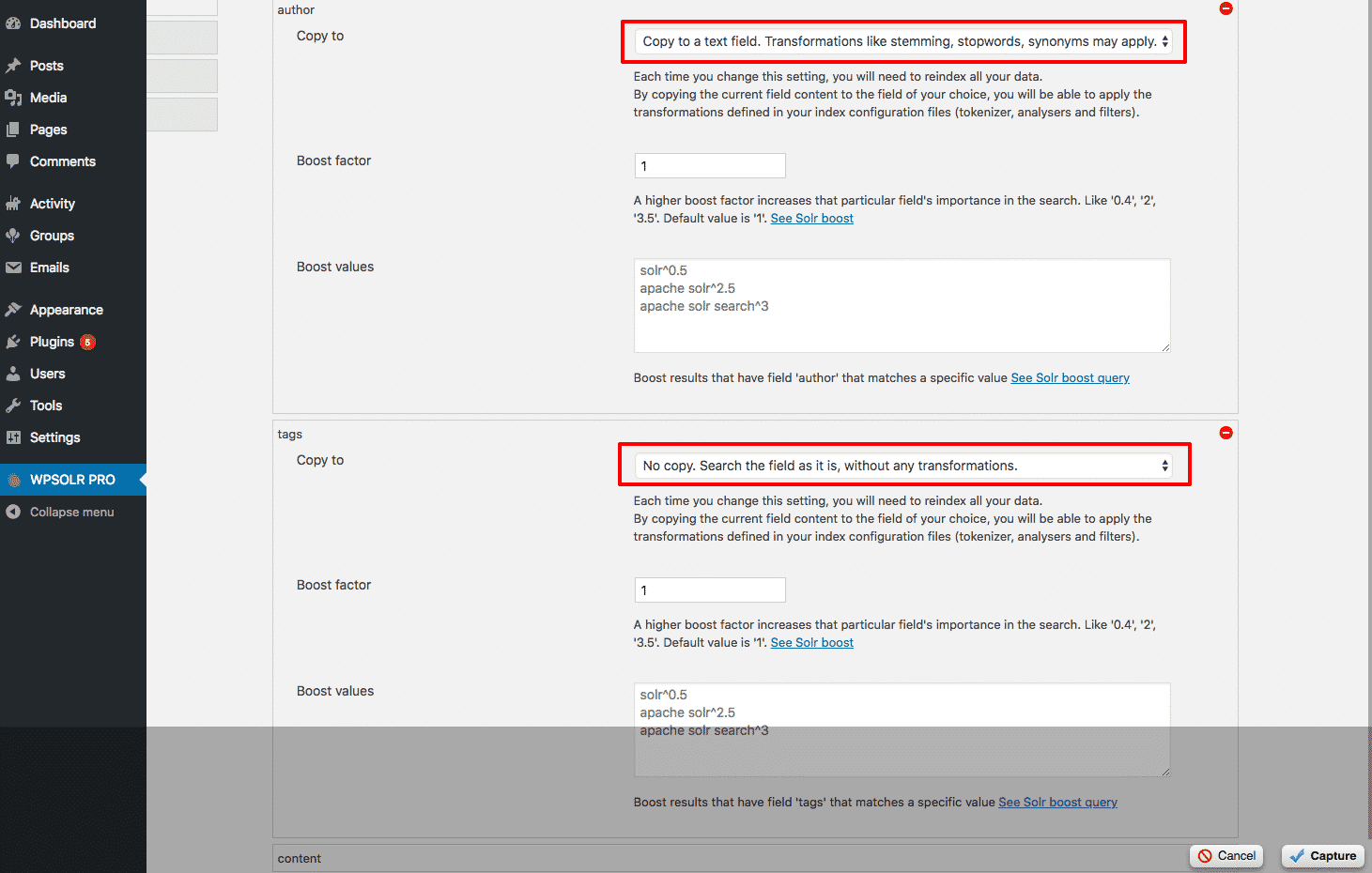
wpsolrKeymaster8 years ago in reply to: Hooks to change Elasticsearch settings and mapping #6898You are saying that I could change the ‘author’ default type ‘keyword’ to ‘text’ in the ‘Search field boosts’?
yes
Have you considering to add a “quote” char_filter in the settings?
No, because there are tens/hundreds of other possible tunings, only adapted to specific needs. That was the purpose of my previous generic mapping settings.
wpsolrKeymaster8 years ago in reply to: Hooks to change Elasticsearch settings and mapping #6893Yes and no.
No : I started a generic mapping by drag&drop with all analysers/filters a few month ago, but did not finish it.
Yes : but in the PRO version, you can select a type for each searched fields (the “boosts”). By default the type is text without analysers. But you can also select the type with the default analysers.
 wpsolrKeymaster8 years ago in reply to: 4 sites with a cross-domain site-wide search #6891
Everything is automatic.
New/updated data is indexed in real-time.
wpsolrKeymaster8 years ago in reply to: 4 sites with a cross-domain site-wide search #6889Solr and Elasticsearch are free to install locally. It will also be very fast.
Else, you can check some external hosting services:
/wpsolr/search/hostingwpsolrKeymaster8 years ago in reply to: 4 sites with a cross-domain site-wide search #6887It is possible, indeed:
/knowledgebase/how-to-search-in-several-sites/You will need one license for each site. And one Solr or Elasticsearch server, to create your index.