

Forum Replies Created
-
wpsolrKeymaster6 years, 8 months ago in reply to: All in One SEO vs Yoast #17524
Activate the WPSOLR Yoast extension.
wpsolrKeymaster6 years, 8 months ago in reply to: Limited options #17523I will try to find out why the select2 list does not display your 1500 brands.
wpsolrKeymaster6 years, 8 months ago in reply to: Link does not work to brands #17522The real question is why WPSOLR is interfering with Yith Brands? By default, WPSOLR only replaces queries on archive pages.
wpsolrKeymaster6 years, 8 months ago in reply to: Filter configuration #17521The fix is part of the plugin. It will be delivered from the next release upgrade. Nothing to do.
wpsolrKeymaster6 years, 8 months ago in reply to: Search results for queries with multiple words #17515“Dan Volitich” should return first the documents with both words, then others.
For both words separated by 4 words maximum:
"Dan Volitich"~4wpsolrKeymaster6 years, 8 months ago in reply to: Search results for queries with multiple words #17513Once you’re in your Solr dashboard:
– select your index in the drop-down list
– click on the left side “query” link
– enter your keywords in the “q” text boxwpsolrKeymaster6 years, 8 months ago in reply to: Search results for queries with multiple words #17511localhost:8983/solr/#/ ?
It depends where is your Solr server.
wpsolrKeymaster6 years, 8 months ago in reply to: Search results for queries with multiple words #17507Here is a screenshot of the Solr admin:
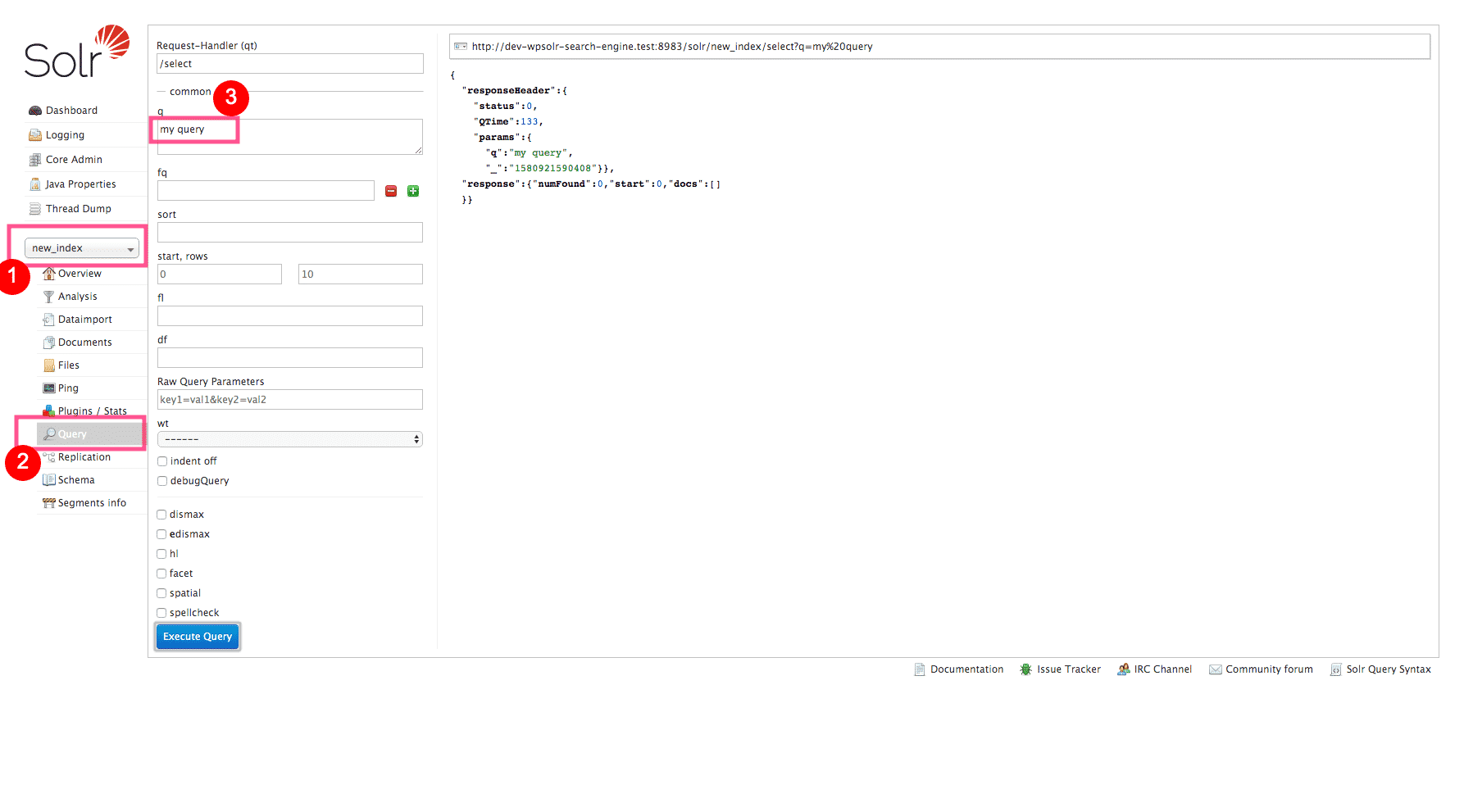 wpsolrKeymaster6 years, 8 months ago in reply to: Search results for queries with multiple words #17505
No boosts either?
Can you try to execute you query in the Solr admin, and see what happens?
wpsolrKeymaster6 years, 8 months ago in reply to: Search results for queries with multiple words #17503Did you select other options in screen 2.1, like “fuzzy” or “partial matching”?
wpsolrKeymaster6 years, 8 months ago in reply to: Search results for queries with multiple words #17501Sorry, I missed your request.
By default, WPSOLR uses the ‘AND’ operator.
wpsolrKeymaster6 years, 8 months ago in reply to: Link does not work to brands #17499I contacted the Yith support to try get a “partner” license for my tests. Unfortunately, “it is not in their policy”.
So, no integration I guess.
wpsolrKeymaster6 years, 8 months ago in reply to: Link does not work to brands #17497The free version? https://wordpress.org/plugins/yith-woocommerce-brands-add-on/
wpsolrKeymaster6 years, 8 months ago in reply to: Link does not work to brands #17495Which Yith plugin is it?
wpsolrKeymaster6 years, 8 months ago in reply to: Limited options #17493Use “10” in your “Show more” option. But also, increase the “No. of values to be displayed by filters” option in screen 2.1 to 2000.