

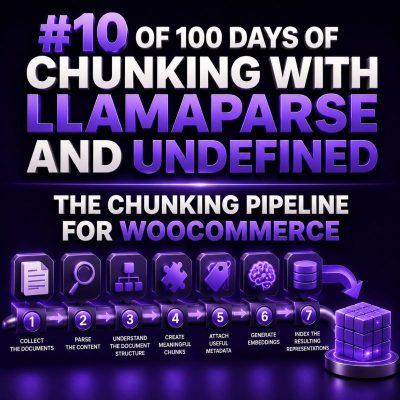
WooCommerce content is rarely organized in the way a retrieval system needs. A single product may contain a short description, a long description, attributes, variations, shipping restrictions, return rules, and purchase instructions. Store policies may live on separate pages, while operational details are buried in FAQs or customer-service documents.
A reliable chunking pipeline turns these sources into small, self-contained records without losing the relationships that make the information useful. For agencies, the goal is not simply to split text into equal lengths. The goal is to produce chunks that can answer questions such as Which size should I order?, Can this product ship to Alaska?, or What is the return window for sale items? with the correct store and product context.
1. Define the retrieval unit before writing a splitter
Start by identifying the types of answers the system must retrieve. Common WooCommerce use cases include:
- Product discovery based on features, materials, or compatibility.
- Questions about variations, dimensions, stock, and availability.
- Shipping, returns, warranty, and payment policies.
- Internal support questions about catalog operations.
- Administrative workflows that need product or order documentation.
Each use case suggests a different retrieval unit. A product feature should usually remain attached to the product name and relevant attributes. A return-policy paragraph should retain its policy heading and scope. An order record should not be mixed into a public product chunk, especially when it contains personal information.
2. Ingest and parse the source material
The pipeline begins with source extraction. Depending on the project, sources may include WooCommerce REST API responses, exported product CSV files, WordPress pages, PDFs, spreadsheets, and support documentation.
LlamaParse is useful when the source contains layout that a basic text extractor would flatten incorrectly, such as tables, headings, multi-column PDFs, or product specification sheets. Preserve the parser output as an intermediate artifact instead of sending it directly to the vector index. This makes parsing errors observable and allows the chunking rules to evolve without downloading every source again.
At this stage, record operational metadata such as:
- Source identifier and source type.
- WooCommerce product ID, variation ID, category, and SKU when available.
- WordPress post or page ID for policy content.
- Language and locale.
- Source modification time and ingestion time.
- Parser version and extraction status.
3. Normalize WooCommerce-specific structure
Normalization should remove presentation noise while preserving meaning. Strip navigation menus, repeated headers, cookie notices, tracking text, and duplicated footer content. Convert HTML formatting into a consistent internal representation, but do not discard semantic elements such as headings, table rows, lists, or links.
Product data needs additional care. A useful normalized representation separates stable fields from descriptive content:
{
  'product_id': 1842,
  'sku': 'TRAIL-42',
  'name': 'Trail Shell Jacket',
  'categories': ['Jackets', 'Outdoor'],
  'description': '...',
  'attributes': {
    'material': 'Recycled nylon',
    'waterproof_rating': '20,000 mm'
  },
  'variations': [...],
  'source_modified': '2025-02-14T09:30:00Z'
}
Do not treat every field as prose. Price, stock status, and variation availability are volatile values. They may be better retrieved live from WooCommerce rather than embedded permanently. If they are indexed, include a timestamp and a clear freshness policy.
4. Classify content before chunking
Classification determines which boundaries and metadata rules apply. At minimum, separate product content, policy content, technical documentation, and private operational data.
A product chunk can include the product name, category, feature heading, and a short section of description. A policy chunk should include the policy name, heading hierarchy, effective date, and applicable region. A support-document chunk may need a procedure name, prerequisites, and numbered steps.
Classification also provides a security boundary. Customer names, addresses, phone numbers, order notes, and payment-related information should not enter a general-purpose store assistant index. If an agency is building an internal support assistant, use a separate protected collection with explicit access controls.
5. Apply structure-aware chunking
Use document structure first and token limits second. Split at meaningful boundaries such as product sections, policy headings, FAQ questions, table groups, and procedure steps. Only split a section further when it exceeds the target size.
For product descriptions, a practical hierarchy is:
- Product name and category.
- Feature or use-case heading.
- Supporting paragraphs or list items.
- Relevant attributes and compatibility information.
Keep a small amount of overlap when a concept naturally continues across boundaries. Overlap should preserve context, not duplicate entire sections. For example, the next chunk might repeat the product name and feature heading rather than the last 200 characters of arbitrary text.
Tables require special handling. A row such as Size: Large; Chest: 42–44 inches is not useful if the column headers were placed in a different chunk. Convert tables into labeled statements or keep the header with every group of rows.
Product: Trail Shell Jacket
Specification: Size Large
Chest: 42–44 inches
Sleeve: 34 inches
6. Attach metadata that supports filtering
Text similarity alone is not enough for WooCommerce retrieval. Store metadata alongside every chunk so the retrieval layer can apply filters before or after semantic search.
content_type: product, policy, faq, or procedure.product_idandvariation_id.sku, category, and brand.languageand market or region.visibility: public, internal, or restricted.source_urland source revision.valid_fromandvalid_untilwhen applicable.
Keep identifiers stable across re-indexes. A chunk ID based on source ID, section path, and content hash makes it easier to update only changed chunks and remove chunks that no longer exist.
7. Send chunks through the indexing layer
After parsing, normalization, classification, and chunking, pass each record to the indexing or retrieval system used by the project, including an Undefined-based workflow where applicable. The interface should receive both the chunk text and its metadata, not just an anonymous string.
A useful record has this shape:
{
  'id': 'product-1842-description-features-a91c',
  'text': 'Trail Shell Jacket. Features. The three-layer shell...',
  'metadata': {
    'content_type': 'product',
    'product_id': 1842,
    'sku': 'TRAIL-42',
    'section': 'Features',
    'visibility': 'public',
    'source_modified': '2025-02-14T09:30:00Z'
  }
}
Keep embedding generation and storage separate from extraction. This allows an agency to change embedding models, retrieval settings, or downstream tools without re-running the entire WooCommerce ingestion process.
8. Validate retrieval with real store questions
Chunk quality should be measured by retrieval tasks, not by chunk count. Build a test set from real customer and support questions. For each question, check whether the expected chunk is retrieved, whether the chunk contains enough context to answer accurately, and whether it contains stale or conflicting information.
Include tests for:
- Questions that require product metadata and descriptive text together.
- Variation-specific questions about size, color, or compatibility.
- Region-specific shipping and return rules.
- Products with nearly identical names.
- Content that has recently changed or been deleted.
- Queries that must not expose private order information.
When a result is wrong, identify the pipeline stage responsible. Missing headings usually indicate a parsing or normalization problem. Answers that mix two products often indicate weak metadata or oversized chunks. Stale policy answers usually indicate an update and deletion problem rather than a chunk-size problem.
9. Operate the pipeline incrementally
WooCommerce catalogs change continuously. Use webhooks, scheduled synchronization, or revision checks to process only new and modified records. Recompute the content hash after normalization, compare it with the indexed version, and replace only changed chunks. When a product is deleted or made private, remove or disable its associated chunks immediately.
A production pipeline should expose counts and errors for each stage: documents received, parser failures, normalized records, generated chunks, indexed chunks, updated records, and deleted records. These metrics make it possible to diagnose whether a retrieval failure began in LlamaParse extraction, WooCommerce synchronization, chunk construction, or the downstream Undefined workflow.
Implementation checklist
- Define the questions and access boundaries the system must support.
- Parse complex documents with layout preservation.
- Normalize HTML, tables, lists, and WooCommerce fields consistently.
- Classify public, internal, and restricted content before indexing.
- Split on headings and semantic sections before applying token limits.
- Keep product, variation, policy, and source identifiers in metadata.
- Use stable chunk IDs and content hashes for incremental updates.
- Evaluate with real WooCommerce questions and stale-content tests.
- Remove deleted, private, or superseded content from retrieval.