100 Days of Amazon Personalize & WooCommerce guides for WordPress & WooCommerce

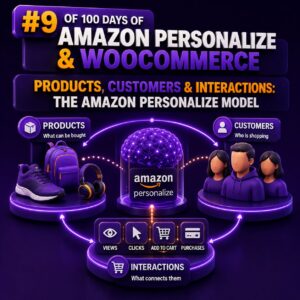
Products, Customers & Interactions: The Amazon Personalize Model

Amazon Personalize uses three core data concepts to understand an ecommerce catalog: users, items, and interactions. For a WooCommerce implementation, these map closely to customers, products, and customer activity. The quality of this mapping determines whether recommendations reflect real shopping behaviour or merely reproduce the most frequently viewed products. The three Personalize dataset types A dataset group in Amazon Personalize can contain a Users dataset, an Items dataset, and an Interactions dataset. Each dataset serves a different purpose, and the identifiers connecting them must remain consistent across historical imports and real-time events. Users: representing WooCommerce customers The Users dataset describes the people receiving recommendations. The required identifier is USER_ID. Additional fields can provide customer attributes that are useful to recipes capable of using user metadata.
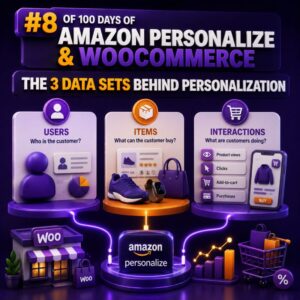

The 3 Data Sets Behind Personalization

Amazon Personalize is built around three core data sets: Interactions, Users, and Items. For a WooCommerce agency, understanding how these data sets relate is more important than choosing a recipe. The quality, consistency, and coverage of these records determine whether recommendations are useful across product pages, cart pages, email campaigns, and other customer experiences. 1. Interactions: what shoppers do The Interactions data set records events between a user and an item. Typical WooCommerce events include product views, searches, add-to-cart actions, purchases, wish-list additions, and product ratings. The minimum useful relationship is usually represented by a user ID, an item ID, and a timestamp. A typical event record might look like this: { "USER_ID": "customer-1842", "ITEM_ID": "product-742", "TIMESTAMP": 1714478400, "EVENT_TYPE": "purchase", "EVENT_VALUE": 2 } The exact

What Data Does Amazon Personalize Need?

Amazon Personalize does not need your entire WooCommerce database. It needs a well-structured record of interactions between shoppers and products, with optional product and customer attributes to improve recommendations and support cold-start scenarios. For most WooCommerce implementations, the quality of the interaction data matters more than the volume of unrelated customer fields. A smaller, consistent dataset of product views, add-to-cart events, purchases, and meaningful engagement is usually more useful than a large export containing incomplete or inconsistent records. The core datasets Amazon Personalize uses Amazon Personalize organizes data into dataset groups. The most common datasets for a WooCommerce store are Interactions, Items, and Users. Interactions dataset The Interactions dataset records what a shopper did with a product. This is the most important dataset for user-personalization

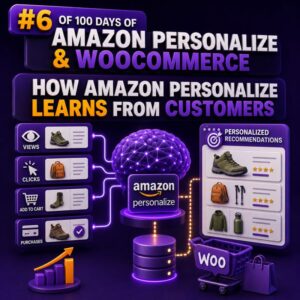
How Amazon Personalize Learns From Customers

Customer behaviour is the training signal Amazon Personalize does not understand a WooCommerce catalogue or customer base automatically. It learns from the interaction records, user attributes, and item attributes that an agency sends to an Amazon Personalize dataset group. For a WooCommerce store, useful interaction records can include: A product detail view A search or product-list click An add-to-cart event A completed purchase A product rating or favourite action Each record should identify the customer, the product, the event type, and the time of the event. A typical interaction might contain USER_ID, ITEM_ID, EVENT_TYPE, and TIMESTAMP. The event type is important because a purchase usually represents stronger intent than a product view. What Amazon Personalize learns from an interaction Consider a customer who views running

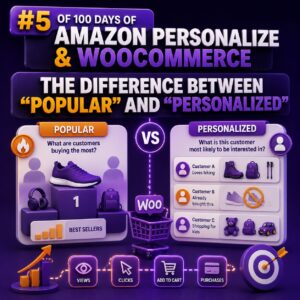
The Difference Between “Popular” and “Personalized”

Why the Distinction Matters “Popular” and “personalized” recommendations can look similar in a WooCommerce storefront, but they answer different questions. Popular: Which products are receiving the most attention or purchases across a defined audience and time period? Personalized: Which products is this particular shopper most likely to engage with, based on their behavior and the behavior of similar shoppers? That difference affects the Amazon Personalize recipe you choose, the data your agency must collect, the placement of recommendation widgets, and the way success should be measured. What a “Popular” Recommendation Does A popular-products widget applies the same ranking logic to many or all visitors. In Amazon Personalize, the Popularity-Count recipe is designed for this type of use case. It ranks items according to interaction frequency,

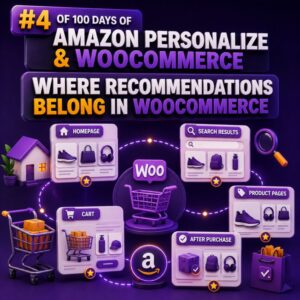
Where Recommendations Belong in WooCommerce

Recommendations should follow the shopper’s decision In WooCommerce, a recommendation block is useful only when it appears at a point where the shopper can act on it. A product carousel placed randomly in the page template may add visual noise without improving discovery or conversion. For agencies, the right approach is to define recommendation placements alongside the customer journey. Each placement should have a clear purpose, a suitable recommendation strategy, and a fallback for cases where there is not enough behavioral data. Product pages: help shoppers compare and continue The product page is usually the strongest starting point because the shopper has already shown intent. A recommendation block can reinforce that intent without interrupting the primary purchase action. Common product-page placements include: “Related products” for

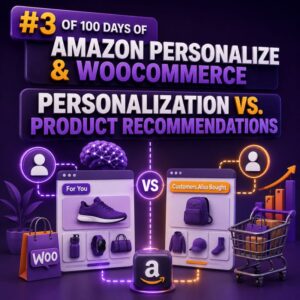
Personalization vs. Product Recommendations

Why the distinction matters In WooCommerce projects, “personalization” and “product recommendations” are often used interchangeably. They are related, but they solve different problems. A product recommendation is a suggested item or group of items shown to a shopper. Personalization is the broader process of adapting an experience to a shopper, customer segment, context, or business rule. Recommendations can be one component of a personalized storefront, but they are not the whole implementation. This distinction affects the data model, integration design, measurement plan, and the WooCommerce components an agency needs to modify. What product recommendations do Recommendations answer a focused question: Which products should appear in this placement? Common WooCommerce placements include: “Customers who viewed this product also viewed” on a product page “Frequently bought together”

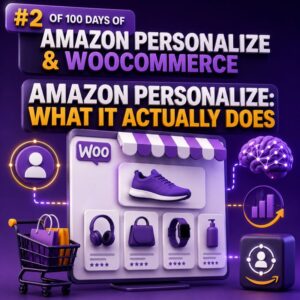
Amazon Personalize: What It Actually Does

Personalization Based on Shopper Behavior Amazon Personalize is a managed machine learning service that creates individualized recommendations from data your business provides. For a WooCommerce store, that usually means using a shopper’s interactions with products—such as views, searches, add-to-cart events, and purchases—to predict which products or content should be shown next. It does not automatically redesign a WooCommerce site, write product descriptions, manage promotions, or replace your store’s catalog and checkout. It produces recommendations and rankings that your application can request and display. The Core Data Model Amazon Personalize commonly uses three types of datasets: Users: Information about shoppers, such as a customer identifier, signup date, membership tier, or location. Items: Information about products, such as a product identifier, category, brand, price, and availability status.

Why WooCommerce Stores Need Personalization

Personalization Is Becoming a Core WooCommerce Capability WooCommerce gives merchants control over catalog data, checkout, and site functionality, but a standard storefront often presents the same products, promotions, and content to every visitor. That approach can work for a small catalog, but it becomes less effective as traffic, product count, and customer diversity increase. Personalization helps a store use shopper behavior and context to make more relevant decisions. Instead of showing identical product grids to everyone, the site can adapt recommendations, category ordering, email content, and promotional messages based on signals such as product views, searches, purchases, cart additions, and repeat visits. Why Relevance Matters in WooCommerce WooCommerce stores compete for attention across search engines, marketplaces, social networks, and email. Visitors often arrive with different