

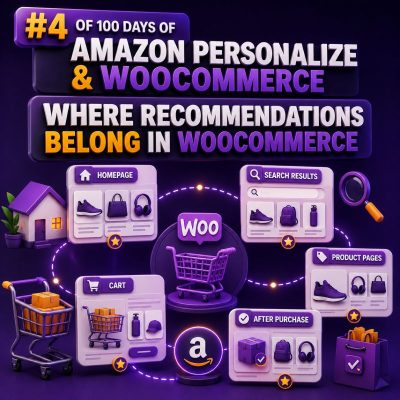
Recommendations should follow the shopper’s decision
In WooCommerce, a recommendation block is useful only when it appears at a point where the shopper can act on it. A product carousel placed randomly in the page template may add visual noise without improving discovery or conversion.
For agencies, the right approach is to define recommendation placements alongside the customer journey. Each placement should have a clear purpose, a suitable recommendation strategy, and a fallback for cases where there is not enough behavioral data.
Product pages: help shoppers compare and continue
The product page is usually the strongest starting point because the shopper has already shown intent. A recommendation block can reinforce that intent without interrupting the primary purchase action.
Common product-page placements include:
- “Related products” for similar products in the same category.
- “You may also like” for products with similar browsing or purchase patterns.
- “Frequently bought together” for complementary products.
- “Complete the setup” for accessories or products that are commonly purchased with the viewed item.
Place the first recommendation block below the product summary or beneath the product description, rather than above the title, price, or add-to-cart button. The primary product must remain visually dominant.
For example, on a WooCommerce store selling coffee equipment, a shopper viewing an espresso machine might see grinders, cleaning tablets, and compatible filters. Recommending another unrelated espresso machine at this point is less useful than showing complementary products.
Category and shop pages: improve discovery
Category pages are useful when shoppers know the type of product they want but have not selected a specific item. Recommendations can appear after the product grid or between product rows, provided they are visually distinct from the category results.
Suitable modules include:
- Popular products within the current category.
- Trending products for the shopper’s customer segment.
- Products frequently viewed after the current category.
- Personalized alternatives when the shopper has an established history.
Avoid replacing category sorting with a personalized list unless the business has tested that behavior carefully. Shoppers often expect category pages to respect filters, sorting, price ranges, and stock status. A recommendation carousel should supplement those controls rather than undermine them.
Cart: increase basket value without creating friction
The cart is an appropriate location for low-friction cross-sells. Recommendations should be closely related to the items already in the basket and should not distract from checkout.
Examples include:
- Replacement filters for a water filter system.
- Protective cases for electronics.
- Additional cables for a device.
- Consumables that are normally purchased with the selected product.
Use concise cards with an obvious add-to-cart action. If the store supports one-click or AJAX add-to-cart behavior, update the cart totals and mini-cart consistently after the recommendation is accepted.
Do not recommend products that are already in the cart, products that cannot be purchased with the current shipping destination, or products that would invalidate an applied promotion. These checks should happen in the WooCommerce application layer even when Amazon Personalize supplies the recommendation candidates.
Checkout and order confirmation: use restraint
Checkout is generally a poor place for exploratory recommendations. Extra choices can distract shoppers from payment and increase abandonment. If a business wants to test checkout recommendations, limit them to essential add-ons and keep them outside the main payment decision.
The order confirmation page is a safer placement. After the order is submitted, show products that are relevant to the completed purchase, such as replenishment items, accessories, or products suitable for a later purchase. This placement can also support account creation, subscription enrollment, or post-purchase education without interrupting checkout.
For example, after a customer purchases printer ink, the confirmation page might recommend paper or a future replenishment reminder. It should not immediately promote an unrelated high-value product simply because it is popular.
Account pages and reorder flows
Logged-in customers provide stronger signals than anonymous visitors, especially when the store has reliable purchase history. The account dashboard, order details page, and reorder flow can use recommendations based on previous purchases and expected replenishment cycles.
A WooCommerce agency might add a “Buy again” module to the order details page and a separate “Often purchased with your previous orders” module to the account dashboard. These should use different logic: the first retrieves known products, while the second discovers relevant new products.
Do not assume that every historical product remains eligible. Check current stock, catalog visibility, product status, price, tax configuration, and any customer-specific purchasing restrictions before rendering the result.
Use placement-specific recommendation strategies
A single recommendation model or list should not be reused everywhere. The context changes the meaning of relevance.
| Placement | Useful strategy | Primary business goal |
|---|---|---|
| Product page | Similar or complementary items | Discovery and conversion |
| Category page | Popular or personalized items within the category | Product discovery |
| Cart | Frequently bought together or accessories | Average order value |
| Order confirmation | Post-purchase complements or replenishment items | Repeat purchase |
| Account area | Buy again and personalized suggestions | Retention |
Amazon Personalize can provide recommendations through a campaign or recommender, but the WooCommerce integration still needs to choose the appropriate request context. Pass the viewed product, category, or cart context when the selected solution supports it, and map the returned item identifiers to products in the WooCommerce catalog.
Build a dependable WooCommerce integration
At implementation time, treat recommendations as a product component rather than as a template-only feature. A typical request flow is:
- Determine the placement, such as product page, cart, or account page.
- Collect the relevant context, including product ID, category, cart contents, customer or session ID, and currency.
- Request recommendations from Amazon Personalize using the configured campaign or recommender.
- Map returned item IDs to WooCommerce products.
- Remove unavailable, hidden, duplicate, or ineligible products.
- Render the approved products with accessible markup and a clear action.
- Record impression, click, add-to-cart, and purchase events using consistent identifiers.
WooCommerce hooks can provide practical insertion points. For example, an agency might attach a product-page module to woocommerce_after_single_product_summary, a cart module to woocommerce_cart_collaterals, and an order-confirmation module through woocommerce_thankyou. The exact hook should be selected with the active theme and block-based checkout implementation in mind; avoid assuming that a classic template hook will control every block-based screen.
Handle identifiers, events, and privacy correctly
The identifier returned by Amazon Personalize must correspond to a stable catalog identifier in WooCommerce. Many stores use product IDs, but stores with variations may need a deliberate choice between parent product IDs and variation IDs. Use the same choice in catalog data, event tracking, and result mapping.
Track events such as Viewed, Clicked, AddedToCart, and Purchased consistently. Anonymous visitors can use a durable session identifier, while authenticated shoppers can use an internal customer identifier. Do not send unnecessary personally identifiable information as an event or user ID.
Consent requirements still apply. Load tracking and personalization according to the store’s privacy configuration and document what data is sent to external services. A recommendation feature should degrade gracefully when a visitor declines optional tracking.
Cache the right layer
Full-page caching can accidentally show one customer’s recommendations to another. Keep personalized responses out of shared page caches, or render the recommendation module through an authenticated or session-aware endpoint after the page loads.
Non-personalized lists, such as category best sellers, can usually be cached more broadly. Personalized responses may be cached briefly per user or session when appropriate, but the cache key must include the relevant customer or session context and placement. Always validate stock and visibility again when a cached result is used.
Design fallbacks before the model is ready
New visitors and low-volume stores may not have enough interaction history for useful personalized results. Every placement needs a deterministic fallback, such as category best sellers, manually curated accessories, or products with strong recent sales.
Fallbacks should use the same eligibility rules as personalized results. A discontinued or out-of-stock product should not appear merely because it was selected as a fallback. The frontend should also hide an empty module instead of leaving a blank heading or carousel container.
Measure each placement separately
Track performance by placement, device type, customer state, and recommendation strategy. Useful measures include recommendation impressions, click-through rate, add-to-cart rate, attributed revenue, average order value, and conversion rate.
Use a control group or an A/B test when the store has enough traffic. Compare the recommendation module with its absence, not only one algorithm with another. A product-page carousel may generate clicks but reduce add-to-cart activity if it distracts from the featured product, while a cart cross-sell may produce fewer clicks but higher incremental revenue.
Store the placement name with each impression and click event. Without that context, an agency cannot determine whether a recommendation performed well because of its algorithm, its location, or the shopper’s stage in the purchase journey.