

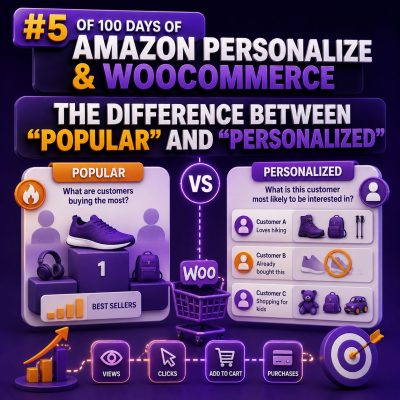
Why the Distinction Matters
“Popular” and “personalized” recommendations can look similar in a WooCommerce storefront, but they answer different questions.
- Popular: Which products are receiving the most attention or purchases across a defined audience and time period?
- Personalized: Which products is this particular shopper most likely to engage with, based on their behavior and the behavior of similar shoppers?
That difference affects the Amazon Personalize recipe you choose, the data your agency must collect, the placement of recommendation widgets, and the way success should be measured.
What a “Popular” Recommendation Does
A popular-products widget applies the same ranking logic to many or all visitors. In Amazon Personalize, the Popularity-Count recipe is designed for this type of use case. It ranks items according to interaction frequency, such as views, add-to-cart events, or purchases, depending on the interaction data and event types supplied.
For a WooCommerce store, this can support placements such as:
- “Best sellers this week” on the homepage
- “Trending products” on a category page
- “Most purchased accessories” below the cart
- Popular products shown to visitors who are not signed in
For example, if running shoes, socks, and water bottles generated the highest number of qualifying interactions during a recent period, a popular-products widget may show those products to a new visitor who has no recorded history.
What a “Personalized” Recommendation Does
A personalized recommendation changes according to the user and their interaction history. Amazon Personalize’s User-Personalization-v2 recipe can learn from events such as product views, searches, add-to-cart actions, and purchases to rank products for an individual user.
Consider two shoppers visiting the same outdoor equipment store:
- Shopper A repeatedly views camping stoves and lightweight cookware.
- Shopper B views waterproof jackets and hiking trousers.
A popular widget might show both shoppers the same top-selling tent. A personalized widget could rank cookware accessories for Shopper A and compatible waterproofing products for Shopper B, even when those items are not the store’s overall best sellers.
Popularity Is Not Personalization
Replacing a label such as “Popular products” with “Recommended for you” does not make a widget personalized. The recommendation must be generated using user-specific context or interaction history.
A useful implementation test is to compare responses for two users with meaningfully different histories. If the same products appear in the same order for every user, the component is probably a popularity or merchandising component rather than a personalized recommendation.
Personalization also does not mean showing obscure products at random. A well-trained model balances relevance with product availability, interaction volume, and the signals represented in the dataset. Business rules can still be applied to exclude discontinued products or restrict recommendations to an appropriate category.
Choosing the Right WooCommerce Placement
Homepage
Use popular products when the homepage needs a reliable default for anonymous visitors. Use personalized recommendations for returning shoppers when a stable user identifier is available.
Product detail page
“Frequently bought together” and “Similar products” are different use cases from general popularity. Amazon Personalize’s Similar-Items recipe can recommend products related to the item currently being viewed. A popular-products module can still be useful, but it should be labeled and measured separately.
Cart and checkout
Personalized cross-sells can use the shopper’s current cart and prior behavior, while a popular accessory list provides a strong fallback. Avoid recommending products already in the cart, products that cannot be purchased, or items that conflict with the order.
Search results
If the goal is to reorder results for a known user, the Personalized-Ranking recipe may be appropriate. This is different from inserting a generic “popular products” block beside the search results.
Data Requirements and Identity
Popularity can work with aggregate interaction data, but personalization requires reliable user and item context. A WooCommerce integration should capture events with consistent identifiers, including:
- USER_ID: a stable identifier for a logged-in customer or an anonymous browser session
- ITEM_ID: the WooCommerce product or variation identifier used consistently in the catalog and event data
- EVENT_TYPE: such as view, search, add-to-cart, or purchase
- EVENT_VALUE: optional information such as quantity or order value, when relevant
- EVENT_TIMESTAMP: the time the interaction occurred
For anonymous visitors, the browser must retain the same session identifier across page views if the store wants to build a short-term behavioral profile. When a visitor signs in, the integration should handle the transition between the anonymous session and the authenticated customer carefully rather than creating inconsistent identities.
The product catalog supplied to Amazon Personalize must also use the same item identifiers that the WooCommerce frontend sends in events and recommendation requests. A mismatch between variation IDs, parent product IDs, and SKU values is a common cause of missing or irrelevant recommendations.
Cold Start and Fallback Design
Personalization needs interaction history. A first-time visitor, a new product, or a newly launched store may not provide enough data for a strong user-specific result.
Agencies should design an explicit fallback sequence rather than relying on an empty response:
- Request personalized recommendations when the visitor has a usable identity and sufficient context.
- Filter out unavailable, out-of-stock, or already purchased products where appropriate.
- Use similar-item recommendations on product pages when the current product provides useful context.
- Fall back to a clearly labeled popular-products list for anonymous or low-history visitors.
- Apply manual merchandising rules for strategic products, seasonal ranges, or regulated categories.
The fallback should not be described as personalized. Clear labels help stakeholders interpret performance correctly and prevent misleading customer experiences.
Practical WooCommerce Example
Suppose an agency manages a WooCommerce cosmetics store with 8,000 products. It could implement the following structure:
- The homepage shows “Trending now” using popularity data for visitors without a known profile.
- A returning customer sees a personalized “Picked for you” carousel based on product views, cart additions, and purchases.
- A product page uses similar-item recommendations to show alternatives in the same product family.
- The cart displays personalized complementary products, excluding items already in the order and products that are out of stock.
A shopper who repeatedly views fragrance-free skincare may see cleansers and moisturizers from that range, even if scented gift sets are the store’s overall best sellers. Another shopper may receive gift sets because their recent interactions indicate that preference.
Measurement: Use Different Success Criteria
Popular and personalized components should not be evaluated as if they were interchangeable.
For a popular-products module, measure impressions, clicks, add-to-cart rate, conversion rate, and revenue per impression. For a personalized module, also examine recommendation coverage, the proportion of users receiving non-empty results, repeat engagement, and incremental conversion compared with a control group.
A practical test is an A/B experiment in which one eligible group receives the current popular widget and another receives the personalized widget. Keep the placement, product availability rules, and reporting window consistent. Compare outcomes by visitor type, because personalization may have little advantage for first-time visitors but a substantial advantage for returning customers.
Implementation Checklist for Agencies
- Document whether each storefront component is popular, personalized, similar-item, or manually merchandised.
- Use stable WooCommerce product or variation identifiers across the catalog, event stream, and recommendation API.
- Capture meaningful events rather than relying only on page views.
- Define anonymous-session and logged-in-user identity handling before development begins.
- Build inventory, price, category, and compliance filters into the serving layer.
- Provide a visible fallback for cold-start users and new products.
- Label widgets accurately so “popular” is not presented as “personalized.”
- Track recommendation impressions and clicks separately from ordinary product-list interactions.
- Validate results with controlled experiments rather than judging relevance from a few manual sessions.
The most effective WooCommerce implementations usually use both approaches: popularity provides dependable discovery when context is limited, while personalization adapts the storefront when reliable behavioral signals are available.