Forum Replies Created
-
wpsolrKeymaster4 years, 1 month ago in reply to: Remove 10000 limit when using elasticsearch #30628
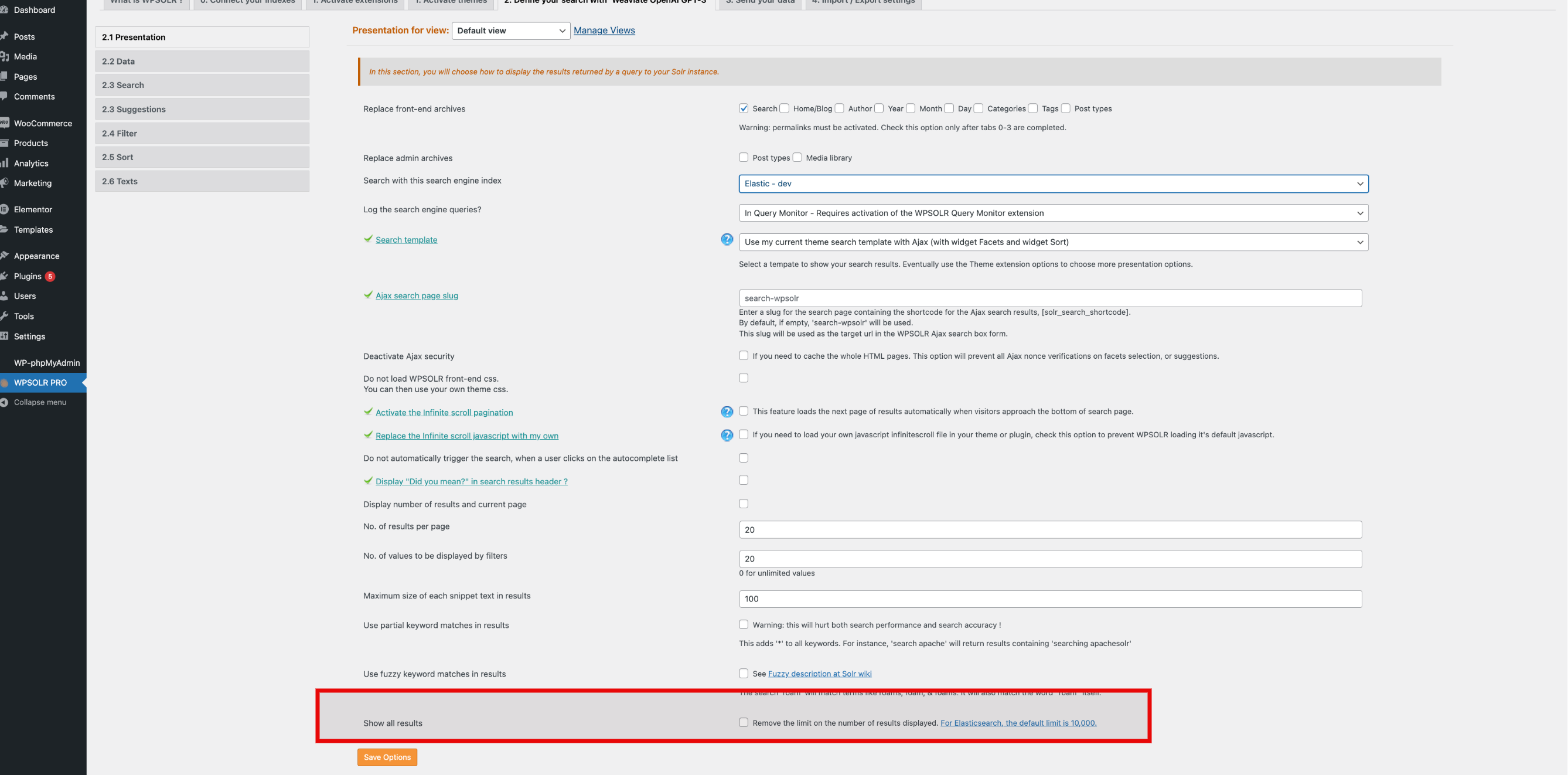
The fix is now part of WPSOLR 22.3: you can override the Elasticsearch 10,000 default limit from the view’s configuration.
 wpsolrKeymaster4 years, 1 month ago in reply to: I want to pay my license but where? #30626
I just asked 2checkout to send your invoice. Please let me know if you received it.
wpsolrKeymaster4 years, 1 month ago in reply to: Amazon Polly Conflict #30624You could execute a command like
composer update --no-devin the /amazon-polly folder. It should update the vendor libraries to the same level as WPSOLR’s libraries.I strongly advise to do it in a test environment first !
wpsolrKeymaster4 years, 1 month ago in reply to: Amazon Polly Conflict #30618Both AWS for WordPress and WPSOLR plugins use the Guzzle library through composer dependencies, but not with the same version, which appears to cause the conflict.
(WPSOLR’s Guzzle version is more recent as it has been updated with the recent 22.3 release, while AWS for WordPress has not been updated for a year at least).A solution could be to somehow update the /wpsolr-pro/wpsolr/core/composer.json to force the same Guzzle version as AWS for WordPress. And do so on each new WPSOLR release.
Or update the AWS for WordPress’s aws/aws-sdk-php to the latest version.
Or better, ask the AWS for WordPress support to update their plugin’s dependencies.wpsolrKeymaster4 years, 2 months ago in reply to: The NOT is no longer working #30557Please uninstall your current WPSOLR 22.3, and install this patched release instead:
https://www.dropbox.com/s/ektpfmix99jnfp1/wpsolr-pro-fix-solr-edismax-not-syntax.zip?dl=0wpsolrKeymaster4 years, 2 months ago in reply to: The NOT is no longer working #30554I found the issue.
I’m building a fix now…wpsolrKeymaster4 years, 2 months ago in reply to: The NOT is no longer working #30553I’m checking that on my environments…
wpsolrKeymaster4 years, 2 months ago in reply to: Index Problem #30471Good news that you could find a workaround.
As I understand, the problem came from some taxonomy name|permalink.
Would you have an example of a name and its permalink?wpsolrKeymaster4 years, 2 months ago in reply to: Index Problem #30469Could you solve your issue?
wpsolrKeymaster4 years, 2 months ago in reply to: Index Problem #30452Are you sure this is the problem?
wpsolrKeymaster4 years, 2 months ago in reply to: I want to pay my license but where? #30362I asked our payment processor to send you the payment link.
Let me know if you received it.wpsolrKeymaster4 years, 2 months ago in reply to: Index Problem #30359All you can do is check your logs (already done), or add traces in your logs to get more informations.
In function “index_data” of file /wpsolr-pro/wpsolr/core/classes/engines/class-wpsolr-abstractindexclient.php, you can add your traces in the catch block or at the very end (before the return).
- This reply was modified 4 years, 2 months ago by wpsolr.
wpsolrKeymaster4 years, 2 months ago in reply to: Index Problem #30356What is strange is that you can edit and index posts individually (in WP admin or terminal), but fail to batch index them.
wpsolrKeymaster4 years, 2 months ago in reply to: Search keyword not working properly #30353This is a file format issue, often due to XML (generated from a PDF for instance) containing the forbidden “<" character. No obvious solution, appart from removing the documents or fixing the documents content: /forums/topic/indexing-error-invalid-utf-8-middle-byte-0x3c/
Back to square one It seems.
wpsolrKeymaster4 years, 2 months ago in reply to: Uploading to Algolia – plugin error #30350This error happens while indexing the product’s custom field ‘wpsolr_on_sale’. You can unselect it on screen 2.2
(The cause of the error is a problem with some variation’s attributes, perhaps during import)