Forum Replies Created
-
wpsolrKeymaster4 years ago in reply to: Facets count not matching with total posts found #31100
What I can see from your screen capture is a custom UI, with possibly some custom backend code.
Please check with all custom code removed (front-end and back-end).
wpsolrKeymaster4 years ago in reply to: Pagination not working with custom search slug #31097I tested your code, but pagination works fine on my environments.
wpsolrKeymaster4 years ago in reply to: Pagination not working with custom search slug #31095You need to discover what is the permalink /search/: a page, the search archive template, other?
wpsolrKeymaster4 years ago in reply to: WP Solr Search for Custom Taxonomy Pages #31094It is a mandatory behaviour of facets.
Facets are extracted from results, not from the current query: if results from the current term’s archive query contain post types with terms outside of the current term hierarchy, they will be displayed too.
wpsolrKeymaster4 years ago in reply to: WP Solr Search for Custom Taxonomy Pages #31091I figured out one thing, whenever we are on a term page, if it has children terms, they are showing up. else that complete term widget is hiding.
Indeed, this is the expected behaviour: current taxonomy term and its parents are hidden.
And I selected a taxonomy here, others are also showing up, may I know the reason why these are showing up.
It could indicate that some post types have both consumer and automotive for instance
wpsolrKeymaster4 years ago in reply to: Pagination not working with custom search slug #31090It does not look like a rewrite, but a redirection (use of wp_redirect). But a redirection to what?
Be aware that WPSOLR replaces archives queries. If “/search/” is not the search archive, it will not work as expected.
wpsolrKeymaster4 years ago in reply to: Pagination not working with custom search slug #31087How did you build your “/search/” ?
wpsolrKeymaster4 years ago in reply to: Pagination not working with custom search slug #31085Ajax is getting sent, but still no results or page number is changing
See my previous answer on tweaking the pagination elements css selector on WPSOLR’s “Theme” add-on
wpsolrKeymaster4 years ago in reply to: Pagination not working with custom search slug #31081It could be that pagination elements are different on both pages, and that on one page WPSOLR cannot find them for refreshing the display after selection.
You can tweak the pagination elements css selector on the “Theme” add-on?wpsolrKeymaster4 years ago in reply to: WP Solr Search for Custom Taxonomy Pages #31080Can you send here a screenshot of the problem?
wpsolrKeymaster4 years ago in reply to: Configure New suggestions #31075Indeed, there is a loophole in the documentation regarding suggestions.
Basically, you can create several suggestions that you will attach to different search boxes with the CSS selector option.
Each suggestion can be of 4 types: keywords (like a keyword checker), flat results (like the search results), grouped results by post types, and Question answering (with Weaviate vector search only).wpsolrKeymaster4 years ago in reply to: WP Solr Search for Custom Taxonomy Pages #31074On taxonomy archives, the current term with all its parent terms are not shown on the facets widgets. All other facets are displayed as usual.
wpsolrKeymaster4 years ago in reply to: Boost Search on Taxonomy Pages #31073I checked, but I could not find a way to activate/deactivate boosts based on some context like being on a taxonomy archive.
wpsolrKeymaster4 years ago in reply to: Exclude posts based on custom acf field value #31072To exclude some posts from the index, you could modify the SQL query as described on /forums/topic/hide-products-with-empty-or-zero-price/
wpsolrKeymaster4 years ago in reply to: Exclude posts based on custom acf field value #31062This hook is not meant for filtering results, but to update results with custom values.
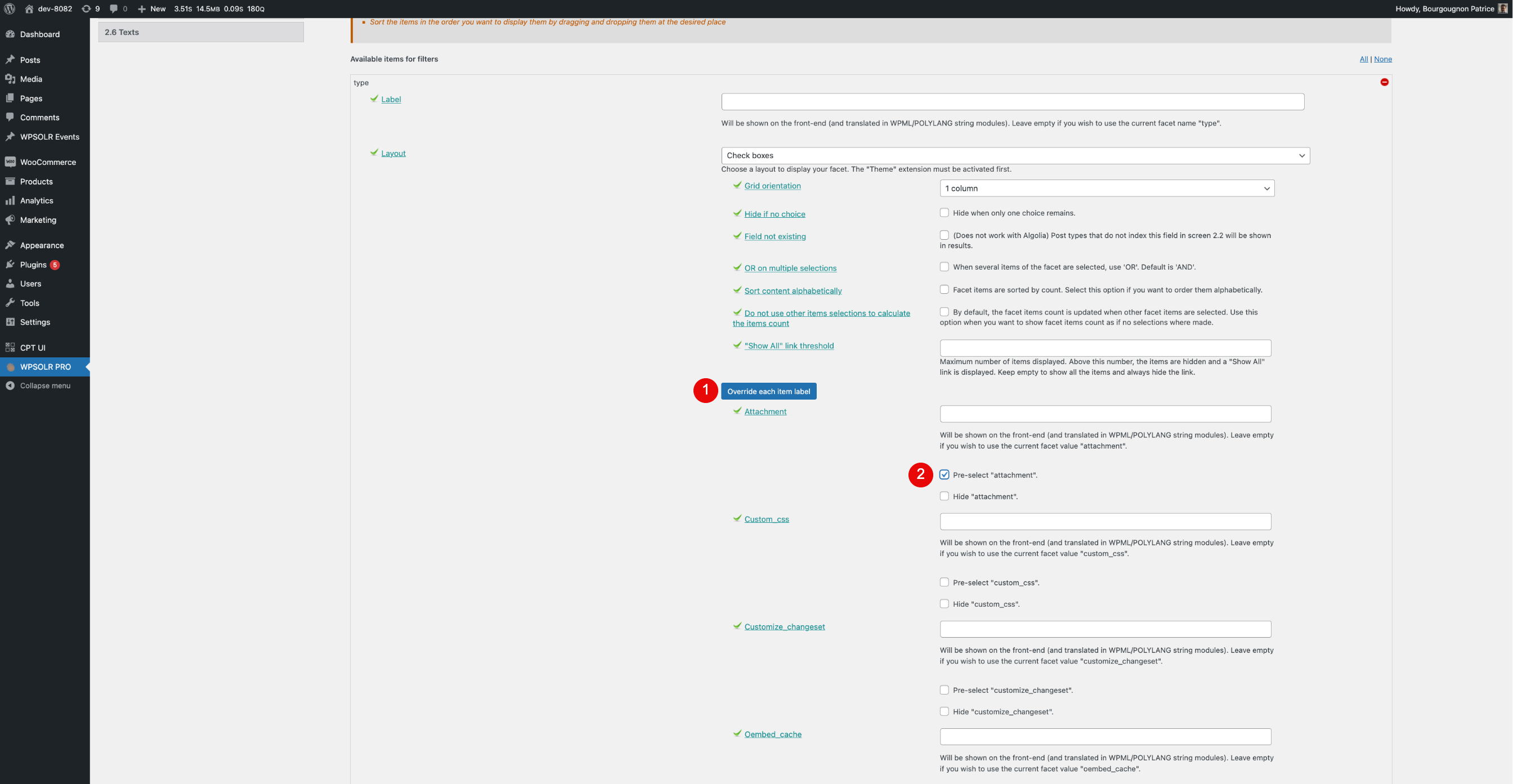
You can filter with no hook: configure your ACF field as a checkbox filter, then pre-select the ‘YES’ value.
Example is shown in below capture, where filter “type” is preselected with value “attachment”.