

Forum Replies Created
-
wpsolrKeymaster5 years, 5 months ago in reply to: Custom field filters #26306
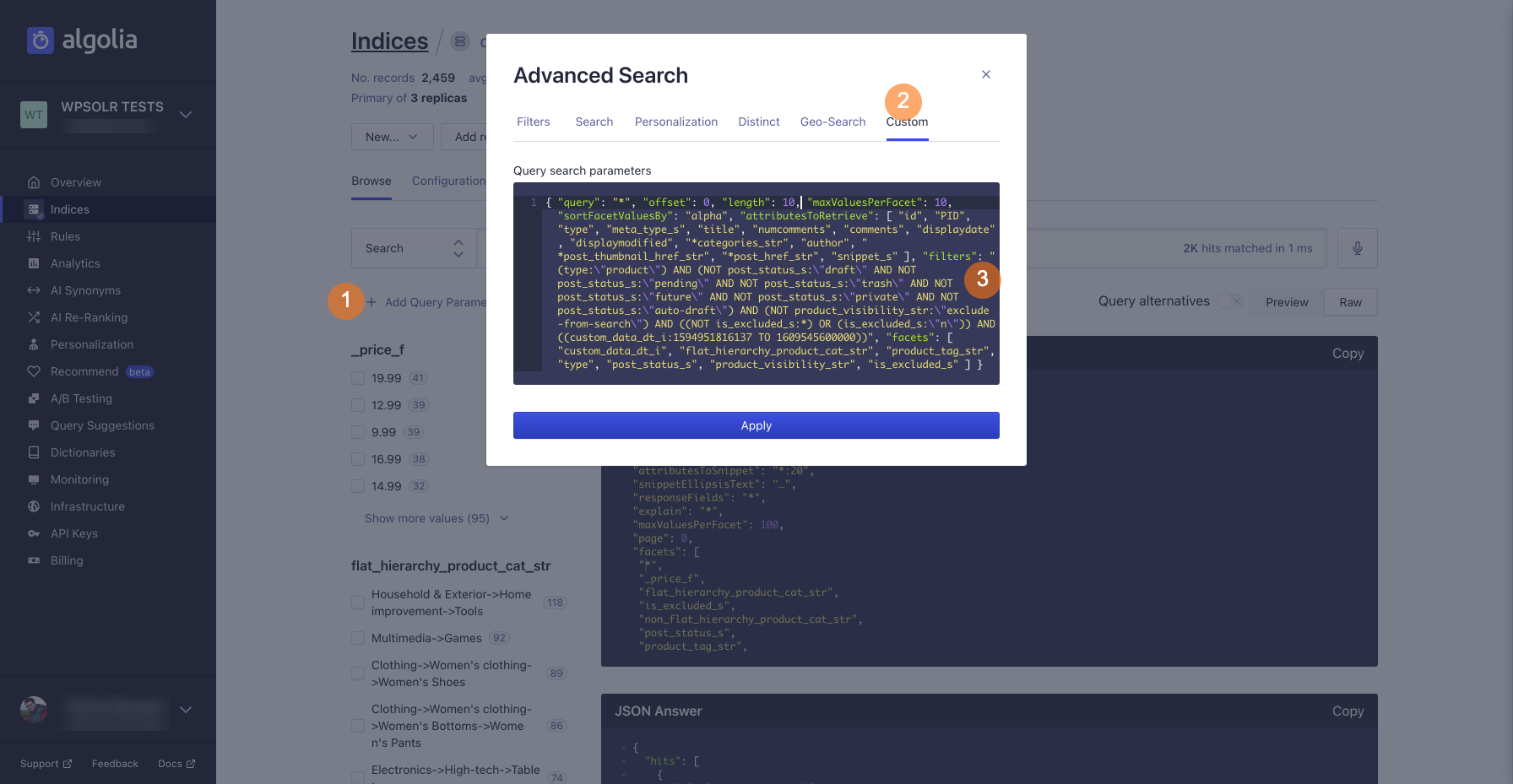
For instance, start with:
{ "filters": "(type:\"product\") AND (NOT post_status_s:\"draft\" AND NOT post_status_s:\"pending\" AND NOT post_status_s:\"trash\" AND NOT post_status_s:\"future\" AND NOT post_status_s:\"private\" AND NOT post_status_s:\"auto-draft\") AND (NOT product_visibility_str:\"exclude-from-search\") AND ((NOT is_excluded_s:*) OR (is_excluded_s:\"n\")) AND ((custom_data_dt_i:1594951816137 TO 1609545600000))"}Screenshot of the Algolia “Add Query Parameters”:
 wpsolrKeymaster5 years, 5 months ago in reply to: Custom field filters #26303
You can execute the query without the filter “AND ((custom_data_dt_i:1594951816137 TO 1609545600000))” on your Algolia dashboard.
wpsolrKeymaster5 years, 5 months ago in reply to: Custom field filters #26301The Elasticsearch/Solr/Algolia query debug mode in tab 2.1 should help you understand the problem.
wpsolrKeymaster5 years, 5 months ago in reply to: Custom field filters #26299Unfortunately, this still requires WPSOLR knowing the current custom field date format is European or US.
But here is your workaround to solve your issue:
<?php use wpsolr\core\classes\WPSOLR_Events; add_filter( WPSOLR_Events::WPSOLR_FILTER_POST_CUSTOM_FIELDS, 'filter_custom_fields', 10, 2 ); /** * @href https://stackoverflow.com/questions/2891937/strtotime-doesnt-work-with-dd-mm-yyyy-format * * Convert a European formatted custom field date to US formatted date, so strtotime() yields the correct value for Elasticsearch Date field * 25/01/2021 => 25-01-2021 * * @param array $custom_fields * @param int $post_id * * @return mixed */ function filter_custom_fields( $custom_fields, $post_id ) { $custom_fields['custom_field_date_ddmmyy'] = str_replace( '/', '-', $custom_fields['custom_field_date_ddmmyy'] ); return $custom_fields; }wpsolrKeymaster5 years, 5 months ago in reply to: Custom field filters #26297Indeed, WPSOLR indexes dates from strtotime(), which seems to take a US date format by default.
I do not know a good way to convert a date from any format (like Italian) to US before calling strtotime().Even more problematic, what if custom dates are stored in several formats (Italian, US)?
Or if WPML is used and all dates must be stored according to the languages?wpsolrKeymaster5 years, 5 months ago in reply to: Custom field filters #26295Dates are stored in a format independent of the country or language.
What makes you think that “it doesn’t index”?wpsolrKeymaster5 years, 5 months ago in reply to: Custom field filters #26258Your custom field must have been selected in tab 2.2, with the data type “Date”, then your data reindexed. It should then appear in your WPSOLR search filters widget.
You can show your filter with a date slider layout.wpsolrKeymaster5 years, 5 months ago in reply to: Indexing woocommerce custom fields #26229As you probably noticed, you just have to select your product custom field in tab 2.2 to get it indexed.
wpsolrKeymaster5 years, 5 months ago in reply to: domain.com/category/s-searchterm #26128It is not possible I’m afraid.
wpsolrKeymaster5 years, 5 months ago in reply to: license de-activation re-activation #26119do i have to de-activate the license before switching servers and re-activate it on the new server
This is indeed the correct procedure to move an instance license
wpsolrKeymaster5 years, 5 months ago in reply to: PHP Fatal Error #26079If you’re on screen 2.2, it could mean that you configured a post type on that screen some time ago.
But later on, this post type was no more in the system, perhaps by deactivating the plugin that brought it (like WooCommerce for the “product” post type).As a workaround, you could reactivate the post type. Then remove it from the screen 2.2 settings. And finally, deactivate the post type again.
wpsolrKeymaster5 years, 5 months ago in reply to: Question: Result counts at the top of the search results (or categories) #26078Counts on category archives are part of your theme. You can verify by deactivating WPSOLR.
wpsolrKeymaster5 years, 5 months ago in reply to: domain.com/category/s-searchterm #26077You can find the details at /documentation/configuration-step-by-step-schematic/activate-extensions/seo-add-ons/yoast-seo-add-on/
wpsolrKeymaster5 years, 6 months ago in reply to: Google Analytics Issues? #26023Sorry, but I cannot answer to implementation specific details.
There is an idea to build a Google Analytics add-on in WPSOLR, but nothing committed yet.- This reply was modified 5 years, 6 months ago by wpsolr.
wpsolrKeymaster5 years, 6 months ago in reply to: No alive nodes found in your cluster #26017Did you try /forums/topic/simple-elastic-cloud-setup/ ?