

Forum Replies Created
-
wpsolrKeymaster6 years, 8 months ago in reply to: Not all products are showing after indexing #16793
On your colour filter, in tab 2.4, where you matched each colour name to its colour picker hexadecimal value. There is also a checkbox to set the colour value as a default selection.
You can see the checkbox in the colour picker documentation.
(“Pre-select Red” in the image).
wpsolrKeymaster6 years, 8 months ago in reply to: How to query the WPSOLR results in my theme? #16790There is no official way, no.
It has been done in the plugin, but in very specific conditions.
You can read the YITH Ajax search add-on code if you want. But it remains internal code, and it can change in the future. Unless you use the predefined actions/filters that you can find also in the add-on code.
- This reply was modified 6 years, 8 months ago by wpsolr.
wpsolrKeymaster6 years, 8 months ago in reply to: How to query the WPSOLR results in my theme? #16788WPSOLR was built for replacing archives queries (search, taxonomies …). There are no good way to build your own custom queries.
wpsolrKeymaster6 years, 8 months ago in reply to: How to query the WPSOLR results in my theme? #16786We have the Toolset Views add-on to do that. Just activate it, create your Toolset View, paste it in your page. WPSOLR will manage the queries behind the scene.
wpsolrKeymaster6 years, 8 months ago in reply to: Not all products are showing after indexing #16784Checking your colour picker, you should see than one colour is preselected.
wpsolrKeymaster6 years, 8 months ago in reply to: Not all products are showing after indexing #16694Can you check that none of your filter values have the “Preselected” checkbox?
(especially colors)
wpsolrKeymaster6 years, 8 months ago in reply to: Not all products are showing after indexing #16683Several ideas you can try:
1. Check for errors in debug.log file
2. Deactivate other plugins that could compete with WPSOLR on the search results
3. Check that your filters from WPSOLR are shown (to be sure WPSOLR query is ok)
4. Identify a “pattern” among the products shown (similar category, …)
5. Attach here your screenshots of screens: 2.1, 2.2, 2.3
6. You mentioned some missing index categories. Is there a link with the “pattern” above?wpsolrKeymaster6 years, 8 months ago in reply to: Not all products are showing after indexing #16680In general, do you see all your products in search when you deactivate the WPSOLR plugin?
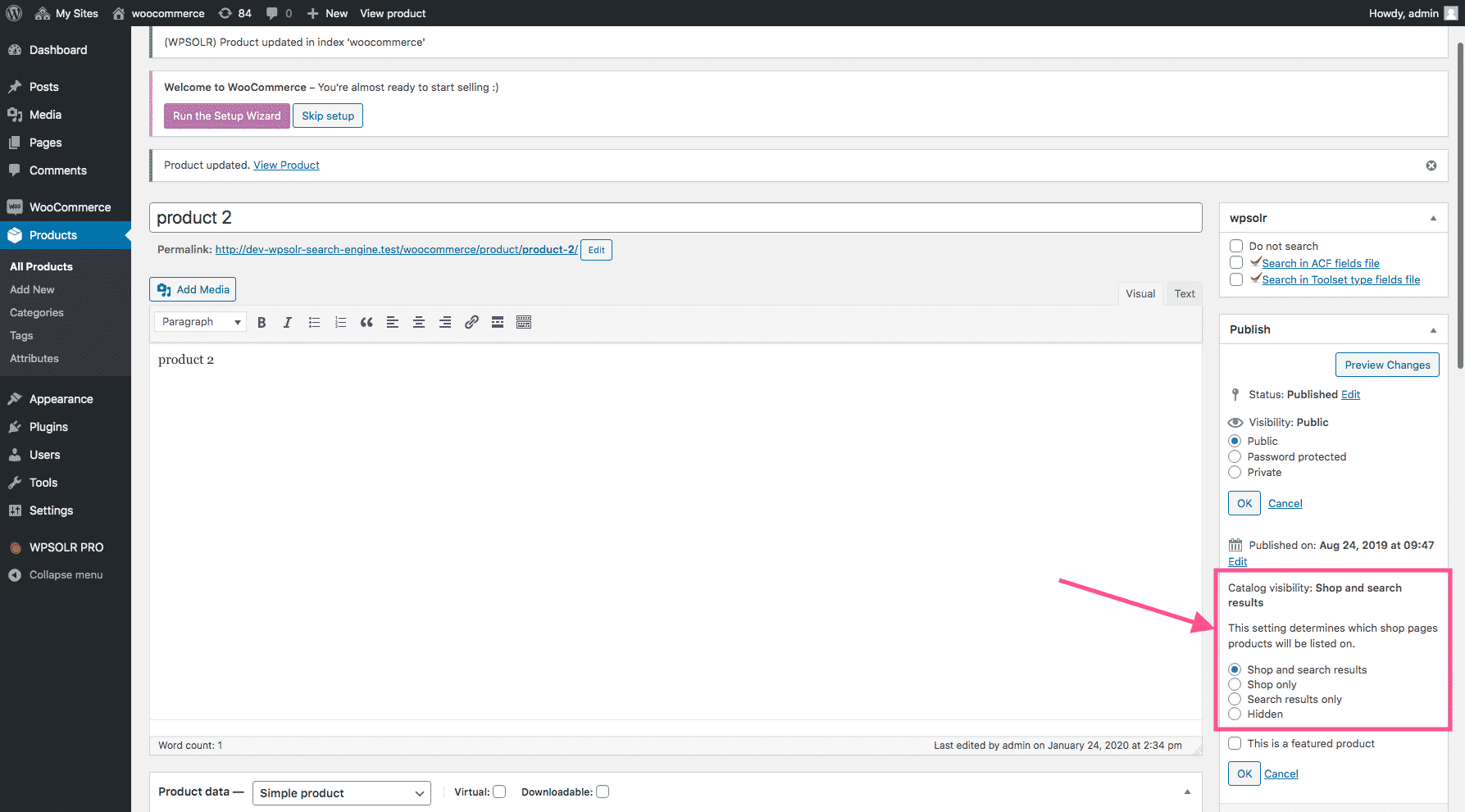
wpsolrKeymaster6 years, 8 months ago in reply to: Not all products are showing after indexing #16677Check the image below:
 wpsolrKeymaster6 years, 8 months ago in reply to: Not all products are showing after indexing #16675
Thanks.
Now, are all your products with “Catalog visibility: Shop and search results” property?
wpsolrKeymaster6 years, 8 months ago in reply to: Return variants matching search criteria #16673By default variations are not shown in WooCommerce archives. No?
wpsolrKeymaster6 years, 8 months ago in reply to: Not all products are showing after indexing #16671Can you index now, and let me know if all products are in the index afterwards?
wpsolrKeymaster6 years, 8 months ago in reply to: Not all products are showing after indexing #16669Still 32.143 products to index?
wpsolrKeymaster6 years, 8 months ago in reply to: Not all products are showing after indexing #16667– in 2.2, uncheck the variations
– in 3., delete your index content. You should not see variations anymore, 0 documents indexed, and 32143 products to index.wpsolrKeymaster6 years, 8 months ago in reply to: Not all products are showing after indexing #16662