
100 Days of WooCommerce Personalization guides for WordPress & WooCommerce

The Difference Between Recommendations and Personalization

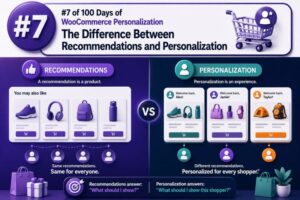
Recommendations and personalization are related WooCommerce capabilities, but they solve different problems. A recommendation selects products, content, or offers that may be relevant to a shopper. Personalization changes the broader shopping experience based on who the shopper is, what they have done, and what they are likely trying to accomplish. That distinction matters when planning a storefront, selecting extensions, defining data requirements, and measuring results. A product carousel can make recommendations without personalizing the page around the visitor. Conversely, a personalized experience may change shipping messaging, navigation, pricing visibility, or checkout prompts without recommending a single product. What a recommendation does A recommendation is an item-level suggestion. Its primary question is: Which product should appear next to this product, in this cart, or in this

How Personalization Changes the Shopping Journey

Personalization changes more than the products a shopper sees. It can alter how a customer discovers a store, evaluates products, completes checkout, and returns for a subsequent purchase. For WooCommerce agencies, the most effective implementations map personalization to each stage of the shopping journey rather than treating it as a single recommendation widget. Map personalization to the customer journey A useful journey model includes five stages: Discovery: The shopper arrives through search, advertising, social media, email, or a referral. Evaluation: The shopper compares products, reads reviews, checks availability, and considers delivery or returns. Conversion: The shopper adds items to the cart and completes checkout. Post-purchase: The store supports delivery, product use, replenishment, and returns. Retention: The store gives the customer relevant reasons to return without

Recommendations Are More Than a “You May Also Like” Widget

The placement changes the job In WooCommerce, recommendations are often treated as a single component: a row of products below the product description. That limits their value. A useful recommendation system changes its purpose according to the shopper’s context. On a product page, the goal may be comparison or discovery. In the cart, it may be completing an order. After checkout, it may be replenishment or a logical next purchase. Each placement should use different inputs, copy, and success criteria. WooCommerce already separates several merchandising relationships: Related products are commonly generated from shared categories and tags. Up-sells are products selected by the store team to replace or upgrade the current product. Cross-sells are products selected for display in the cart. These relationships are useful, but

Why Showing the Same Products to Everyone Is Costing You Sales

The merchandising problem behind missed sales A WooCommerce store that shows the same products, sorting, promotions, and recommendations to every visitor is treating different buying intentions as if they were identical. A first-time visitor researching options, a returning customer who has purchased twice, and a wholesale buyer looking for case quantities may all see the same storefront. That approach is simple to maintain, but it can reduce product discovery and make the store less relevant. When shoppers cannot quickly find products that match their needs, they are more likely to leave, search elsewhere, or buy only the item they already had in mind. Why one catalogue experience underperforms A standard catalogue usually reflects the store’s internal structure: categories, featured products, recent products, or best sellers.

The 5 Types of Product Recommendations Every Store Needs

Why recommendation types matter Product recommendations are not interchangeable widgets. Each type serves a different customer intent and appears at a different stage of the buying journey. A WooCommerce store may use the same product catalog, but the logic, placement, and success metric should change between a product page, the cart, checkout, and post-purchase email. For agencies, the most reliable approach is to define recommendation rules by intent first, then choose the placement and implementation method. The five types below cover the core use cases most WooCommerce stores need. 1. Related products Related products help shoppers discover alternatives or complementary items while they are browsing a product. In WooCommerce, the default related-product output is generally based on shared categories and tags, rather than real-time behavioral

What Makes a Recommendation Truly Personalized?

Personalization is more than inserting a customer’s name A recommendation becomes personalized when it reflects a shopper’s current needs, preferences, and context—not merely when a store displays a familiar product or uses the shopper’s first name. For a WooCommerce store, that usually means combining several signals: Products viewed, searched for, added to the cart, or purchased Product attributes such as category, brand, size, compatibility, and price range The customer’s lifecycle stage, such as first visit, repeat purchase, or post-purchase The current page, cart contents, device, location, and referral source Inventory, margin, promotions, and product availability Explicit preferences, such as selected interests or saved sizes The goal is not to use every available signal. The goal is to use the signals that are relevant, reliable, and

Personalization vs. “People Who Bought This Also Bought”

Two different jobs in the recommendation layer “People Who Bought This Also Bought” is a recommendation pattern. Personalization is the broader practice of changing product discovery, merchandising, content, or offers according to a shopper’s context and behavior. An also-bought module usually answers: What products are commonly purchased with this product? Personalization can answer more specific questions, such as: Which products should this returning customer see first? Which accessory fits the item currently in the cart? Which category should a shopper who repeatedly views running shoes explore? Which promotion is appropriate for a wholesale customer rather than a retail customer? For WooCommerce agencies, the distinction matters because the two approaches require different data, rules, placement decisions, and success metrics. How “People Who Bought This Also Bought”

Why Product Recommendations Are No Longer Optional

The role of recommendations in a WooCommerce store Product recommendations are no longer a decorative feature reserved for large marketplaces. For many WooCommerce stores, they are a practical way to help shoppers find relevant products, increase basket size, and reduce the number of decisions required during a purchase. A recommendation can appear in several places: on a product page, in the cart, after checkout, in an email, or within a category archive. Each placement serves a different purpose. A product-page recommendation may help a shopper compare alternatives, while a cart recommendation should usually focus on complementary items that do not interrupt checkout. For agencies, the important shift is to treat recommendations as part of the store’s merchandising and customer-experience strategy rather than as an isolated