100 Days of Chunking with LlamaParse and Undefined guides for WordPress & WooCommerce

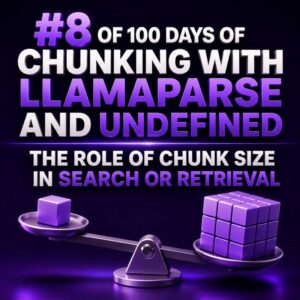
The Role of Chunk Size in Search or Retrieval

Chunk size is one of the highest-impact configuration choices in a retrieval-augmented search system. It determines how much text is embedded and returned as a single unit, which affects retrieval precision, context completeness, latency, storage cost, and the quality of answers generated from the retrieved content. For a WooCommerce agency, this decision matters whenever a system searches product documentation, support tickets, store policies, implementation notes, theme files, or customer-facing content. A chunk that is too small may match a query precisely but omit the conditions needed to interpret the match. A chunk that is too large may contain the answer, but bury it among unrelated content and reduce retrieval precision. What chunk size controls A chunk is usually measured in tokens, although some systems configure
Understanding Elements Before Creating Chunks

Chunking should begin with an understanding of the elements in a document, not with an arbitrary character limit. For a WooCommerce agency, this distinction matters because product guides, setup manuals, refund policies, API references, and support exports all contain different structures. A heading, table, warning, code sample, and paragraph should not be treated as interchangeable text. What an element represents An element is a meaningful unit produced during parsing. Depending on the parser and output format, an element may represent a title, heading, paragraph, list item, table, image description, code block, page header, page footer, or other document component. Before creating chunks with LlamaParse and Undefined, inspect the parsed output and identify which fields describe: Content: the visible text or structured data. Type: whether the

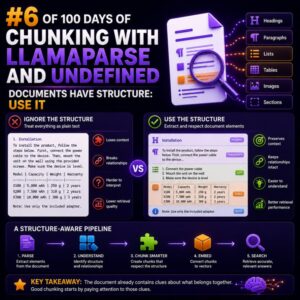
Documents Have Structure: Use It

Why flat text creates weak search results WooCommerce projects depend on documents whose meaning is tied to structure. A return policy, product catalog, installation guide, and shipping matrix do not communicate information in the same way. If each document is converted into one uninterrupted stream of text and split every 500 words, important relationships are lost. A chunk might contain a heading without the section it describes, a table row without its column labels, or a product specification separated from the product name. The resulting search result may contain the right words but still be unusable to an agency team, store manager, or support specialist. Chunk by document boundaries Start with the structure already present in the source document. Useful boundaries include: Document title and

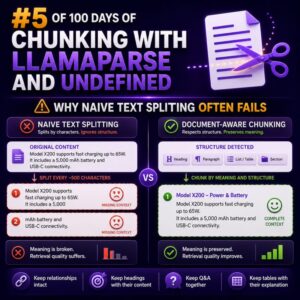
Why Naive Text Splitting Often Fails

Why Naive Text Splitting Often Fails Text chunking is easy to underestimate. A WooCommerce agency may take product descriptions, documentation, support articles, and store policies, split them into fixed-size blocks, and assume the resulting content is ready for search, retrieval, or downstream processing. In practice, naive splitting often separates the information customers need from the context that makes it useful. What Naive Splitting Looks Like The simplest approach divides text every 500 characters or 1,000 tokens, sometimes with a fixed overlap: chunk_size = 1000 chunk_overlap = 100</n This method is predictable, but it knows nothing about headings, paragraphs, product fields, HTML elements, tables, or WooCommerce shortcodes. A split can occur in the middle of a sentence, list item, price rule, or code example. How Context

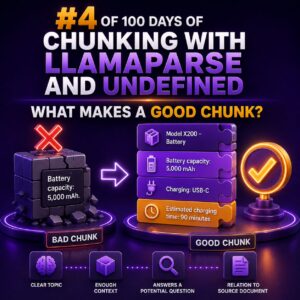
What Makes a Good Chunk?

Chunking Is a Content Design Problem A chunk is a self-contained section of content stored and retrieved as a unit. For a WooCommerce agency, that content might come from product documentation, support procedures, developer guides, client contracts, or checkout troubleshooting notes. A good chunk gives a reader—or a search system—enough information to understand one specific topic without requiring the entire source document. It should preserve the relationship between the subject, the relevant conditions, and the action or answer. What Makes a Chunk Good? One clear purpose: The chunk answers one closely related question or explains one procedure. Enough context: It identifies the product, feature, platform, or condition being discussed. Logical boundaries: It starts and ends at a heading, paragraph group, list, or complete procedural step

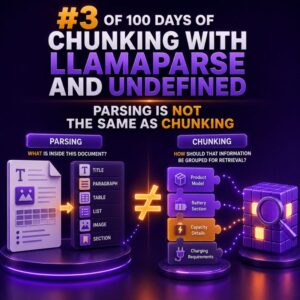
Parsing Is Not the Same as Chunking

When a WooCommerce project involves product catalogs, order exports, policy documents, or support content, two data-preparation tasks are often treated as if they were interchangeable: parsing and chunking. They solve different problems, and confusing them can lead to incomplete product data, broken search results, and unreliable downstream workflows. What parsing does Parsing converts a source file into structured, usable content. The parser identifies text, tables, headings, lists, links, page boundaries, and other document elements, depending on the format and the quality of the source. For example, a product specification PDF might contain: A product name and SKU Several paragraphs of description A technical specifications table A warranty section Footnotes and page headers A successful parsing step should preserve the relationship between those elements. The SKU

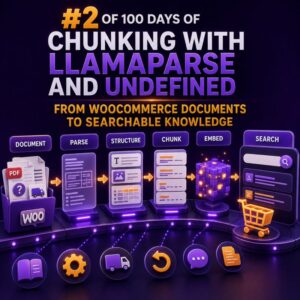
From WooCommerce Documents to Searchable Knowledge

Why WooCommerce documents need structure before search WooCommerce stores often contain valuable information across product guides, supplier PDFs, shipping policies, return documents, installation instructions, FAQs, and internal operating procedures. When these files are uploaded into a search system as raw text, important relationships are easily lost. Tables may become unreadable, headings can be separated from their content, and a result may not indicate which product, region, or customer group it applies to. A useful document pipeline should preserve the meaning of each section while adding enough metadata to filter results accurately. LlamaParse can be used at the extraction stage to convert complex documents into structured text, including documents that contain headings, tables, and mixed layouts. The parsed output can then be split into searchable chunks

Why Chunking Matters for WooCommerce AI Search

Why Chunking Matters for WooCommerce AI Search Product data is rarely written in a way that search systems can use efficiently. A WooCommerce product page may combine the product name, short description, long description, specifications, shipping information, variations, reviews, and custom fields in one large document. Treating that entire page as a single search unit makes it harder to retrieve the most relevant information for a customer’s question. Chunking solves this problem by splitting product and store content into smaller, meaningful sections. Each section can then be indexed and retrieved independently, giving a search system a better chance of finding the exact information needed to answer a query or filter a catalog. What Chunking Means in WooCommerce A chunk is a self-contained piece of content