

Chunking Is a Content Design Problem
A chunk is a self-contained section of content stored and retrieved as a unit. For a WooCommerce agency, that content might come from product documentation, support procedures, developer guides, client contracts, or checkout troubleshooting notes.
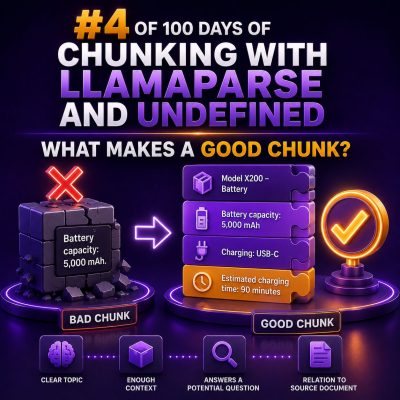
A good chunk gives a reader—or a search system—enough information to understand one specific topic without requiring the entire source document. It should preserve the relationship between the subject, the relevant conditions, and the action or answer.
What Makes a Chunk Good?
- One clear purpose: The chunk answers one closely related question or explains one procedure.
- Enough context: It identifies the product, feature, platform, or condition being discussed.
- Logical boundaries: It starts and ends at a heading, paragraph group, list, or complete procedural step rather than in the middle of a thought.
- Useful specificity: It includes important values such as plugin names, settings, error messages, user roles, and version requirements.
- Minimal noise: Navigation menus, repeated footers, unrelated disclaimers, and duplicate content are removed.
Example: A Poor Product-Setup Chunk
Consider this extracted text:
Enable the setting. This may not work with all gateways. Save changes. For more information, see the documentation. Customers can then complete checkout.
This chunk is difficult to use because it does not identify the setting, the affected gateways, or the conditions under which customers can complete checkout. It may have been split from the heading and the paragraphs that explained the feature.
Example: A Better Chunk
A stronger version would preserve the heading and the complete explanation:
Enable express checkout for eligible payment gateways
In WooCommerce, go to Settings > Payments > Express Checkout and enable the setting. Express checkout is supported by Stripe and PayPal, but availability depends on the customer’s device, browser, currency, and payment method. Select Save changes after updating the setting. Customers who meet the eligibility requirements will see the express checkout button on supported product and cart pages.
This chunk has a clear subject, a precise location in the WordPress admin, relevant limitations, and the expected result.
Keep Headings with Their Content
Headings carry essential meaning. A paragraph titled Refunds for subscription renewals means something different from a paragraph titled Refunds for physical products, even if both mention the same refund window.
When processing documentation, include the nearest heading or a useful heading path in the chunk. For example:
- Payments > Stripe > Express Checkout
- Subscriptions > Renewals > Failed Renewal Emails
- Shipping > Free Shipping > Minimum Order Amount
Heading context is particularly important when a document contains repeated terms such as “settings,” “requirements,” or “troubleshooting.”
Use Natural Boundaries Before Fixed Lengths
Fixed-size chunking is easy to implement, but character or token limits should not be the first rule. Splitting every document at the same length can separate a question from its answer, divide a code example, or detach a warning from the procedure it qualifies.
A practical order of preference is:
- Split by document sections and headings.
- Split long sections by paragraphs.
- Split unusually long paragraphs by sentences or list items.
- Apply a maximum size only after preserving those logical boundaries.
If a WooCommerce troubleshooting section is too long, divide it into distinct units such as symptoms, possible causes, diagnostic checks, and resolution steps. Do not divide a numbered procedure between the instruction and its required result.
How Much Context Should a Chunk Include?
A chunk should be complete enough to stand on its own, but not so broad that it combines several unrelated topics. Include:
- The feature or process being described.
- The relevant WooCommerce, WordPress, theme, or extension context.
- Prerequisites and restrictions that change the result.
- The actual steps, expected output, or policy answer.
For example, a note that says “set the threshold to 50” is incomplete. A useful chunk says what the threshold controls, where it is configured, whether the value uses the store currency, and what happens when the cart total reaches or falls below 50.
Use Overlap Carefully
Small overlap between adjacent chunks can protect context when a section must be split. For example, repeating the last sentence or a short heading context may help connect a continuation to the preceding section.
Overlap should not duplicate entire paragraphs across many chunks. Excessive overlap increases storage, creates repeated search results, and can make a procedure appear more authoritative than it is. Start with no overlap for well-structured sections, then add limited overlap only where testing shows that important context is being lost.
Treat Lists, Tables, and Code as Structured Content
WooCommerce documentation often relies on formats that lose meaning when extracted as plain text.
- Lists: Keep the introductory sentence with the list items when it defines their scope.
- Tables: Repeat the column headings or table subject in each extracted table chunk.
- Code: Keep the language label, required hooks, function names, and surrounding explanation together.
- Warnings: Keep warnings with the step or setting they qualify.
A shipping table containing “Zone,” “Method,” and “Cost” is not useful if the extracted chunk contains only values without the column headings. Likewise, a PHP snippet that uses a filter without its hook name or required arguments is incomplete.
Include Metadata That Changes the Meaning
Store metadata alongside each chunk rather than forcing the text to carry every administrative detail. Useful fields for an agency knowledge base include:
- Client or store identifier
- Source URL or document name
- Content type, such as runbook, policy, product guide, or support ticket
- Plugin and WooCommerce version
- Language and publication date
- Access permissions
Metadata supports filtering and prevents a procedure for one client’s custom checkout from being confused with a general WooCommerce procedure. Access permissions are essential when chunks contain private credentials, pricing, customer information, or client-specific configuration. Sensitive values should be removed before indexing.
Examples of Useful Chunk Sizes
There is no universal chunk size. A short support answer may be complete in one or two paragraphs. A technical procedure may need several paragraphs, a list of prerequisites, and a verification step.
As a starting point for testing:
- FAQ or support answer: One question, its conditions, and its answer.
- Configuration procedure: Prerequisites, numbered steps, and verification, usually kept as one unit when reasonably short.
- Troubleshooting guide: One symptom and its related checks and fixes.
- Policy document: One policy rule, its scope, exceptions, and effective date.
Measure results using real agency questions. If users receive incomplete answers, chunks are probably too small or missing context. If results regularly combine unrelated settings, chunks are probably too large or boundaries are poorly defined.
A Practical Quality Checklist
Before publishing a chunked WooCommerce knowledge base, review a sample manually:
- Can someone identify the topic from the chunk alone?
- Does the chunk preserve its heading or heading path?
- Are prerequisites, limitations, and version details included?
- Are steps kept in the correct order?
- Are tables, lists, warnings, and code still understandable?
- Has repeated navigation, boilerplate, and unrelated content been removed?
- Does the metadata identify the correct client, source, version, and permissions?
- Can the chunk answer a realistic agency question without requiring an arbitrary neighboring chunk?
Good chunks are not simply equal-sized pieces of a document. They are deliberately scoped units of meaning. For WooCommerce agencies, that usually means preserving the feature, conditions, steps, and expected result that a team member needs to resolve a store issue or complete a client task.