

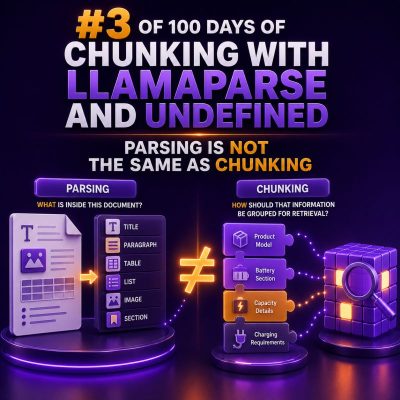
When a WooCommerce project involves product catalogs, order exports, policy documents, or support content, two data-preparation tasks are often treated as if they were interchangeable: parsing and chunking. They solve different problems, and confusing them can lead to incomplete product data, broken search results, and unreliable downstream workflows.
What parsing does
Parsing converts a source file into structured, usable content. The parser identifies text, tables, headings, lists, links, page boundaries, and other document elements, depending on the format and the quality of the source.
For example, a product specification PDF might contain:
- A product name and SKU
- Several paragraphs of description
- A technical specifications table
- A warranty section
- Footnotes and page headers
A successful parsing step should preserve the relationship between those elements. The SKU should remain associated with the correct product, and a value such as “Maximum load: 25 kg” should not be detached from its specification label.
Parsing is primarily about representation and extraction. It answers questions such as:
- What content exists in the source?
- Where are the headings, paragraphs, and tables?
- Which values belong to which row or product?
- What metadata should be retained, such as page number or source URL?
What chunking does
Chunking divides parsed content into smaller sections for storage, indexing, retrieval, or processing. It happens after—or as part of—a structured parsing workflow, but it has a different purpose.
A 40-page returns policy may be parsed into headings, paragraphs, and lists first. Chunking can then group those elements into sections such as:
- Eligibility for returns
- Time limits
- Excluded products
- Damaged goods procedure
- Refund processing
The chunks should be small enough to retrieve or process efficiently, while retaining enough context to remain useful on their own.
Why the distinction matters in WooCommerce
WooCommerce agencies frequently work with mixed content: CSV product feeds, supplier PDFs, manufacturer catalogs, Word documents, spreadsheets, and HTML pages. Each format has different structural risks.
If a catalog is parsed incorrectly, chunking cannot repair the result. For example, if a table parser places every specification value into one long column, creating smaller chunks will only produce smaller pieces of incorrect data.
Likewise, a correctly parsed document can still produce poor results if it is chunked without considering its structure. Splitting a product description from its SKU, price rules, or compatibility information makes the resulting content difficult to search and verify.
A practical product-catalog example
Suppose a supplier provides a PDF with three products per page. Each product includes a name, SKU, description, dimensions, and compatibility notes.
The parsing stage should produce records similar to:
{
  "product_name": "Alpine Roof Rack",
  "sku": "ALP-RR-220",
  "description": "Aluminium roof rack for medium vans.",
  "dimensions": {
    "length": "2200 mm",
    "width": "120 mm"
  },
  "compatibility": "Fits Transit Custom models from 2018 onward",
  "source_page": 4
}
Chunking can then create one product-level chunk containing the name, SKU, description, dimensions, compatibility, and source reference. If the description is unusually long, it can be divided into smaller semantic sections while repeating the product identity in each chunk.
A poor approach would be to split the raw page every 500 characters. That method may separate the SKU from the product name, place dimensions in a different chunk, and combine the end of one product with the beginning of another.
Chunk by meaning, not only by length
Fixed-size chunking is simple, but it should not be the only rule used for WooCommerce content. Useful boundaries often include:
- Product records
- Document headings
- FAQ questions and answers
- Policy sections
- Table rows or logical table groups
- Order-export records
Maximum size still matters, particularly when content will be indexed or sent through a service with input limits. A practical strategy is to use semantic boundaries first, then apply a size limit only when a section is too large.
Preserve metadata in every chunk
Each chunk should carry enough metadata to identify and verify its source. For WooCommerce projects, useful fields may include:
- Product ID or SKU
- Category or taxonomy path
- Document name
- Source URL
- Page number or spreadsheet row
- Supplier name
- Last updated date
- Language or market
For example:
{
  "content": "Fits Transit Custom models from 2018 onward.",
  "metadata": {
    "sku": "ALP-RR-220",
    "category": "Van Accessories > Roof Racks",
    "source_file": "supplier-catalogue.pdf",
    "source_page": 4
  }
}
Metadata makes it easier to trace a result back to the original supplier content and to update or remove affected chunks when a product changes.
Handling tables safely
Tables require special attention because their meaning depends on headers and row relationships. A chunk containing “25 kg” is not useful if it no longer includes the associated label, such as “Maximum load.”
Before chunking a table, consider converting each logical row into a readable record:
Material: Aluminium
Maximum load: 25 kg
Warranty: 3 years
For large WooCommerce price lists, preserve the column headers, currency, customer group, minimum quantity, and effective date. Never assume that a numeric value is self-explanatory after the table has been divided.
Validation checks for agency projects
Build validation into the pipeline before importing or indexing the result. Useful checks include:
- Every product chunk has a SKU or another stable identifier.
- No chunk combines content from two products.
- Headings remain attached to the sections they describe.
- Table headers are retained with table values.
- Page, row, or source references are present.
- HTML entities, units, prices, and decimal values are preserved correctly.
- Duplicate headers and repeated page footers are removed where appropriate.
For a supplier catalog, manually inspect a sample from the first, middle, and final pages. Compare the parsed records with the source document before processing the complete catalog.
Recommended workflow
- Identify the source formats and their structural risks.
- Parse each source into structured elements.
- Normalize labels, whitespace, units, and metadata.
- Validate relationships between product names, SKUs, tables, and descriptions.
- Chunk by product, heading, question, policy section, or another meaningful boundary.
- Apply size limits only after semantic grouping.
- Attach source metadata to every chunk.
- Test representative chunks against the original files.
Parsing determines whether the content has been understood correctly. Chunking determines how that verified content is divided for practical use. Treating them as separate stages gives WooCommerce teams better data quality, easier troubleshooting, and more reliable catalog and content operations.