Elasticsearch guides for WordPress & WooCommerce

Wordpress Ajax (live) search

How to add Ajax (live) search to WordPress

In today’s world, every popular website is equipped with some form of Ajax search. allowing users to experience real-time updates and dynamic search suggestions as they type. This seamless interaction enhances user engagement and provides instant access to relevant information, ensuring a smoother and more efficient browsing experience overall. So how could you add this search feature to your WordPress website. Well this step-by-step guide will teach you.   What is Ajax search Example of a autocomplete Ajax search in WordPress using WPSolr plugin. Ajax search consists of returning results in real-time as a user enters text in a search. It will simply place the clickable results under the aforementioned search bar and differentiates itself from regular search by not reloading the page. This seamless


How to (Easily) Configure Elasticsearch on WordPress

One of the best ways of improving user experience on your WordPress websites is to have a speedy and accurate search. While the default search can be quite effective on websites with limited amounts of data, it’s speed can become problematic (slow) as traffic and data increases. This is why, in this case, you should replace your WordPress search with a high performance search engine. But where do you start? Elasticsearch is an easy choice, since it is probably the one with the best price to performance ratio.   Elasticsearch search stack for WPSOLR You can install our fully functional Elasticsearch search stack from GitHub, ready to work with WPSOLR. What is Elasticsearch ? While the default WordPress search (and many other search plugins such

Wordpress search

WordPress search : Ultimate Guide

WordPress is the most widely used CMS and single handedly powers 40% of the web. If you haven’t tried it already, it is intuitive, powerful and if you use one of many hosting providers out there, you can easily set up a working website in minutes. But once you made all of your content, how do you ensure that your users can find it. For that, you need a good site search. Many types of search exist : keyword search, AI search, even personalized search. WordPress provides one by default, but it is incredibly slow and ineffective. This guide will go over the benefits of a fast and relevant search and how you could implement third party search engines easily into any WordPress or Woocommerce

Comparing search technologies: Elasticsearch vs. Solr vs. Algolia in WordPress

Search functionality is crucial for many websites, particularly e-commerce platforms, where a significant portion of online transactions originates from search queries. Unfortunately, the default search feature in WordPress often falls short of expectations, making the addition of a search plugin a necessary upgrade. WPSOLR stands out as an excellent choice, catering to a wide range of website needs and supporting various search engines. This article will delve into Elasticsearch, Solr, and Algolia, comparing their features and performance. Although these are just a few of the search engines compatible with WPSOLR, they are among the most renowned. Each offers unique advantages, and we’ll explore how they stack up against each other in the following comparison.   Elasticsearch Elasticsearch, built atop the Lucene library, stands out for

How do search engines use inverted indexes?

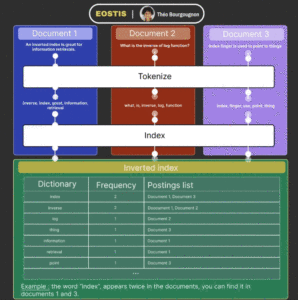
How are inverted indexes used ?   Have you ever wondered how search engines and libraries like Lucene, Solr and Elasticsearch work?   They use inverted indexes which are faster and more efficient than forward indexes since the document database doesn’t need to perform a full table scan. They are a fundamental component of keyword search.   Almost every software that does Information Retrieval uses some kind of inverted index since you don’t go through a list of documents hoping to find the match, you go through a list of documents that you already know contains the match.     How do inverted indexes work ?   Indexation works in a few steps : The data received is tokenized : it simplifies each word of

demo woocommerce flatsome 100 thousand products

Did you know that Elasticsearch is free on Cloudways?

Why not use it with elasticpress.io or wpsolr.com or wpsolr free https://wordpress.org/plugins/wpsolr-free/ to power your WooCommerce or #WordPress? Try the Elasticsearch demo on Cloudways with WPSOLR: https://demo-woocommerce-flatsome-cloudways.wpsolr.com/shop/ The configuration is described in the link. And even more, with WPSOLR, for DigitalOcean clients eager to use Algolia https://demo-woocommerce-flatsome-cloudways-algolia.wpsolr.com/shop/, Elasticsearch, OpenSearch Project https://demo-woocommerce-cloudways-100k-aws-opensearch.wpsolr.com/shop/, Google Retail search https://lnkd.in/dNz83eQw, or even Weaviate vector search https://demo-woocommerce-flatsome-cloudways-2k-cohere.wpsolr.com/shop/, and soon Vespa.ai https://demo-woocommerce-flatsome-cloudways-2k-vespa.wpsolr.com/shop/. Try all WPSOLR search demos on Cloudways: /wpsolr-demos/

Elasticsearch indexing: Tips for getting it right

Introduction Elasticsearch is a powerful open-source search engine that provides fast and scalable indexing capabilities. When it comes to indexing data in Elasticsearch, there are a few tips and best practices that can help you get it right. In this post, we will explore these tips and also look at how the PHP client for Elasticsearch can be used to index data. Additionally, we will discuss the benefits of using WPSOLR, a WordPress plugin that integrates Elasticsearch to enhance search functionality. Elasticsearch Indexing Tips 1. Define a Suitable Data Model: Before indexing data, it is crucial to define a suitable data model that represents the information you want to search. This includes identifying the fields and their respective data types. 2. Optimize Mapping: Elasticsearch allows

Elasticsearch for WooCommerce setup on a dedicated server

Introduction Elasticsearch is a powerful search and analytics engine that is designed for distributed environments. It provides capabilities for full-text search, real-time analytics, and data visualization. When combined with WooCommerce, Elasticsearch can significantly improve the search functionality of your online store, making it easier for customers to find the products they are looking for. Setting up Elasticsearch on a dedicated server can be a complex process, but with the right guidance, it can be done efficiently. In this post, we will walk you through the steps required to set up Elasticsearch for WooCommerce on a dedicated server, along with an integration using the PHP client.   Prerequisites Before we begin, it is important to note that setting up Elasticsearch on a dedicated server requires a

How to troubleshoot Elasticsearch

Introduction Elasticsearch is a powerful distributed search and analytics engine that is widely used for storing, searching, and analyzing large volumes of data. However, like any other technology, Elasticsearch can encounter issues and require troubleshooting to ensure optimal performance. In this post, we will explore some common troubleshooting techniques when working with Elasticsearch.   Troubleshooting Elasticsearch 1. Check Elasticsearch Cluster Status: The first step in troubleshooting Elasticsearch is to check the cluster status. You can use the Elasticsearch PHP client library to query the cluster health and obtain information about individual nodes, indices, and their status. Here’s an example of how you can use the PHP client to obtain the cluster health: require 'vendor/autoload.php'; $client = Elasticsearch\ClientBuilder::create()->build(); $response = $client->cluster()->health(); // Check the cluster status

Different Elasticsearch search patterns for WooCommerce

Introduction Elasticsearch has emerged as a popular solution for building search functionality into web applications. WooCommerce, being one of the leading eCommerce platforms, can greatly benefit from integrating Elasticsearch to enhance search capabilities. In this post, we will explore different Elasticsearch search patterns specifically tailored for WooCommerce, along with some code examples to get you started. Elasticsearch PHP Client To use Elasticsearch in your WooCommerce store, you need to communicate with the Elasticsearch server using a programming language. In this example, we will be using the official Elasticsearch PHP client. The first step is to install the Elasticsearch PHP client library using Composer. Open your terminal and navigate to your WooCommerce project directory. Run the following command: Next, let’s create a simple search function that

Elasticsearch in the cloud: The pros and cons

Introduction Elasticsearch is a popular search and analytics engine that is widely used for its scalability, speed, and ease of use. It is designed to handle large amounts of data and perform real-time searches and analytics on that data. When it comes to deploying Elasticsearch, one option that many organizations consider is deploying it in the cloud. There are several cloud providers that offer Elasticsearch as a managed service, such as Amazon Web Services (AWS) Elasticsearch Service, Google Cloud Elasticsearch, and Elasticsearch Service on Elastic Cloud. In this post, we will explore the pros and cons of using Elasticsearch in the cloud, and also provide some code examples using the PHP client for Elasticsearch. Pros of Elasticsearch in the cloud 1. Scalability: One of the

Using Elasticsearch for creating dynamic facets in WooCommerce

Introduction Elasticsearch is a powerful search and analytics engine that can be used to enhance the search capabilities of your WooCommerce website. One of the key features of Elasticsearch is the ability to create dynamic facets, which allow users to easily refine their search results based on various attributes. In this post, we will explore how Elasticsearch can be used to create dynamic facets in WooCommerce and how you can implement it using the PHP client.   Using Elasticsearch for Dynamic Facets in WooCommerce Facets in Elasticsearch are essentially filters that allow users to narrow down their search results by applying certain criteria. For example, if you are running an online store and have products with attributes such as color, size, and brand, you can

Elasticsearch and the world of machine learning

Introduction Elasticsearch is a powerful, open-source search engine built on top of the Apache Lucene library. It is commonly used to store, search, and analyze large volumes of data. The world of machine learning, on the other hand, is concerned with creating algorithms that can learn from and make predictions or take actions based on data. Combining Elasticsearch and machine learning can be a game-changer in terms of the insights and actions that can be derived from data. In this post, we will explore some ways in which Elasticsearch can be leveraged for machine learning tasks and how the two technologies can complement each other. Using Elasticsearch for Machine Learning Elasticsearch provides several features and functionalities that can be beneficial for various machine learning tasks.

How to migrate to Elasticsearch from other search engines in WooCommerce

Introduction Migrating from other search engines to Elasticsearch can greatly improve the search capabilities of your WooCommerce store. Elasticsearch is a powerful, open-source search engine that provides scalability and high performance. In this post, we will discuss the steps to migrate to Elasticsearch from other search engines in WooCommerce, along with some code examples using the PHP client. Additionally, we will explore how the WPSOLR plugin can assist you in this migration process. Understanding the Migration Process Before we dive into the technical details, it is crucial to understand the overall migration process. Here are the general steps involved in migrating to Elasticsearch from other search engines in WooCommerce: 1. Set up an Elasticsearch instance: Start by installing Elasticsearch and setting up a new Elasticsearch

The benefits of Elasticsearch security

Introduction Elasticsearch is a powerful and flexible search and analytics engine that is widely used for storing, searching, and analyzing data. However, using Elasticsearch without proper security measures can leave your system vulnerable to data breaches and unauthorized access. This is where Elasticsearch security comes into play. Elasticsearch security provides a range of features and functionalities to protect your data and ensure that only authorized users have access to it. In this post, we will explore the benefits of Elasticsearch security and how it can help in securing your Elasticsearch cluster. The Benefits of Elasticsearch Security 1. Authentication: Elasticsearch security allows you to enable different authentication mechanisms, such as username/password, Active Directory/LDAP integration, or JSON web tokens. This ensures that only authenticated and authorized users

Making data-driven decisions with Elasticsearch and WooCommerce

Introduction In today’s digital age, businesses are collecting vast amounts of data from various sources such as websites, apps, and online transactions. This data holds valuable insights that can help businesses make informed decisions and improve their operations. However, with such a massive volume of data, it can be overwhelming for businesses to analyze and extract meaningful information from it. This is where Elasticsearch, a powerful and scalable search and analytics engine, comes into play. Elasticsearch allows businesses to index, search, and analyze their data in real-time, enabling them to make data-driven decisions quickly and efficiently. WooCommerce, on the other hand, is a popular open-source e-commerce platform that powers thousands of online stores worldwide. Integrating Elasticsearch with WooCommerce can provide businesses with a robust and

Understanding Elasticsearch Indexing Processes

Introduction Elasticsearch is a powerful open-source search engine known for its high performance, scalability, and ease of use. It is widely used for indexing and searching large volumes of data in real-time. Understanding the indexing processes in Elasticsearch is crucial for efficiently managing and querying your data. In this post, we will dive into the intricacies of Elasticsearch indexing processes and explore how it works under the hood. We will also provide some code examples using the PHP client to demonstrate the indexing capabilities of Elasticsearch. Understanding Elasticsearch Indexing Processes Elasticsearch follows a document-oriented approach, where the basic unit of information is a document. A document can be any JSON-serializable data, and Elasticsearch indexes these documents for efficient searching and retrieval. Indexing Basics When you

Elasticsearch vs. Solr: Which one is better?

Introduction Elasticsearch and Solr are two of the most popular and widely-used search engines in the field of information retrieval. Both offer powerful features and are capable of handling large-scale search applications efficiently. However, when it comes to choosing between Elasticsearch and Solr, it can be challenging to determine which one is better suited for your specific use case. In this post, we will explore the differences between Elasticsearch and Solr, compare their key features, and discuss how WPSOLR can help enhance your search capabilities.   Elasticsearch Elasticsearch is a real-time search and analytics engine built on top of the Apache Lucene library. It is known for its distributed architecture, scalability, and speed. One of the key advantages of Elasticsearch is its ability to handle

The top Elasticsearch use cases

Introduction Elasticsearch is a highly scalable, distributed, and open-source search and analytics engine. It is built on top of Apache Lucene and provides a RESTful API, making it incredibly easy to integrate with various programming languages and frameworks. Elasticsearch is well-known for its ability to handle large volumes of data in real-time, making it suitable for a wide range of use cases. In this post, we will explore some of the top Elasticsearch use cases and how it can be utilized with the PHP client. We will also highlight how WPSOLR, an advanced search plugin for WordPress, can leverage Elasticsearch to enhance search functionality. Top Elasticsearch Use Cases 1. Logging and Log Analysis Elasticsearch is commonly used for logging and log analysis purposes. It effortlessly

The role of analytics in eCommerce with Elasticsearch

Introduction: In the ever-evolving world of eCommerce, it is crucial for businesses to make data-driven decisions that optimize their online storefronts and improve customer experiences. This is where analytics comes into play. By harnessing the power of analytics, businesses can uncover valuable insights from vast amounts of data, opening up opportunities for optimization and growth. One such tool that has gained immense popularity in recent years is Elasticsearch. In this post, we will explore the role of analytics in eCommerce with Elasticsearch and showcase how it can be leveraged using the PHP client.   The Role of Analytics in eCommerce Analytics plays a pivotal role in eCommerce by providing businesses with the ability to understand customer behavior, make data-driven decisions, and optimize their online platforms.

Multi-modal WooCommerce search: Elasticsearch orders + Weaviate Cohere products + Weaviate CLIP media.

— Current solution — Just finished upgrading a WooCommerce client, who already had a front-end products multi-lingual Weaviate + Cohere search, and also a 200,000 orders/coupons Elasticsearch admin search. — Needs — The client’s team had troubles searching in thousands of unlabelled media images. — New solution — After upgrading the Weaviate Kubernetes cluster to enable the CLIP module, we indexed the thousands of images. This was relatively fast, on CPUs. — Results — Now the team can search images from their content, rather than from titles and captions. This was done thanks to the WPSOLR “views”, each setup with a dedicated index. WPSOLR + Weaviate + Cohere + CLIP: https://tmp-bopa1934-odns.wpsolr.com #search #clip #cohere #weaviate #woocommerce

Advanced Elasticsearch features to improve search results in WooCommerce

Introduction WooCommerce is a versatile and widely used plugin on WordPress that powers e-commerce websites. One of its most vital functionalities is the search bar that lets customers search for products with ease. However, the default search functionality is rather basic and can sometimes give irrelevant results. Elasticsearch is an open-source search engine that powers advanced search and analytics. In this post, we will discuss the advanced Elasticsearch features that can help improve search results in WooCommerce. Advanced Elasticsearch features 1. Fuzziness Fuzziness refers to the ability of Elasticsearch to find results with similar spellings to the searched query. This is an essential feature when customers misspell words while searching. This feature can be enabled in the Elasticsearch index settings. 2. Synonyms Synonyms refer to

Leveraging Elasticsearch to power faceted search in WordPress and WooCommerce

Introduction Faceted search is a powerful feature that allows users to filter search results based on specific criteria. Elasticsearch is a highly scalable search engine that can be leveraged to provide faceted search capabilities in WordPress and WooCommerce. In this post, we’ll explore how Elasticsearch can be used to power faceted search and provide some code snippets to help you get started. Using Elasticsearch for Faceted Search Elasticsearch has powerful aggregation features that can be used to break down search results into categories based on specific criteria. These categories can be presented to users in a sidebar, allowing them to easily filter results based on their preferences. To get started, you’ll need to install Elasticsearch on your server and create an index for your content.

Elasticsearch indexing in WooCommerce

Introduction Elasticsearch is an open-source full-text search engine that is widely used in e-commerce platforms like WooCommerce. Elasticsearch indexing is the process of adding and updating data (product, customer, order) into Elasticsearch, allowing users to quickly and accurately search for the content they need. This blog post will explore how Elasticsearch indexing works in WooCommerce, along with some PHP client code examples. Additionally, we will discuss how WPSOLR can help enhance WooCommerce’s search capabilities by providing a fast and efficient search engine. Elasticsearch Indexing in WooCommerce WooCommerce allows you to create a custom Elasticsearch index to store and search your data. By default, WooCommerce indexes products, orders, and customers, However, you can add other custom post types or taxonomy to your index. When items in

Apache Solr versus Elasticsearch: which is better?

Introduction Apache Solr and Elasticsearch are both incredibly powerful open-source search engines that can deliver lightning-fast search results for developers who want to provide users with an optimized search experience. Both of these tools can perform a wide range of search-related functions, including text searches, suggestions, spellchecking, and more. In this post, we will take a closer look at the differences between Apache Solr and Elasticsearch, and which one may be better suited to your specific needs. Apache Solr vs Elasticsearch: Which One is Better? Both Apache Solr and Elasticsearch can deliver impressive search engine capabilities. Here are a few key differences between the two: Data Handling Apache Solr is often preferred for its data handling capabilities. It is particularly well-suited for handling complex, structured

How to set up an Elasticsearch cluster

Introduction If you’re looking for a distributed, open-source search and analytics engine, then Elasticsearch is your best bet. It can help you with structured and unstructured data, including HTTP web logs, machine-generated data, and social media. It’s fast, reliable, and scalable, making it a popular choice for big data search applications. In this post, we’ll show you how to set up an Elasticsearch cluster. What is Elasticsearch? Elasticsearch is a distributed search engine that uses Lucene for full-text indexing and search. It’s written in Java and uses the Apache Lucene library to provide fast and accurate indexing of large amounts of data. Elasticsearch is designed to be scalable, fault-tolerant, and easy to use. How to set up an Elasticsearch cluster To set up an Elasticsearch

Elasticsearch and the future of search

Introduction Elasticsearch is an open-source search engine that is built on top of Apache Lucene. It allows for scalable search, efficient data indexing, and fast queries. Elasticsearch was developed in 2010, by Shay Banon, an Israeli software developer, and its popularity is constantly increasing since then. The future of search is uncertain, but one thing is for sure – Elasticsearch is going to play a significant role in it. Elasticsearch and the Future of search The importance of Elasticsearch in the future of search cannot be overstated. The volume of data being generated by the world is unimaginable, and with the increasing growth of social media platforms and cloud technologies, the need for efficient search engines is more significant than ever. Elasticsearch has emerged as

Creating custom Elasticsearch queries for WooCommerce

Introduction When it comes to optimizing the search experience on your WooCommerce website, Elasticsearch is the best search engine that you can use. Elasticsearch is a fast, scalable, and powerful solution that can improve the search experience on your WooCommerce website dramatically. However, there is a lot of work that goes into creating custom Elasticsearch queries for WooCommerce. In this post, we will walk you through the process of creating custom Elasticsearch queries for WooCommerce. Creating Custom Elasticsearch Queries for WooCommerce The first step to creating custom Elasticsearch queries for WooCommerce is to install Elasticsearch on your server. Once you have Elasticsearch installed, you can start building custom queries using the Elasticsearch API. The easiest way to do this is to use the Elasticsearch PHP

How to install Elasticsearch on Windows

Introduction Elasticsearch is a powerful open-source search and analytics engine that enables you to store, search, and analyze large volumes of data quickly, reliably, and in near-real-time. With Elasticsearch, you can perform complex searches, visualize data, and create dashboards. Elasticsearch is written in Java and is extremely scalable and easy to use. If you are using Windows, then you can install Elasticsearch on your system and start using it for your project. In this post, we will guide you through the steps for installing Elasticsearch on Windows. Step 1: Download and Install Java JDK Before you start the installation of Elasticsearch, you need to download and install the Java Development Kit (JDK) on your system. Elasticsearch requires Java 8 or later version to run, so

Implementing custom ranking in Elasticsearch for WooCommerce

Introduction Elasticsearch is a powerful open-source search engine that can be used with many different applications. WooCommerce is one such application and is known as one of the most popular eCommerce platforms. By default, WooCommerce uses a relevance ranking system to sort the search results. However, sometimes businesses require different ranking systems, and hence, being able to implement a custom ranking system within Elasticsearch can be highly advantageous. In this post, we will discuss how you can implement custom ranking in Elasticsearch for WooCommerce with PHP client. We will also talk about how WPSOLR, a popular WordPress plugin, can help with that. Implementing Custom Ranking in Elasticsearch for WooCommerce To implement a custom ranking in Elasticsearch for WooCommerce, we need to understand how Elasticsearch handles

10 reasons why Elasticsearch is the best search engine

Elasticsearch is a powerful search engine that has become increasingly popular in recent years. It has become the go-to search engine for companies and organizations of all sizes that need to search and analyze large amounts of data quickly and efficiently. In this post, we will discuss the 10 reasons why Elasticsearch is the best search engine and how it can benefit your business. Reason 1: Scalability and Performance Elasticsearch is built to handle large amounts of data and is highly scalable. It can easily handle millions of queries per second and can handle large amounts of data without any performance issues. It also has a distributed architecture, which means that it can be scaled horizontally across multiple servers. Reason 2: Full-Text Search and Analysis

Elasticsearch alternatives for WooCommerce

Introduction WooCommerce is a popular e-commerce platform that runs on WordPress. However, when it comes to search functionality, WooCommerce comes with its own built-in search functionality. But this search functionality is not always enough. Often, store owners face issues with search performance, relevancy, and scalability when the store has a large number of products. Elasticsearch, a search engine based on Lucene, could be the solution for such issues. Elasticsearch can help to optimize search performance, relevancy, and scalability. It provides full-text search, document-oriented storage, and real-time distributed search and analytics. However, Elasticsearch is not the only solution available in the market, so let’s take a look at some Elasticsearch alternatives for WooCommerce. Elasticsearch Alternatives Algolia Algolia is a cloud-based search engine that provides a fast

How Elasticsearch powers search

Introduction With the growing amount of data available on the internet, managing and searching through this data has become increasingly challenging. Elasticsearch is a search engine that enables users to perform complex searches on large amounts of data in real-time. Users can perform text searches, structured searches, and analytics through Elasticsearch. In this article, we will discuss how Elasticsearch powers search, using a PHP client and how WPSOLR can help users in the management and customization of Elasticsearch. Elasticsearch and Search Queries Elasticsearch is based on Lucene, a software library for full-text search. Elasticsearch manages, indexes, and searches through a vast volume of data in real-time using a request-response system in JSON format. It has various features such as performance optimization, high scalability, availability, and

Algolia vs Elasticsearch: Which one should you choose?

Introduction When it comes to search engines, Algolia and Elasticsearch are two of the most popular options. They both have their strengths and weaknesses, which can make it difficult to determine which one is the right choice for your project. In this article, we’ll compare Algolia vs Elasticsearch and provide some guidance on which one to choose. Algolia is a cloud-based search engine that offers lightning-fast search results, and easy-to-use features. Elasticsearch, on the other hand, is open-source software that can be hosted on your own servers or in the cloud. It is known for its powerful search capabilities, scalability, and flexibility. So, which one should you choose? Algolia vs Elasticsearch: Speed and Scalability One of the biggest advantages of Algolia is its speed. It

Using Elasticsearch to improve customer experience in WooCommerce

Introduction Elasticsearch is a highly customizable and scalable open source search engine. It provides solutions for full-text search, structured search, analytics, and more. By integrating Elasticsearch with WooCommerce, you can significantly improve the search experience of your customers by providing accurate and relevant search results. Using Elasticsearch to improve customer experience in WooCommerce When customers search for products on an e-commerce site, they expect the search results to be accurate and aligned with their search intent. However, the default search engine of WooCommerce may not always provide the best results. This is where Elasticsearch can help. By using Elasticsearch, you can build a powerful search engine that can handle complex search queries and provide relevant results within milliseconds. Elasticsearch uses various techniques like text analysis,

Understanding the basics of Elasticsearch

Introduction Elasticsearch is an open-source and highly scalable search engine. Its core function is to monitor and store large volumes of data, therefore, making it readily available for search query requirements. Its search engine structure revolves around a REST API, offering developers the ability to interact with the search engine via indices. When compared to other types of search engines, Elasticsearch stands out because of its scalability, speed, and efficiency in handling complex queries. Additionally, it is an open-source software which makes it easier for users to fine-tune and modify it. Before delving further into the functionalities of Elasticsearch, let’s have a brief overview of its salient features. Salient Features The following are some of Elasticsearch’s outstanding features: 1. Scalability: Elasticsearch was designed to be

The benefits of using Elasticsearch for catalog management in WooCommerce

Introduction In recent times, e-commerce has become one of the most reliable and widespread methods of buying and selling products. WooCommerce is an excellent platform that allows businesses to create online stores easily. However, managing a vast catalog of products can be a daunting task. That’s where Elasticsearch comes in. Elasticsearch is an open-source search engine built on top of the Apache Lucene library. It is fast, scalable, and designed to handle large amounts of data. In this post, we’ll explore the benefits of using Elasticsearch for catalog management in WooCommerce and how you can implement it using the PHP client. Benefits of Using Elasticsearch for Catalog Management in WooCommerce 1. Faster Search Results: Elasticsearch is built to handle large volumes of data, and it

Different ways of integrating Elasticsearch with WooCommerce

Introduction Elasticsearch is an open-source search engine that helps in storing and indexing data quickly and efficiently. It is a powerful tool that can be integrated with various applications, including eCommerce platforms like WooCommerce. WooCommerce is a free WordPress plugin that allows businesses to sell their products online through their websites. Integrating Elasticsearch with WooCommerce can enhance the search experience for users and provide better search results. In this post, we will discuss different ways of integrating Elasticsearch with WooCommerce and how WPSOLR can help in this process. We will also add some PHP code to help you get started with the Elasticsearch client. Integrating Elasticsearch with WooCommerce There are different ways to integrate Elasticsearch with WooCommerce, and we will discuss some of them here:

Top Elasticsearch plugins for WooCommerce

Introduction Elasticsearch is a powerful and popular search engine that can be integrated with WooCommerce to improve search functionality. However, Elasticsearch alone may not offer many features that you may want or need for your online store. That is why Elasticsearch plugins are important. In this post, we will discuss some of the top Elasticsearch plugins for WooCommerce and how they can add more functionality to your search engine. We will also give a brief overview of the plugins and how they work with Elasticsearch. Top Elasticsearch Plugins for WooCommerce 1. Elasticsearch for WooCommerce – This plugin is designed to help you integrate Elasticsearch with WooCommerce. It has many features that will help you create a more powerful search engine that can handle large amounts

Exploring the Role of AI in Enhancing Search Engine Efficiency

Introduction Search engines have become an integral part of our daily lives, assisting us in finding relevant information from the vast sea of data available on the internet. Over the years, advancements in artificial intelligence (AI) have played a crucial role in enhancing search engine efficiency. AI-powered techniques, such as LLMs (large language models), vector search, and advanced algorithms, have revolutionized the way search engines retrieve and rank information. In this article, we will explore the role of AI in enhancing search engine efficiency and highlight some cutting-edge technologies like Weaviate, Pinecone, Vespa, Elasticsearch, Solr, and Algolia. Additionally, we will discuss how AI has rendered previous search tricks unnecessary and has opened up new possibilities for multi-language search capabilities.   Enhancing Search Efficiency with AI