100 Days of Weaviate guides for WordPress & WooCommerce

Designing a Product Collection for WooCommerce

A useful WooCommerce search experience starts with a deliberate product model. Before importing products into Weaviate, decide which product facts should be searchable, which should be filterable, which should be returned to the storefront, and which should remain in WooCommerce as the source of truth. Define the search contract first A product collection should support the queries your storefront and merchandising tools actually perform. Typical requirements include: Semantic search such as waterproof commuter backpack for a laptop. Keyword matching for product names, SKUs, brands, and technical specifications. Structured filters for price, stock status, category, brand, attributes, and ratings. Catalog scoping by language, channel, customer group, or store. Stable identifiers that let the application retrieve the authoritative WooCommerce product. Write these requirements down before choosing properties.

Your First Weaviate Collection

In Weaviate, a collection is the top-level container for a type of object. For a WooCommerce agency, a collection might represent products, product documentation, orders, support articles, or store policies. It defines the properties stored on each object and the vector configuration used for semantic search. Choose a collection boundary Start with one business concept rather than creating a single collection for every record in a store. A Product collection is a sensible first example because product data commonly supports search, recommendations, merchandising, and support workflows. A useful product record might include: sku for the WooCommerce product identifier name for the product title description for searchable product content categories for taxonomy values price for filtering or display metadata permalink for linking search results back to

Why Semantic Search Changes Product Discovery

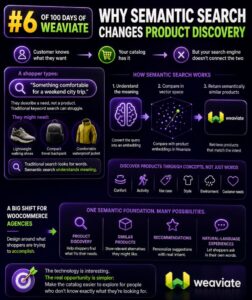
Search That Understands Shopping Intent Traditional WooCommerce search usually matches the words in a query against product titles, descriptions, SKUs, categories, and attributes. That works well when a shopper knows the exact product name, but it struggles when the shopper describes a need instead. A customer searching for “comfortable shoes for walking around a city all day” may be interested in cushioned sneakers, lightweight walking shoes, or supportive casual trainers. A keyword-only search may return products containing “city” or “walking,” while ignoring products that satisfy the underlying need. Semantic search represents the meaning of queries and products, allowing the search system to identify related concepts even when the wording differs. For product discovery, that changes search from a text-matching feature into an intent-matching feature. Keyword

Embeddings: Turning WooCommerce Products Into Meaning

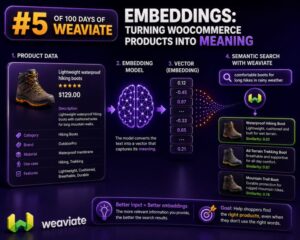
Why product data needs more than keywords WooCommerce search usually starts with exact fields: product title, SKU, attributes, categories, and description. That works when a shopper searches for a phrase stored on the product. It becomes less reliable when the shopper describes an intent instead: “A waterproof jacket for city cycling” “A quiet keyboard for an open-plan office” “Gift ideas for someone who likes espresso” An embedding converts text into a numerical vector that represents its meaning. Products with related descriptions are positioned near one another in vector space, even when they do not share the same words. A WooCommerce agency can use those vectors to build semantic product search, related-product features, catalog recommendations, and support tooling. What to embed from a WooCommerce product Do

What a Vector Actually Represents

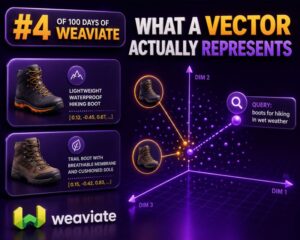
A Vector Is a Numerical Representation In a WooCommerce search or recommendation system, a vector is an ordered list of numbers that represents the meaning or characteristics of an item. A product title, description, category, or customer query can be converted into this numerical form by an embedding model. For example, a product such as “waterproof men’s hiking jacket with removable hood” might become a vector containing hundreds or thousands of decimal values: [0.021, -0.184, 0.773, 0.042, …] These values are not individually readable labels. The first number does not necessarily mean “waterproof,” and the second does not necessarily mean “men’s.” Meaning is distributed across the vector as a whole. What the Numbers Represent The numbers encode patterns learned from relationships between words, phrases, and

Keyword Search vs Vector Search for WooCommerce

Choosing the Right Search Method for WooCommerce Search quality directly affects product discovery, conversion rates, and support workload. For WooCommerce stores, the choice is not simply between an old search system and a modern one. Keyword search and vector search solve different problems, and the best implementation often uses both. Keyword search is strongest when shoppers know the exact terms they want to find. Vector search is strongest when shoppers describe a need, use unfamiliar wording, or search by meaning rather than by product name. Agencies should evaluate the store’s catalog, search behavior, product data, and business rules before selecting an approach. How Keyword Search Works Keyword search compares the terms in a query with indexed text from product titles, descriptions, SKUs, attributes, categories, and

Vector Search Explained Without the Hype

What Vector Search Actually Does Vector search finds items by meaning rather than relying only on exact words. A product title, description, category, or attribute is converted into a numerical representation called an embedding. Text with similar meaning produces vectors that are close together in a high-dimensional space. For example, a keyword search for waterproof hiking shoes may miss a product described as weather-resistant trail footwear if those exact terms are not present. Vector search can identify the relationship between the phrases and return the relevant product. This does not mean the search engine understands products like a person. It compares mathematical representations generated from text or other data. The quality of the result depends on the source content, the embedding model, the index, and

What Is Weaviate and Why Should WooCommerce Agencies Care?

Weaviate in Plain Terms Weaviate is an open-source, cloud-native vector database. It stores structured objects, such as products, categories, documentation pages, and support articles, together with vector representations of their meaning. Those vectors make it possible to find content by intent and context rather than by exact keyword matches alone. Weaviate also supports traditional keyword search, metadata filtering, and hybrid search. It can run as a managed Weaviate Cloud instance or be self-hosted, depending on an agency’s operational, security, and budget requirements. Why a Vector Database Matters for WooCommerce WooCommerce product catalogs often contain inconsistent terminology. A shopper may search for “waterproof walking shoes,” while a product title says “women’s trail footwear.” A keyword-only search may miss that product. A vector search can identify the