

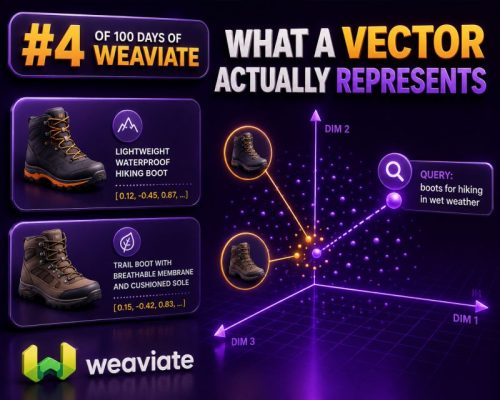
A Vector Is a Numerical Representation
In a WooCommerce search or recommendation system, a vector is an ordered list of numbers that represents the meaning or characteristics of an item. A product title, description, category, or customer query can be converted into this numerical form by an embedding model.
For example, a product such as “waterproof men’s hiking jacket with removable hood” might become a vector containing hundreds or thousands of decimal values:
[0.021, -0.184, 0.773, 0.042, ...]These values are not individually readable labels. The first number does not necessarily mean “waterproof,” and the second does not necessarily mean “men’s.” Meaning is distributed across the vector as a whole.
What the Numbers Represent
The numbers encode patterns learned from relationships between words, phrases, and documents. Products with related descriptions tend to produce vectors that are close together in the vector space.
Consider these WooCommerce products:
- Lightweight waterproof hiking jacket
- Water-resistant outdoor shell
- Leather office briefcase
The first two products are likely to have similar vectors because they share concepts such as weather protection, outdoor use, and jackets or shells. The briefcase should be farther away, even if all three descriptions contain common words such as “water-resistant” or “lightweight.”
A vector therefore represents relationships and patterns rather than a direct list of product attributes. It is useful for measuring similarity, but it is not a replacement for structured product data.
Dimensions Are Coordinates, Not Human-Readable Fields
A vector’s dimensions are its numerical positions. An embedding model might produce 384, 768, or 1,536 values for each item, depending on the model and its configuration.
It is tempting to treat each dimension as a product field, such as brand, color, or price. That is usually incorrect. Dimensions are latent coordinates learned by the model, and their individual meanings are not normally stable or interpretable in isolation.
For WooCommerce work, store explicit business attributes separately:
- Price and sale price
- Stock status
- Brand
- Size and color
- Product category
- Material
- Shipping region
Use vectors for semantic similarity, then apply structured filters for requirements such as “under $100,” “in stock,” or “size 10 available.”
How Similarity Search Works
When a shopper searches for “comfortable shoes for standing all day,” the query is converted into a vector using the same embedding model used for the product content. A vector database then compares the query vector with stored product vectors and returns the nearest matches.
Common similarity measures include cosine similarity, dot product, and Euclidean distance. Cosine similarity compares the angle between two vectors and is frequently used for text embeddings. With normalized vectors, dot-product search can produce equivalent rankings to cosine similarity.
The result is not a guaranteed statement that one product is suitable. It is a ranking based on mathematical proximity. A product titled “supportive work sneaker” may rank highly, while a technically suitable product with a sparse or poorly written description may rank lower.
A Practical WooCommerce Example
Suppose an agency is building a natural-language product finder. The catalog contains:
- “Women’s insulated trail running shoes”
- “Men’s casual canvas sneakers”
- “Orthopedic walking shoes with arch support”
A query for “shoes for long walks with extra foot support” may place the orthopedic walking shoes closest to the query vector. The trail running shoes may also appear because of their relationship to walking and footwear. The canvas sneakers are likely to rank lower.
The application should then apply WooCommerce rules. If the shopper selects women’s footwear, the system should filter by the appropriate attribute. If the shopper requires a particular size, inventory must be checked after retrieval. Vector similarity alone cannot verify stock, price, fit, shipping eligibility, or legal product claims.
What Should Be Embedded?
For most stores, embed a carefully prepared text representation rather than only the product title. A useful representation might combine the title, short description, long description, category names, brand, and selected searchable attributes:
Product: Waterproof Men's Hiking Jacket
Brand: North Ridge
Category: Men's Outdoor Clothing
Features: Waterproof shell, removable hood, sealed seams
Use: Hiking, trekking, wet weather
Do not automatically include every database field. Internal IDs, timestamps, stock quantities, and unrelated administrative content add noise. Prices and inventory are usually better handled as structured filters or live lookups.
Why Content Preparation Matters
Vectors reflect the input content. If a product description is incomplete, contradictory, or filled with keyword repetition, the resulting representation can be less useful.
Before generating vectors, normalize the catalog and remove duplicate boilerplate where appropriate. Make sure variations have meaningful descriptions, and decide whether parent products and individual variations should be represented separately. A color variation may need its own vector when color-specific text or imagery affects search relevance, but it should still retain a link to the parent product.
Important Limitations
A vector does not understand your store’s commercial rules by itself. It does not know that a product is discontinued, that a size is unavailable, or that a particular brand should be excluded. It also cannot guarantee factual accuracy in the source description.
Use vectors to retrieve semantically relevant candidates. Combine them with keyword search, taxonomy filters, product attributes, permissions, inventory checks, and ranking rules. For example, a hybrid search can find products matching the shopper’s wording while still preserving exact matches for model numbers, SKU codes, and brand names.
Checks Agencies Should Run
- Use the same embedding model and preprocessing rules for products and shopper queries.
- Record the model and content version used for each stored vector.
- Regenerate vectors when important product content changes.
- Test searches with synonyms, misspellings, technical terms, and conversational phrases.
- Measure results against real catalog queries rather than judging vectors by their individual values.
- Keep product metadata available so search results can be filtered and rendered from current WooCommerce data.