

Forum Replies Created
-
wpsolrKeymaster2 years, 11 months ago in reply to: WPSolr 23.4 returning error connecting to AWS elastic search server #37029
Sorry for the troubles, but Amazon Elasticsearch is not supported anymore, as stated on release WPSOLR 23.4
Amazon Elasticsearch will officially never support ES versions >= 8, for license reasons, while WPSOLR needs to follow the ES PHP client versions to keep up to date.
We support Amazon Opensearch on its latest version, or Elasticsearch on its latest version on self installed or providers like elastic.co
wpsolrKeymaster2 years, 11 months ago in reply to: WPSOLR_Query did you mean and filter by date #36975This part is not supported in this forum, being an internal piece of code of the plugin.
wpsolrKeymaster2 years, 11 months ago in reply to: Remove 10000 limit when using elasticsearch #36962Screen is “2.1 Presentation”, as on screenshot
wpsolrKeymaster2 years, 11 months ago in reply to: Remove 10000 limit when using elasticsearch #36960Indeed, there is now a checkbox “Show all results” to remove this limit on screen 2.1, as displayed on the screenshot above.
wpsolrKeymaster2 years, 11 months ago in reply to: Bug when the term name includes the word “OR” #36958You can replace your WPSOLR with this fix in the meantime to solve this issue
wpsolrKeymaster2 years, 11 months ago in reply to: Bug when the term name includes the word “OR” #36957A fix will be included in WPSOLR 23.5
wpsolrKeymaster2 years, 11 months ago in reply to: WPSOLR_Query did you mean and filter by date #36956WPSOLR provides a date slider facet and filter:
/guide/configuration-step-by-step-schematic/activate-extensions/extension-theme/theme-facets-layouts/theme-range-slider-layout/#3_Dates_Range_SliderwpsolrKeymaster2 years, 11 months ago in reply to: WPSOLR_Query did you mean and filter by date #36954You cannot pass a query to Opensearch, you have to use the Opensearch library directly.
wpsolrKeymaster2 years, 11 months ago in reply to: WPSOLR_Query did you mean and filter by date #36950I don’t think so. You could use the OpenSearch php library to build your custom query.
wpsolrKeymaster2 years, 11 months ago in reply to: Search results header in custom search template #36922The standard
global $wp_queryshould contain the information you need to build you header:wpsolrKeymaster2 years, 12 months ago in reply to: Slow keyword search #36770Thank you so much for the feedback.
Please also visit our Showcase LinkedIn group for more ideas about using WPSOLR, or even post your testimony!
wpsolrKeymaster2 years, 12 months ago in reply to: Custom sorting for archive pages #36696‘public’ is not necessary for a function indeed, it was used in my code for a class method.
Use string constant
'pubs_publication_date_str_asc'instead of$pubs_publication_date_str_ascwpsolrKeymaster3 years ago in reply to: Custom sorting for archive pages #36694Thank you!
If you’re satisfied with our service, I invite you to share your use case in our LinkedIn group.
Your contribution will be greatly valued by fellow users!
wpsolrKeymaster3 years ago in reply to: Custom sorting for archive pages #36681It looks good. Just use the field name that you see in your urls when you use your sort.
return 'sort_by_title_s_asc';return 'sort_by_date_desc';return 'sort_by_last_modified_desc';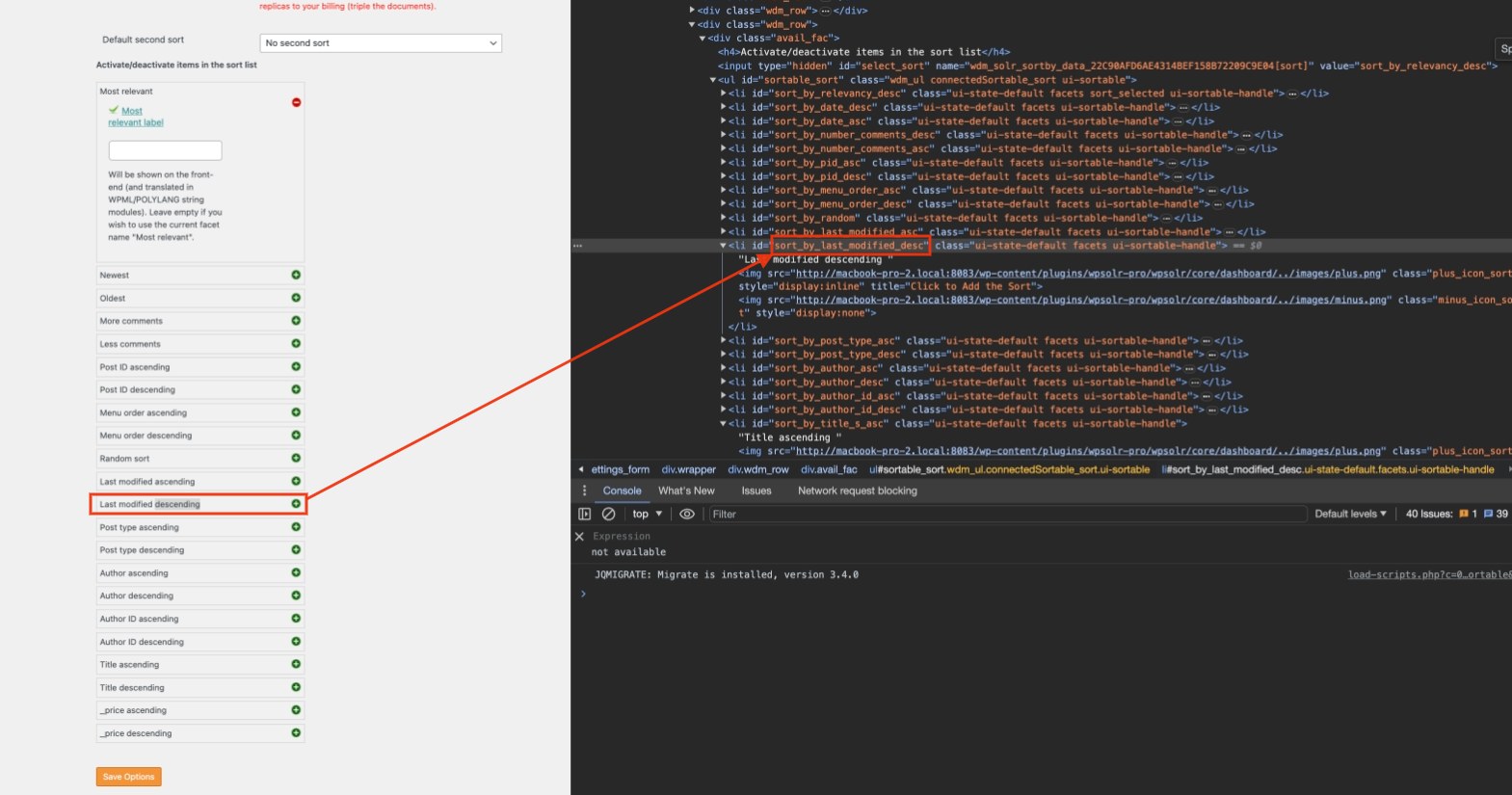 wpsolrKeymaster3 years ago in reply to: Custom sorting for archive pages #36678
This is correct. In your use case, you will need some code.
use wpsolr\core\classes\WPSOLR_Events;
add_filter( WPSOLR_Events::WPSOLR_FILTER_DEFAULT_SORT, 'wpsolr_filter_default_sort', 10, 2 );
public function wpsolr_filter_default_sort( $default_sort, $wpsolr_query ) {
  if ( /* Your condition here*/ ) {
    return $my_sort;
  }
  return $default_sort;
}