

Forum Replies Created
-
pseudo visitorParticipant7 years, 11 months ago in reply to: “No enabled connection” error with local Flywheel index #8811
Ok, it starts to work …
To search by date (from … to …) you need another extension?
If you could ever activate it?pseudo visitorParticipant7 years, 11 months ago in reply to: “No enabled connection” error with local Flywheel index #8807Another problem:
And I can not select the post-type …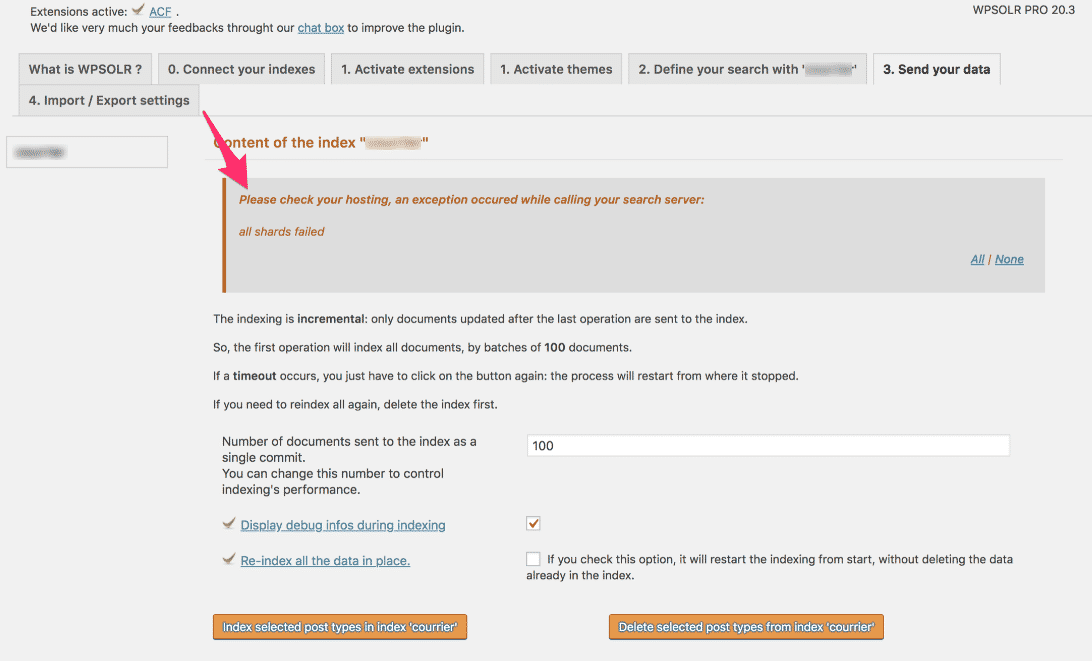 pseudo visitorParticipant7 years, 11 months ago in reply to: “No enabled connection” error with local Flywheel index #8806
It is fine thanks!
pseudo visitorParticipant7 years, 11 months ago in reply to: “No enabled connection” error with local Flywheel index #8798The last one … I just downloaded it on their website.
But can we try with bonsai.io?
See the screenshots.
 pseudo visitorParticipant7 years, 11 months ago in reply to: “No enabled connection” error with local Flywheel index #8796
No, because I stopped Kibana and Elasticsearch and launched Elasticsearch as mentioned in the support on the Flywheel site (download and double click on the binary) …
Do I restart them?pseudo visitorParticipant7 years, 11 months ago in reply to: “No enabled connection” error with local Flywheel index #8794Same error.
pseudo visitorParticipant7 years, 11 months ago in reply to: “No enabled connection” error with local Flywheel index #8792Have tried synonymous with the ip address. The same.
I think it will be easier with https://bonsai.io/.
Will try.pseudo visitorParticipant7 years, 11 months ago in reply to: “No enabled connection” error with local Flywheel index #8790Otherwise I also created a free account at https://bonsai.io/
Maybe can I use that to test?pseudo visitorParticipant7 years, 11 months ago in reply to: “No enabled connection” error with local Flywheel index #8789I tried both, same error! For info, my local WordPress runs under local by flywheel.
But it is docker with a nice packaging I think.pseudo visitorParticipant7 years, 11 months ago in reply to: “No enabled connection” error with local Flywheel index #8788I tried both, same mistake!
pseudo visitorParticipant7 years, 11 months ago in reply to: Elasticsearch indexing error #8780I have the same problem in the wp-search result, the result doesnt show clickable links.
pseudo visitorParticipant7 years, 11 months ago in reply to: Elasticsearch indexing error #8778Ok, thank you.
Can you help me with how to fix the php so I can see links? Or should I contact my theme if I can not figure this out?pseudo visitorParticipant7 years, 11 months ago in reply to: Elasticsearch indexing error #8776Great! Thank you! Now I can see the content of tablepress in the serach engine, but the content/ result is text and characters not links. How can I make the result show as clickable links and not characters?
pseudo visitorParticipant7 years, 11 months ago in reply to: Elasticsearch indexing error #8774So I tried to activate the extension but our license does not work for this apparently. We bought Wpsolr Pro. Do we have to buy something more for TablePress to work?
pseudo visitorParticipant7 years, 11 months ago in reply to: Elasticsearch indexing error #8772Thank you. I can now see the Wpsolr search on the website.
I have one more question, I can not see content from TablePress-tables in the search. We have a lot of tables with external links and we would like to be able to search for these links in the Wpsolr search. What should we do?