

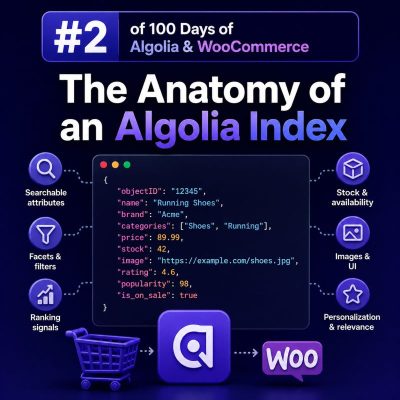
What an Algolia index contains
An Algolia index is a collection of JSON records that Algolia searches and ranks. For a WooCommerce store, an index commonly represents a searchable product catalog, but it can also contain categories, brands, blog posts, or other content types.
An index is not a direct mirror of a WooCommerce database table. It is a search-optimized, denormalized representation of the data customers need to discover products. A single product record might include its name, SKU, brand, category hierarchy, prices, stock status, image URLs, and selected attributes in one document.
Records and objectID
Each item in an index is a record. Records are JSON objects, and every record must have a unique objectID. Algolia uses this value to identify records when updating, replacing, or deleting them.
For a simple product index, the record identifier can be the WooCommerce product ID:
{
  "objectID": "4812",
  "name": "Trail Running Shoe",
  "sku": "TRAIL-4812",
  "brand": "North Ridge",
  "categories": ["Footwear", "Running Shoes"],
  "price": 129.99,
  "in_stock": true,
  "image_url": "https://example.com/uploads/trail-running-shoe.jpg"
}
The value should remain stable. Do not generate a new random identifier each time a product is synchronized, or Algolia will treat every update as a new record and leave obsolete records behind.
Choosing the record model for WooCommerce
The most important indexing decision is whether to create one record per product or one record per purchasable variation.
One record per product
Use one record per product when customers primarily search for the parent product. Store variation information as nested data or summarized fields, while keeping the search result focused on the product:
{
  "objectID": "4812",
  "name": "Trail Running Shoe",
  "color_values": ["Black", "Blue"],
  "size_values": ["8", "9", "10", "11"],
  "min_price": 119.99,
  "max_price": 139.99,
  "in_stock": true
}
This model avoids duplicate product cards and is usually the better choice for category and search pages where the customer selects options after opening the product.
One record per variation
Use one record per variation when SKU-level search, inventory, or pricing is central to the buying process. Each variation needs a unique identifier, such as a product ID combined with a variation ID:
{
  "objectID": "4812-9077",
  "parent_product_id": 4812,
  "name": "Trail Running Shoe",
  "sku": "TRAIL-4812-BLK-10",
  "color": "Black",
  "size": "10",
  "price": 129.99,
  "in_stock": true
}
Variation-level records can produce multiple hits for the same product. If the interface should display only one hit per product, configure Algolia’s distinct feature with a shared product identifier, such as parent_product_id, and set attributeForDistinct in the index settings.
Attributes have different jobs
Index attributes are not automatically used in the same way. A well-designed index separates display data, searchable text, filtering data, sorting values, and operational metadata.
- Display attributes: name, image URLs, permalink, price, sale price, and short description.
- Searchable attributes: name, SKU, brand, categories, and selected product attributes.
- Facet attributes: brand, categories, color, size, availability, and other values shown in filters.
- Numeric attributes: price, rating, stock quantity, and popularity scores used in numeric filters or ranking.
- Ranking attributes: sales volume, margin, inventory priority, or another business-specific score.
- Metadata: WooCommerce IDs, variation IDs, taxonomies, and synchronization timestamps used by the application rather than shown to shoppers.
Keep records deliberately shaped. Sending every post meta field, description fragment, or plugin-generated value increases index size and makes relevance and synchronization harder to control.
Searchable attributes control where matching occurs
The searchableAttributes setting determines which fields Algolia considers and their priority. A typical product configuration might prioritize the product name, then SKU, brand, and categories:
[
  "name",
  "sku",
  "brand",
  "categories",
  "unordered(description)"
]
Putting name first gives matches in the product name more importance than matches in the description. Use unordered() for long text when the position of a matching word should not affect relevance as strongly.
Do not add every attribute to this setting. Including internal IDs, URLs, or verbose descriptions can create matches that are technically correct but unhelpful to shoppers.
Facets and filters require explicit configuration
Facets power refinements such as Brand, Color, Size, and Category. Attributes used as facet filters must be declared in attributesForFaceting. For example:
[
  "searchable(brand)",
  "categories",
  "color",
  "size",
  "in_stock"
]
Use searchable(attribute) when the interface needs search-as-you-type within facet values, such as a long brand list. Keep the underlying values consistent: do not index Blue, blue, and BLUE as separate values unless that distinction is intentional.
For prices and other numeric fields, store consistent numeric values rather than formatted strings. A value such as 129.99 can support numeric filters and ranges, while £129.99 is display text and should not be used as the filtering value.
Ranking settings shape the result order
Algolia’s ranking combines textual relevance with business rules. The default ranking considers factors such as typo tolerance, proximity, attribute order, exactness, and custom ranking. The exact settings should reflect the store’s merchandising requirements.
A WooCommerce index might use a custom ranking such as:
[
  "desc(popularity)",
  "desc(in_stock_priority)",
  "asc(price)"
]
Use this carefully. If price or popularity dominates too strongly, a highly relevant product may be pushed below a less relevant one. It is usually better to index an explicit business score, such as in_stock_priority or a normalized sales score, than to rely on a value with an unclear range.
Search relevance and merchandising are separate concerns. Textual settings determine whether the result matches the query; custom ranking determines how matching results are ordered.
Settings are part of the index design
Records contain catalog data, while index settings define how Algolia interprets and returns that data. Important settings include:
searchableAttributesfor text search priority.attributesForFacetingfor facet and filter behavior.customRankingfor business ordering.attributesToRetrievefor limiting fields returned to the browser.highlightPreTagandhighlightPostTagfor search-result highlighting.attributesToSnippetfor controlled description excerpts.typoTolerance, query rules, synonyms, and relevant sort settings for the search experience.
Store these settings in deployment configuration or version-controlled infrastructure where possible. Rebuilding records without restoring the settings can produce an index that contains the right products but behaves incorrectly in production.
Replicas support alternate sorting
A primary index has one main ranking configuration. If the store needs several sort options, such as Relevance, Price: Low to High, and Best Selling, use replica indices rather than attempting to change ranking settings for every query.
A replica contains the same logical catalog but applies an alternate ranking. The frontend selects the appropriate index based on the shopper’s sort choice. For example, a primary index named products_production might have replicas named products_production_price_asc and products_production_sales.
Replicas must be managed as part of the index configuration. When environments are created or renamed, verify that the primary index and all replicas are configured consistently.
Index naming and environments
Use predictable names that distinguish environment, site, locale, and catalog where needed. Examples include:
products_staging_en_gbproducts_production_en_gbproducts_production_fr_fr
Do not let staging and production jobs write to the same index. For agencies managing multiple WooCommerce sites, include a site-specific identifier and keep index names in configuration rather than hard-coding them throughout plugins and themes.
Synchronization from WooCommerce
WooCommerce remains the source of truth for products, prices, stock, taxonomy terms, and product status. Algolia should be treated as a derived search index.
A reliable synchronization process should:
- Send a record when a product or variation is created or updated.
- Delete the corresponding
objectIDwhen a product is permanently removed or no longer belongs in search. - Handle stock, visibility, catalog status, price, and taxonomy changes.
- Queue updates instead of making a blocking indexing request during every customer-facing request.
- Retry failed operations and record enough context to diagnose them.
- Run a scheduled reconciliation or full export to detect records left behind by missed webhooks or failed jobs.
Use indexing credentials only on the server. The browser should receive a search-only API key, ideally restricted to the required indices and operations. Never expose an Admin API key in WordPress frontend code.
Returning only what the frontend needs
Product records often contain fields needed for synchronization but not for rendering a search result. Configure attributesToRetrieve or specify returned attributes in the query so the browser receives only the required data.
For example, a product card may need objectID, name, price, image_url, permalink, and in_stock, while internal import timestamps and synchronization flags can remain out of the response. This reduces payload size and makes it harder for frontend code to depend on implementation details.
Testing an index before launch
Test the index with real WooCommerce search behavior rather than only checking whether records exist. Include queries for:
- Exact product names and partial names.
- SKUs and model numbers containing punctuation.
- Common misspellings and alternate terminology.
- Products with multiple categories or attributes.
- Out-of-stock and hidden products.
- Variation searches where the selected record model requires them.
- Facet combinations such as brand plus price range plus availability.
Also verify that deleted products disappear, price changes are reflected, replica sorting works, and the frontend links to the correct canonical product or variation URL. These checks catch index-model and synchronization errors that a basic record-count comparison will miss.