

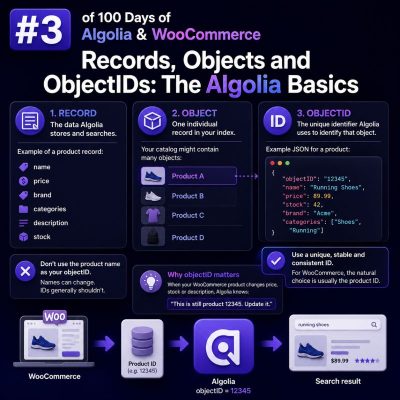
Why the record is the unit of search
Algolia does not index a WooCommerce product, post, or database row directly. It indexes a JSON document called a record. Each record contains the fields Algolia can search, filter, display, or use for ranking.
For a simple WooCommerce product, a record might look like this:
{
  "objectID": "product_4821",
  "name": "Merino Wool Travel Socks",
  "slug": "merino-wool-travel-socks",
  "description": "Lightweight merino socks designed for travel and everyday wear.",
  "brand": "North Ridge",
  "categories": ["Clothing", "Socks"],
  "price": 24.99,
  "inStock": true,
  "image": "https://example.com/uploads/merino-socks.jpg",
  "url": "https://example.com/product/merino-wool-travel-socks/"
}
This is separate from the underlying WordPress wp_posts, post metadata, taxonomy tables, and WooCommerce lookup tables. Your indexing process selects the product data that should be available to the search experience and transforms it into an Algolia record.
A record should contain enough information to support the intended experience, but it should not be a complete dump of the WooCommerce product. Avoid indexing private metadata, internal notes, large page-builder payloads, or fields that are not used by search, filtering, display, or ranking.
Records and objects are the same concept
Algolia documentation and client libraries commonly use the terms record and object for the JSON documents stored in an index. In practical terms, they refer to the same indexed item.
For example, this PHP array represents one object before it is sent to Algolia:
$productRecord = [
    'objectID' => 'product_4821',
    'name' => 'Merino Wool Travel Socks',
    'categories' => ['Clothing', 'Socks'],
    'price' => 24.99,
    'inStock' => true,
];
An index is a collection of these objects. A product index may contain one object per parent product, while a variation index may contain one object per purchasable variation. The correct model depends on how customers search and choose products.
For a catalog where size and color need to appear as separate searchable results, variation-level records can be appropriate:
{
  "objectID": "variation_4821_733",
  "productID": 4821,
  "name": "Merino Wool Travel Socks - Blue - Large",
  "parentName": "Merino Wool Travel Socks",
  "color": "Blue",
  "size": "Large",
  "sku": "MWS-BLU-L",
  "price": 24.99,
  "inStock": true,
  "url": "https://example.com/product/merino-wool-travel-socks/"
}
If customers should see only one result for the parent product, index one parent-level record and include variation data as nested or flattened attributes. This decision affects deduplication, facet counts, result URLs, and inventory behavior.
ObjectIDs identify records
objectID is Algolia’s unique identifier for a record within an index. It is used when updating, deleting, retrieving, or referring to a specific result. Two records in the same index must not share the same objectID.
For WooCommerce, use a stable identifier rather than a value that can change. Common choices include:
product_4821for a parent productvariation_733for a variationpost_4821when the index contains several WordPress content types- A stable external catalog ID when WooCommerce is synchronized with another system
Use a type prefix when different entity types may share numeric IDs. WordPress products and variations can otherwise create ambiguous identifiers in a combined index.
Keep the identifier unchanged when a product is edited. A product name, slug, SKU, or price can change; the objectID should normally remain the same. If an indexing job generates a new objectID after every update, Algolia will treat the update as a new record and leave the old record behind until it is explicitly removed.
ObjectIDs should also be serialized consistently. For example, do not index a product as 4821 during one synchronization and product_4821 during another. A deterministic formatter makes full reindexing and incremental updates predictable:
function algoliaObjectId(int $productId): string
{
    return 'product_' . $productId;
}
When an integration does not provide an objectID, Algolia may generate one for certain add operations. That is useful for temporary data, but it is generally unsuitable for a WooCommerce catalog because later product updates need to address the original record. Agency integrations should assign objectIDs explicitly.
Choose fields by their search role
A useful record separates customer-facing values from implementation details and uses appropriate data types:
- Text attributes such as
name,description, andbrandcan be searched. - Facet attributes such as
categories,color, andsizesupport filters and navigation. - Numeric attributes such as
price,rating, andstockQuantitysupport ranges or numeric filtering. - Boolean attributes such as
inStocksupport simple filters. - URLs and image URLs can be returned for rendering but do not need to be searchable.
The same field can serve more than one purpose. For example, brand can be searchable and facetable, but those roles must be configured in the index settings. Sending a field in the record alone does not make it searchable or filterable.
For price filtering, send a number rather than a formatted string:
{
  "price": 24.99,
  "currency": "USD",
  "displayPrice": "$24.99"
}
Use price for numeric filters and displayPrice only for presentation. A value such as "$24.99" cannot reliably support a price range.
Keep identifiers and display data separate
A SKU is valuable for exact lookup, but it is not always the best display title. Likewise, an internal product ID may be needed for synchronization but should not necessarily appear in the user interface.
A practical record can include both:
{
  "objectID": "product_4821",
  "productID": 4821,
  "sku": "MWS-001",
  "name": "Merino Wool Travel Socks",
  "url": "https://example.com/product/merino-wool-travel-socks/"
}
Configure name, brand, and selected descriptive fields for full-text search, while retaining productID and sku for URLs, analytics, exact matching, or synchronization logic.
Handle deletions and catalog changes
An update should replace or modify the record with the existing objectID. If a product is permanently deleted, excluded from the catalog, or made unavailable according to the site’s business rules, remove its corresponding object from Algolia or mark it appropriately if it should remain discoverable.
A reliable WooCommerce synchronization process usually maps events as follows:
- Product creation creates a record with a deterministic objectID.
- Product edits update that same objectID.
- Stock or price changes update only the affected records.
- Product deletion or exclusion removes the object.
- A scheduled full reindex checks for records that no longer exist in WooCommerce.
For agencies, storing the Algolia objectID rule in the integration documentation is important. It allows developers to rebuild an index, migrate environments, and troubleshoot stale results without guessing how a record was identified.