

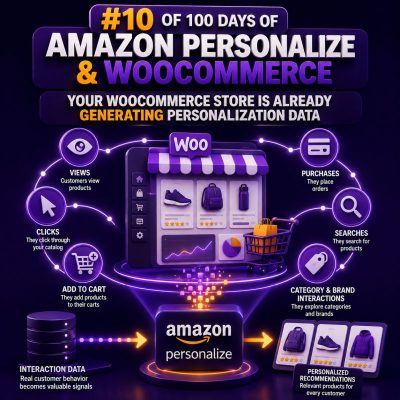
Most WooCommerce stores already produce the behavioral signals needed for product recommendations and other personalized experiences. The data is usually distributed across orders, sessions, product catalogs, customer accounts, carts, searches, and marketing systems rather than being organized as a personalization dataset.
Where the data already exists
A typical WooCommerce installation can provide several useful data sources:
- Orders: customer identity, products purchased, quantities, order dates, prices, refunds, and order status.
- Product views: products displayed or viewed during a browsing session, when tracked by analytics or a custom event integration.
- Cart activity: products added to carts, removed from carts, or abandoned before checkout.
- Searches: search terms and the products returned or selected.
- Customer profiles: account identifiers, registration dates, billing region, language, and other permitted attributes.
- Product catalog data: product IDs, titles, categories, brands, descriptions, prices, availability, and custom attributes.
WooCommerce does not automatically send this information to Amazon Personalize. The important distinction is that the store is already generating the raw signals; an integration must collect, normalize, consent-check, and deliver them to the appropriate Amazon Personalize dataset.
Map WooCommerce activity to interaction events
Amazon Personalize commonly uses an interactions dataset containing an event type, an item identifier, a user identifier, and an event timestamp. A WooCommerce implementation can map store activity into events such as these:
| WooCommerce activity | Example event type | Typical item identifier |
|---|---|---|
| Product page view | view |
WooCommerce product ID |
| Add to cart | cart |
WooCommerce product ID |
| Completed purchase | purchase |
Purchased product ID |
| Product search or selection | search or click |
Selected product ID, where available |
| Wishlist addition | wishlist |
WooCommerce product ID |
Event names are implementation choices, but they must be used consistently. If one system records add_to_cart and another records cart, reporting and model configuration become unnecessarily difficult. Purchase events should normally be emitted only after the order reaches a business-approved status, such as processing or completed, rather than when a payment attempt merely begins.
Use stable identifiers from the beginning
Recommendation quality depends heavily on identity resolution. A signed-in shopper can usually be represented by a stable internal customer ID or a deliberately chosen account identifier. Do not use an email address as a primary identifier unless the security, privacy, and lifecycle implications have been explicitly addressed.
For anonymous visitors, generate a first-party session or visitor identifier and preserve it for the relevant period. When the visitor signs in, your application may associate the anonymous activity with the authenticated identity in its own identity layer. That association should be designed carefully; simply replacing one identifier with another can fragment the shopper’s history.
Item identifiers also need to remain stable. Decide whether recommendations operate on parent products, variations, or both. If a shopper views a variation but the catalog contains only the parent product, the integration needs a deliberate mapping rather than silently producing unmatched events.
Separate historical data from real-time events
Historical order data is useful for training and evaluation. It can be exported from WooCommerce tables, an order management system, or a reporting warehouse and transformed into rows that match the Amazon Personalize interactions schema. The export should normally exclude failed, cancelled, and fully refunded orders unless those behaviors have a specific analytical purpose.
New behavior can be sent as it happens through the Amazon Personalize event ingestion workflow. For example, a custom WooCommerce endpoint can receive a browser event after a product view, validate the request, resolve the visitor identifier, and call the Amazon Personalize events API from a server-side process. Keeping AWS credentials out of browser JavaScript is essential.
const event = {
  eventType: 'view',
  itemId: String(productId),
  properties: JSON.stringify({
    source: 'product_page',
    device_type: deviceType
  })
};
The exact request shape depends on the Amazon Personalize event tracker and SDK being used. Treat the example as an event-mapping illustration, not as a complete WordPress plugin implementation.
Build a useful item catalog
Interactions alone do not provide enough context for every recommendation use case. An item dataset can add product metadata such as category, brand, collection, material, price band, gender, season, or compatibility. These fields should be represented consistently and should reflect the values available when a recommendation is served.
WooCommerce product data often requires preprocessing. HTML descriptions should be converted to suitable text or omitted, attributes should be normalized, and variable products should be handled according to the chosen product model. Products that are unpublished, out of stock, restricted, or discontinued may need to be filtered from serving even if they remain in historical training data.
Audit the signals before sending them
Before designing a recommendation campaign, create a simple data audit:
- List each available event and identify its source in WordPress, WooCommerce, analytics, or the data warehouse.
- Measure event volume by day and by event type.
- Check how many events have a valid user or visitor identifier.
- Check whether item IDs match the current product catalog.
- Identify duplicate orders, test transactions, refunds, bots, and internal staff activity.
- Document consent, retention, deletion, and regional processing requirements.
- Compare timestamps and confirm that all systems use a consistent timezone convention.
A useful first metric is not the total number of orders. It is the percentage of usable interactions that can be joined to a valid item and a permitted identifier. A large event count with inconsistent IDs can be less valuable than a smaller, clean dataset.
WooCommerce implementation points
Custom integrations commonly observe WooCommerce actions related to order status changes, product views, cart updates, and checkout completion. The integration should be idempotent: the same order-status notification or webhook retry must not create an unintended set of duplicate purchase events. Store an event ID or processing record so retries can be recognized.
Do not block checkout while a recommendation event is being transmitted. Queue events for asynchronous processing, record failures, and retry transient AWS or network errors. A queue also provides a controlled place to apply consent rules, redact attributes, and enforce rate limits.
For product recommendations on a page, request recommendations server-side or through a controlled application endpoint. Cache responses where appropriate, but vary or invalidate the cache when the user, item context, inventory, or campaign rules require it. Never expose credentials or unrestricted AWS API access in the storefront.
Start with a narrow, testable dataset
A practical first dataset might contain twelve months of completed purchases, a current catalog of published products, and a limited set of authenticated or consented customer identifiers. Add views and cart events after the purchase pipeline has been validated. This approach makes it easier to answer concrete questions: Are product IDs joining correctly? Are new events arriving? Are recommendations returning available products? Does the output improve a defined merchandising or conversion metric?
The store’s existing data is an asset, but it is not automatically ready for machine learning. The next engineering task is to turn operational records into a governed event stream with stable identities, clean item references, reliable timestamps, and explicit business rules.