

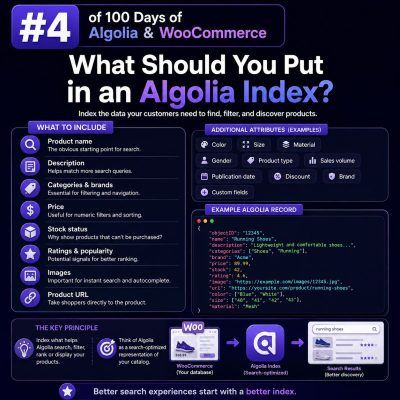
Start with the customer’s search experience
An Algolia index should contain the product information shoppers need to discover, compare, and select items. It should not be a copy of every column in the WooCommerce database.
For an agency project, define the search and browsing experiences first:
- Which product fields should match a query?
- Which attributes should customers use as filters?
- Which values should appear in search results, autocomplete, and category pages?
- Which products, prices, or stock states must be hidden from a shopper?
The answers determine the index schema. Keeping the schema focused reduces record size, simplifies synchronization, and makes ranking easier to manage.
The minimum product record
Every Algolia record needs a stable objectID. In WooCommerce, this is commonly the product ID, provided that the same product keeps that ID across synchronization runs.
A practical product record might look like this:
{
  "objectID": "4821",
  "name": "Waterproof Hiking Jacket",
  "slug": "waterproof-hiking-jacket",
  "url": "https://example.com/product/waterproof-hiking-jacket/",
  "image": "https://example.com/wp-content/uploads/jacket.jpg",
  "price": 129.99,
  "currency": "GBP",
  "short_description": "A lightweight waterproof shell for changeable weather.",
  "categories": ["Outdoor Clothing", "Jackets"],
  "brand": "North Ridge",
  "in_stock": true,
  "stock_status": "instock"
}
The record contains enough information to render a useful hit without making another request for every result. The product page URL and image are especially important for a fast, self-contained results interface.
Fields that should be searchable
Searchable attributes should represent the language customers use when looking for a product. Typical WooCommerce fields include:
- Product name
- SKU, when customers know or use it
- Brand
- Category names
- Relevant tags
- Short description
- Selected product attributes, such as material, compatibility, or model number
Do not automatically make every custom field searchable. Internal notes, import identifiers, supplier data, SEO metadata, and long technical content can introduce irrelevant matches and increase index size.
Configure the intended order in Algolia’s searchableAttributes. For example, putting the product name before the description gives name matches more importance:
[
  "name",
  "brand",
  "categories",
  "sku",
  "attributes.searchable",
  "short_description"
]
Use a deliberately structured attribute for variable product attributes instead of flattening every value into an ambiguous text string. For example, a record might include attributes.searchable containing values such as “USB-C”, “128 GB”, and “stainless steel”.
Fields that should be filterable or facetable
Facets support refinement menus, filters, and category navigation. Common examples for WooCommerce include:
- Category and subcategory
- Brand
- Color, size, material, and other product attributes
- Product type
- Price or price range
- Stock status
- On-sale status
- Rating or review count
Store facet values in predictable formats. A color should be a value such as Black, not a sentence such as “Available in a classic black finish”. Numeric values such as price should remain numeric so they can support range filters and numeric comparisons.
For a product with multiple applicable values, use an array:
{
  "categories": ["Shoes", "Running Shoes"],
  "color": ["Black", "Blue"],
  "sizes": ["8", "9", "10"],
  "price": 84.95,
  "on_sale": true
}
Declare only the attributes that the interface actually filters or displays as facets. Algolia’s facet configuration is separate from simply including a field in a record.
Represent price and availability explicitly
WooCommerce pricing often has more than one relevant value. Decide whether the index is for the current customer-facing price, a minimum variation price, or a price range.
For simple products, a record may use:
{
  "price": 49.95,
  "regular_price": 59.95,
  "on_sale": true
}
For variable products, consider fields such as min_price, max_price, and a display label. Use numeric fields for filtering and sorting, and keep formatted currency text for presentation only. If prices differ by customer role, country, tax setting, or currency, the indexing strategy must reflect that context. A single public index should not expose a price that is incorrect for the current shopper.
Availability should also be explicit. Include a boolean or controlled status such as in_stock and use it consistently in filters, ranking, or separate indices. Do not rely on a description containing the words “in stock”. If backorders are allowed, decide whether backorderable products should be treated as available and encode that decision in the record.
Choose between product records and variant records
The right record granularity depends on how shoppers search.
Use one record per parent product when the result should lead to a product page and variations are mainly choices made after opening that page. Include variation information that helps discovery, such as available sizes, colors, compatibility values, and the lowest available price.
Use one record per variation when customers need to search or filter by variation-level data, or when each variation has a separate URL, image, price, or stock state. In that model, use a stable identifier such as product-4821-variation-917 for objectID, and include the parent product ID so results can be grouped or linked correctly.
Do not mix parent and variation records accidentally. Doing so can produce duplicate hits, contradictory prices, and misleading stock information.
Include data needed to render the result
Search results should normally be rendered from the Algolia hit rather than requiring a WordPress request for every card. Include:
- Product name and URL
- Primary image and, where needed, a hover image
- Current price and sale information
- Currency or a currency-specific price value
- Short merchandising copy
- Brand and category labels
- Availability messaging
- Rating and review count, if shown in the interface
Keep presentation data separate from searchable data where useful. For example, price_display can contain a localized string while price remains numeric for sorting and range filtering.
Handle visibility, permissions, and customer context
Only index products that the relevant audience is allowed to discover. The synchronization process should account for published status, catalog visibility, excluded categories, deleted products, and any membership or wholesale rules.
Do not index private WooCommerce data, supplier costs, purchase notes, internal IDs that reveal sensitive information, or customer-specific values in a shared public index. If different users receive different catalogs or prices, use separate indices, secured filtering, or a design that obtains protected data from the application after the search response. Never treat a hidden field in the frontend as an access-control mechanism.
Plan synchronization around source-of-truth fields
WooCommerce remains the source of truth for product data. Algolia should be a search-optimized projection of that data.
A robust integration should:
- Send a full record when a product is created or materially updated.
- Update price, stock, visibility, and taxonomy changes promptly.
- Delete records when products are permanently removed or should no longer be discoverable.
- Use deterministic object IDs so updates do not create duplicates.
- Reindex records when changes to brands, categories, or global attributes affect many products.
- Log failed operations and provide a way to run a complete reconciliation.
WordPress hooks can trigger incremental updates, but scheduled reconciliation is still valuable. It catches missed webhooks, failed background jobs, bulk imports, and changes made by third-party WooCommerce extensions.
Keep records consistent across a project
Define a schema before multiple developers or integrations begin writing records. Agree on field names, types, empty-value behavior, category paths, attribute casing, currency handling, and object ID rules.
For example, do not send in_stock as a boolean in one batch and the strings yes or no in another. Do not use a category’s display name in one locale and an internal term ID in another unless the application is designed for that choice.
Consistent records make Algolia settings, frontend components, analytics, and automated tests predictable. Before launch, inspect records for representative simple products, variable products, out-of-stock products, sale items, translated products, and products with missing images or attributes.