

Choosing the Right Search Method for WooCommerce
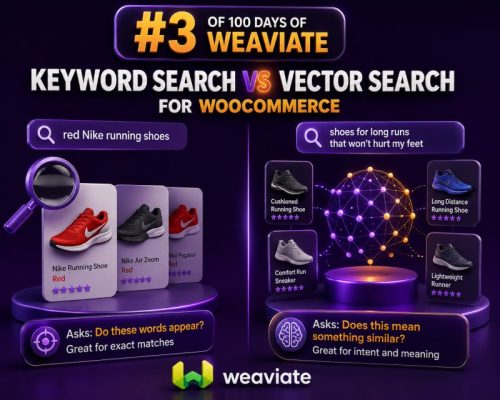
Search quality directly affects product discovery, conversion rates, and support workload. For WooCommerce stores, the choice is not simply between an old search system and a modern one. Keyword search and vector search solve different problems, and the best implementation often uses both.
Keyword search is strongest when shoppers know the exact terms they want to find. Vector search is strongest when shoppers describe a need, use unfamiliar wording, or search by meaning rather than by product name. Agencies should evaluate the store’s catalog, search behavior, product data, and business rules before selecting an approach.
How Keyword Search Works
Keyword search compares the terms in a query with indexed text from product titles, descriptions, SKUs, attributes, categories, and tags. Search engines commonly use relevance algorithms such as BM25 to score documents based on term frequency, term rarity, and field length.
For example, a query such as black leather office chair can match products containing those words in their title or description. A query such as SKU-48291 can identify an exact product or variation when the SKU field is indexed correctly.
Keyword search is particularly useful for:
- Exact SKUs, model numbers, part numbers, and product codes
- Brand names and technical specifications
- Color, size, material, voltage, and other structured attributes
- Regulated or industry-specific terminology
- Queries where exact term matching is an important business rule
Its main limitation is vocabulary dependence. A product described as a water-resistant commuter backpack may not rank for bag for rainy city cycling unless those concepts appear in the indexed content or are added as synonyms.
How Vector Search Works
Vector search represents text as numerical embeddings. An embedding model converts a product document and a shopper’s query into vectors, and the search system retrieves products whose vectors are close in semantic space.
This allows a store to match related concepts even when the wording differs. A shopper searching for comfortable shoes for standing all day may find products described as supportive work sneakers with cushioned insoles, even when the exact phrase is absent.
Vector search is useful for:
- Natural-language product discovery
- Queries containing synonyms or paraphrases
- Use-case searches such as
equipment for a small home gym - Large catalogs with inconsistent product copy
- Product recommendations based on semantic similarity
Vector search does not inherently understand every business constraint. A semantically similar product may be the wrong size, incompatible with a customer’s equipment, out of stock, or outside the required price range. Those requirements must be handled through metadata filters, structured ranking, inventory rules, or a combination of search methods.
WooCommerce Example: Exact Product Search
Consider a store selling plumbing components. A contractor searches for 3/4 inch brass ball valve 600 WOG. Exact terms and specifications matter. A keyword index can give strong results by searching the product title, SKU, attributes, and technical specification fields.
A vector-only implementation could return products that are semantically related to valves but have a different connection size or pressure rating. That creates friction and can result in incorrect purchases. In this scenario, keyword matching and structured filters should carry significant weight.
WooCommerce Example: Use-Case Search
Now consider a fashion store where a shopper searches for an outfit for a summer wedding on a budget. The query does not specify an exact product name. It expresses an occasion, season, style, and price preference.
Vector search can identify products described with terms such as lightweight linen blend dress, occasion wear, or breathable formal clothing. Price, stock status, gender, size, and category should then be applied as structured filters or ranking signals.
Hybrid Search Is Usually the Practical Choice
Hybrid search combines keyword and vector retrieval. The system can retrieve candidates using both methods, then combine or rerank the results. This preserves exact-match behavior while improving results for natural-language queries.
For example, a hybrid query for Nike Pegasus black size 10 can use keyword search to recognize the brand and model, while filters enforce color and size. A query such as running shoes for long-distance training can use vector similarity to identify relevant products, with category, availability, and price rules applied afterward.
Common hybrid strategies include:
- Weighted score blending: Combine normalized keyword and vector scores using configurable weights.
- Candidate union: Retrieve a set of results from each method, merge them, and remove duplicates.
- Reranking: Use one method to retrieve candidates and a second model or rules engine to reorder them.
- Query routing: Detect SKU-like or specification-heavy queries and favor keyword search, while routing conversational queries toward vector search.
The correct weighting depends on the catalog and search logs. A parts distributor may favor keyword relevance, while a lifestyle retailer may give vector similarity more influence.
Indexing WooCommerce Product Data
Search quality depends on the data sent to the index. A product document should normally include the product ID, title, description, short description, SKU, categories, attributes, brand, price, currency, stock status, variation data, and product URL.
For vector indexing, create a deliberate text representation rather than embedding a raw database record. For example:
Product: Alpine Commuter Backpack
Brand: North Ridge
Category: Backpacks
Materials: Recycled nylon, waterproof coating
Features: Padded laptop sleeve, reflective panels, 22-liter capacity
Use cases: Cycling to work, daily commuting, short trips
Keep filterable values separate from the text used for semantic similarity. Price, stock status, category, size, color, and brand should be stored as structured properties where the search platform supports filtering. This prevents semantic similarity from replacing deterministic business rules.
Handling Product Variations
WooCommerce variable products require an explicit indexing decision. Index the parent product only when variations differ mainly by selectable options such as color or size and the parent can represent the product accurately. Index individual variations when each variation has its own SKU, stock status, price, dimensions, or compatibility.
For example, a T-shirt with color and size variations may be represented by one searchable product with variation metadata. Replacement filters for industrial equipment may need variation-level documents because each model has a distinct part number and compatibility profile.
Whichever approach is used, the result should link back to the correct WooCommerce product or variation and should not show unavailable options as purchasable.
Filters, Ranking, and Business Rules
Neither keyword relevance nor vector similarity should override essential store rules. Apply constraints such as these outside the semantic score when possible:
- Only show products that are published and eligible for the current channel.
- Filter out-of-stock products when the store does not allow backorders.
- Respect category, brand, price, size, color, and compatibility filters.
- Boost products with higher inventory, stronger margins, or active promotions only when this aligns with the store’s merchandising policy.
- Prevent discontinued or restricted products from appearing through semantic similarity.
Use boosts carefully. A product should not rank first merely because it has a high margin if it is a poor match for the query.
Implementation Considerations for Agencies
Start by collecting representative queries from WooCommerce search logs, customer-support tickets, site-search analytics, and sales teams. Divide them into groups such as exact identifiers, attribute searches, category searches, problem descriptions, and broad discovery queries.
Create a test set with expected results for each group. Measure more than click-through rate. Useful metrics include zero-result rate, add-to-cart rate after search, conversion rate, exact-match accuracy, and the percentage of queries returning an acceptable product in the first few results.
When using an external search service or a vector database such as Weaviate, build a reliable synchronization process. Product creation, updates, variation changes, stock changes, price changes, taxonomy changes, and deletion events must reach the index. A stale vector index can produce products that no longer exist or show incorrect commercial information.
Keep embeddings versioned. If the embedding model or document template changes, re-embed products in a controlled batch and compare results against the existing index. Store the model version with each indexed document so that mixed versions can be identified and replaced.
When to Use Each Approach
| Search requirement | Preferred method |
|---|---|
| SKU, model number, or part number lookup | Keyword search |
| Exact brand and technical specification matching | Keyword search with structured filters |
| Natural-language use-case discovery | Vector search |
| Catalog search combining identifiers and intent | Hybrid search |
| Real-time stock and price restrictions | Structured filters and live WooCommerce data |
Operational Safeguards
Provide a fallback path when vector generation fails, the index is unavailable, or a query cannot be processed. Keyword search against a local or primary index is often a suitable fallback. Cache common queries, monitor latency separately for retrieval and reranking, and log the query, applied filters, result IDs, and ranking method for troubleshooting.
Also review privacy and data boundaries. Product content is usually public, but customer-specific pricing, account information, order history, and other sensitive fields should not be placed in a general product-search index without strict access controls.