

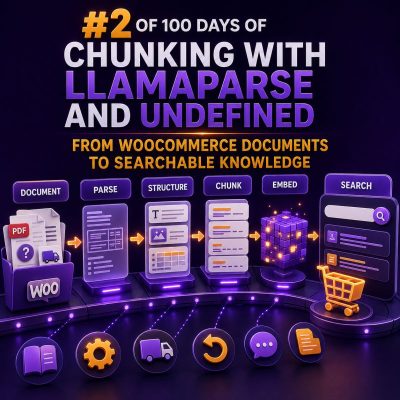
Why WooCommerce documents need structure before search
WooCommerce stores often contain valuable information across product guides, supplier PDFs, shipping policies, return documents, installation instructions, FAQs, and internal operating procedures. When these files are uploaded into a search system as raw text, important relationships are easily lost. Tables may become unreadable, headings can be separated from their content, and a result may not indicate which product, region, or customer group it applies to.
A useful document pipeline should preserve the meaning of each section while adding enough metadata to filter results accurately. LlamaParse can be used at the extraction stage to convert complex documents into structured text, including documents that contain headings, tables, and mixed layouts. The parsed output can then be split into searchable chunks and connected to WooCommerce product or order data.
Choose the WooCommerce content to index
Start by listing the sources that staff and customers currently search manually. Common sources include:
- Product manuals and specification sheets
- Supplier catalogs and warranty documents
- Shipping, refund, and returns policies
- Installation and maintenance instructions
- Internal support procedures
- Category-level buying guides
- Frequently asked questions stored in WordPress
- WooCommerce product descriptions, attributes, and variations
Separate public content from internal content at the start. A customer-facing search experience should not retrieve warehouse procedures, supplier pricing, or internal escalation notes. This distinction should be represented in metadata and enforced by the search application, not left to the wording of a prompt or query.
Parse documents without losing context
Consider a PDF containing a table of replacement filters. A plain text extractor might produce a sequence of model numbers, sizes, and prices with no reliable indication of which value belongs in each column. A parser that recognizes the table structure can retain the relationship between the product code, compatible appliance, dimensions, and replacement interval.
During ingestion, retain useful structural information such as:
- Document title and source URL
- Heading hierarchy
- Page number or section identifier
- Table boundaries and column names
- Product SKU, variation ID, or category
- Document version and publication date
- Audience, locale, and access level
For example, a chunk should carry metadata similar to this:
{
  "source_type": "product_manual",
  "product_id": 1842,
  "sku": "FILTER-900-B",
  "category": "Replacement filters",
  "locale": "en-GB",
  "access": "public",
  "document_version": "2025-01",
  "section": "Replacement schedule",
  "page": 12
}
The exact field names can vary, but the principle is consistent: the text explains the answer, while metadata controls where and for whom the answer is relevant.
Build chunks around meaning, not page length
Chunking an entire page at a fixed character count often splits a heading from its instructions or separates a warning from the step it qualifies. Instead, use the document structure to create semantic chunks.
A practical approach is to:
- Keep each heading with the paragraphs that belong to it.
- Keep table headers with the rows they describe.
- Split long procedures by logical steps or subheadings.
- Keep warnings, prerequisites, and exceptions with the related procedure.
- Add a small overlap between adjacent chunks when a section depends on preceding context.
For a product installation manual, a useful set of chunks might be “Required tools,” “Compatible models,” “Installation steps,” “Error indicators,” and “Maintenance schedule.” Each chunk is easier to retrieve than a full 30-page PDF and more useful than an arbitrary slice of text.
Chunk size should be tested against the content. Short policy clauses may need only a few paragraphs, while a technical procedure may require a longer chunk to include all prerequisites and steps. Measure retrieval quality with real WooCommerce questions instead of selecting a size based only on a token limit.
Connect documents to WooCommerce products
Product documents become substantially more useful when they are linked to WooCommerce records. A document that mentions “Model 900” may need to be associated with a product ID, SKU, and several variation IDs. Use stable identifiers wherever possible rather than relying only on product names, which can change.
A typical ingestion flow is:
- Read product, variation, category, and attribute data from WooCommerce.
- Collect attached documents and approved WordPress content.
- Parse each document and preserve its structure.
- Resolve product references using SKU, product ID, or a controlled mapping table.
- Create chunks with product and access metadata.
- Generate embeddings and store the chunks in a vector index.
- Store the original source reference for verification and updates.
Do not assume that a file name is a reliable product identifier. A supplier may upload files named “manual-final.pdf” or “new-guide-v3.pdf.” A mapping table maintained by the agency or store team is safer, especially when one manual applies to several variations.
Combine semantic and exact-match search
WooCommerce questions often contain both natural language and identifiers. A customer may ask, “Which filter fits the AirClean 900?” while a support agent may search for the exact SKU “FILTER-900-B.” Semantic search helps with the first type of query, but exact matching is usually better for SKUs, model numbers, error codes, and order references.
A hybrid search strategy can combine:
- Keyword or field search for SKUs, product IDs, model numbers, and error codes
- Vector search for questions expressed in different wording
- Metadata filters for locale, product, category, audience, and document status
- Re-ranking to place the most relevant sections above broad category material
For example, a search for “returns on opened consumables” should filter for the current returns policy and retrieve the clause about opened packaging. A search for “replacement interval for FILTER-900-B” should use the SKU as an exact constraint and then search the related maintenance sections.
Handle updates and document versions
Search indexes need an update process. If a return policy changes but the previous PDF remains searchable, staff may receive conflicting answers. Every indexed document should have a status, version, effective date, and source location.
When a document changes:
- Detect the changed file or WordPress revision.
- Remove or deactivate chunks from the previous version.
- Parse and index the new version.
- Verify that product and access metadata are still correct.
- Run searches for important terms such as “refund,” “warranty,” and “delivery.”
- Record the ingestion result for troubleshooting.
Soft deletion is often safer than immediately deleting old chunks. Marking them as inactive preserves an audit trail while preventing them from appearing in normal search results. If historical order support requires an older policy, that version can be queried explicitly with a date or version filter.
Use practical retrieval tests
Before deploying the search experience, create a test set based on real support and sales questions. Include questions that test product matching, policy exceptions, tables, synonyms, and access control.
Examples include:
- “Does the 900 series use the washable filter?”
- “What is the warranty period for commercial installations?”
- “Can a customer return a custom-sized item?”
- “Which replacement part fits SKU PUMP-22?”
- “What should support request when a shipment arrives damaged?”
For each test, check whether the correct chunk appears, whether outdated content is excluded, whether the source can be opened, and whether the result contains enough context to be useful. Also test near matches, such as a similar product with a different voltage or a policy for another country.
Make the source visible in WordPress workflows
Search results should link back to the original product page, document, or policy section. Showing the document name, page number, product SKU, and revision date helps staff verify the result before responding to a customer.
For agency implementations, expose ingestion status in an administrative view. Useful statuses include pending, parsed, indexed, failed, and superseded. Log parser errors, missing product mappings, unsupported files, and permission conflicts. This turns document search into an maintainable WooCommerce feature rather than a one-time import.
A structured pipeline—parse the source, preserve its hierarchy, attach WooCommerce metadata, chunk by meaning, index with hybrid retrieval, and manage versions—gives agencies a reliable foundation for searchable store knowledge. It also makes future improvements easier because product data, documents, and search behavior remain connected to identifiable sources.