

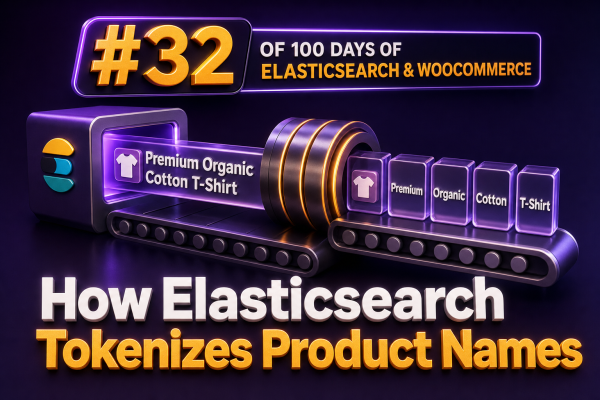
Product-name search quality depends heavily on how Elasticsearch turns text into tokens. A shopper may search for “men’s waterproof trail shoes”, while the catalog contains “Men’s Waterproof Trail Shoe – Black/Blue, Size 10”. Elasticsearch does not compare these values as raw strings. It analyzes the product name, creates tokens, and uses those tokens in the inverted index.
What tokenization means
Tokenization is the process of splitting a character sequence into searchable terms. An analyzer usually performs several stages:
- Character filters modify the original text before tokenization.
- A tokenizer identifies token boundaries.
- Token filters normalize or transform the generated tokens.
For example, a product name such as Acme Trail-Shoe 2.0 / Women's might be converted into tokens such as acme, trail, shoe, 2.0, and women's, depending on the selected analyzer and its configuration.
The standard analyzer for product names
Elasticsearch’s standard analyzer is a common starting point. It uses the Unicode Text Segmentation algorithm for tokenization and applies lowercase filtering. It is suitable for many general-purpose product-name fields because it handles punctuation and common word boundaries without requiring a large custom configuration.
This request shows the resulting tokens:
POST /_analyze
{
  "analyzer": "standard",
  "text": "Acme Trail-Shoe 2.0 / Women's"
}
The exact token output should always be checked against the Elasticsearch version and the catalog’s real data. A useful result will generally contain lowercase terms for the meaningful words, while punctuation is not retained as a searchable token.
For a WooCommerce agency, this test is important before changing an existing search implementation. A custom analyzer can improve one group of products while making SKU-like names, model numbers, or technical specifications harder to find.
Tokenizer versus analyzer
A tokenizer only creates token boundaries. An analyzer combines a tokenizer with character filters and token filters.
For example, the whitespace tokenizer splits only at whitespace. Given Trail-Shoe/Black, it may produce one token, Trail-Shoe/Black, because there is no space. The standard tokenizer is more appropriate when punctuation such as hyphens and slashes should act as boundaries.
POST /_analyze
{
  "tokenizer": "whitespace",
  "text": "Trail-Shoe/Black"
}
POST /_analyze
{
"tokenizer": "standard",
"text": "Trail-Shoe/Black"
}These analyzers can produce materially different search behavior. If the catalog contains product names such as USB-C Hub, AC-DC Adapter, or Model X/200, test those values explicitly rather than relying on assumptions about punctuation.
Inspecting tokens with positions and offsets
The _analyze API can return positions and character offsets. Positions matter for phrase queries, while offsets are useful when debugging highlighting.
POST /products/_analyze
{
  "field": "name",
  "text": "Women's waterproof trail shoes"
}
Using the field’s analyzer is preferable when validating production behavior because it tests the mapping configuration rather than an unrelated built-in analyzer. If the field does not have the expected analyzer, the request will expose a mapping or index-configuration problem early.
How common filters change product-name tokens
Lowercase
The lowercase filter makes matching independent of capitalization. Blue, BLUE, and blue can then map to the same indexed term.
ASCIIFolding
The asciifolding filter can normalize characters such as é to e. This may help when customers omit accents, but it should be introduced deliberately for brands and names where diacritics are meaningful.
Stop words
Stop-word filtering removes configured high-frequency words. It is often risky for product names. Words such as the, one, or in may be part of a product’s official name, and removing them can affect phrase matching or relevance. Do not enable stop-word removal merely because it is common in general text search.
Word delimiter graph
The word_delimiter_graph filter can split and generate combinations for mixed letters and numbers, case changes, and delimiters. It can be useful for values such as PowerShot2000 or XL-500, but it requires careful configuration. Applying it blindly can create unexpected matches and can interfere with phrase queries if the index and search analyzers are not designed together.
When using this filter, avoid deprecated configurations copied from old examples. Prefer the current word_delimiter_graph filter and validate generated tokens with _analyze.
A practical product-name analyzer
A simple custom analyzer for a WooCommerce product-name field might preserve ordinary word matching, normalize case, and support unaccented customer input:
PUT /catalog-products
{
  "settings": {
    "analysis": {
      "analyzer": {
        "product_name": {
          "type": "custom",
          "tokenizer": "standard",
          "filter": [
            "lowercase",
            "asciifolding"
          ]
        }
      }
    }
  },
  "mappings": {
    "properties": {
      "name": {
        "type": "text",
        "analyzer": "product_name",
        "fields": {
          "keyword": {
            "type": "keyword",
            "ignore_above": 256
          }
        }
      }
    }
  }
}
The text value supports full-text matching, while name.keyword supports exact filters, sorting, aggregations, and administrative lookups. The keyword subfield is not a replacement for tokenization; it serves a different use case.
Using different analyzers at index and search time
WooCommerce search often benefits from a stable index analyzer and a slightly more flexible search analyzer. For example, an index analyzer can lowercase and fold accents, while a search analyzer can additionally apply a search-time synonym strategy. Search-time changes are generally easier to deploy because they do not require reindexing the product catalog, although synonym configuration still needs careful testing.
PUT /catalog-products-v2
{
  "settings": {
    "analysis": {
      "analyzer": {
        "product_name_index": {
          "type": "custom",
          "tokenizer": "standard",
          "filter": ["lowercase", "asciifolding"]
        },
        "product_name_search": {
          "type": "custom",
          "tokenizer": "standard",
          "filter": ["lowercase", "asciifolding"]
        }
      }
    }
  },
  "mappings": {
    "properties": {
      "name": {
        "type": "text",
        "analyzer": "product_name_index",
        "search_analyzer": "product_name_search"
      }
    }
  }
}
Do not expect an analyzer change to affect documents already indexed. Analyzer settings are applied when text is indexed or queried. If the index analyzer changes, create a new index, reindex the WooCommerce products, and switch the application to the new alias.
Product names, SKUs, and exact identifiers
Names and identifiers should usually be modeled separately. A product name such as Premium Cotton Hoodie benefits from tokenization. A SKU such as HOO-XL-BLK-042 may need exact matching, prefix matching, or a specialized identifier strategy.
A common mapping keeps both capabilities available:
"sku": {
  "type": "keyword",
  "fields": {
    "text": {
      "type": "text",
      "analyzer": "standard"
    }
  }
}
Use the keyword value for exact SKU filters and the text subfield only if customers genuinely search SKU components. For identifiers, test hyphens, leading zeroes, letter-number transitions, and case sensitivity with the actual catalog data.
WooCommerce indexing considerations
- Normalize the source product name consistently before indexing. Decide whether HTML entities, trademark symbols, variation labels, and duplicated attributes belong in the searchable value.
- Keep display text separate from the search field when the storefront needs rich formatting or merchandising labels.
- Index parent products, variations, and visibility rules according to the storefront’s business logic rather than treating every indexed document as independently searchable.
- Use a separate field for brand, category, attributes, and SKU so queries can boost structured matches without forcing one analyzer to handle every data type.
- Record representative difficult names, including hyphenated models, sizes, colors, accented brand names, and names containing numbers, as regression tests.
Debugging a tokenization problem
- Capture the exact product name stored in Elasticsearch, not only the value shown in the WooCommerce admin.
- Run
_analyzewith the mapped field and inspect the tokens. - Run the same test using the query text and the search analyzer.
- Compare the query’s terms with the indexed terms using the
_termvectorsAPI when document-level inspection is needed. - Check whether the issue is tokenization, filtering, field selection, query type, field boosts, or a stale index.
- Reindex after changing index-time analysis and verify the new index through the same search requests used by the storefront.
For agencies maintaining multiple WooCommerce stores, analyzer behavior should be treated as part of the search contract. A documented analysis configuration, a token test suite, and a repeatable reindex process prevent small punctuation or normalization changes from silently altering product discovery.